Workstation 4 Setup Guide B-3
Connector and Cable Diagrams
IO Panel Connectors
LCC(-)
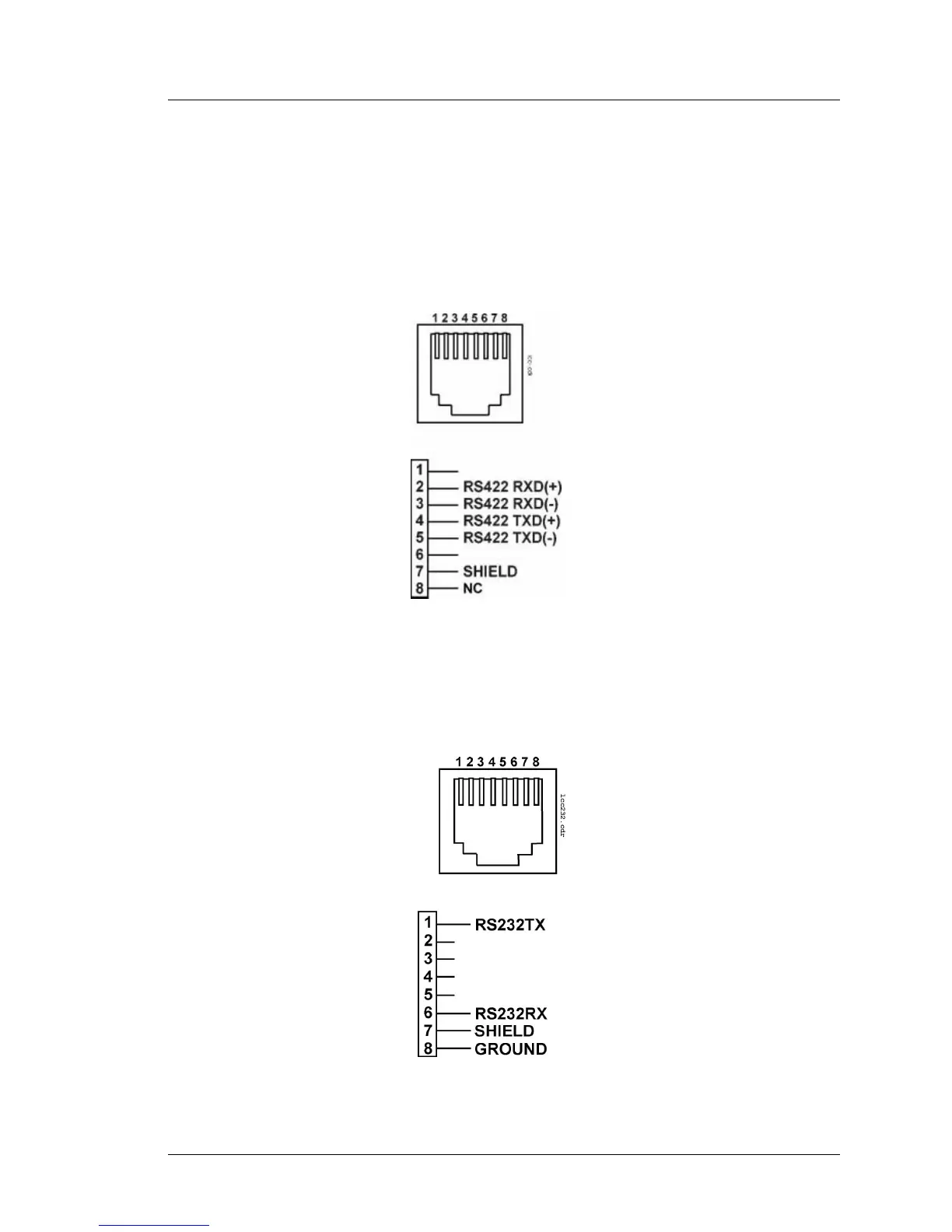
Figure B-2. In the LCC(-) configuration, the RS422-A COM4 port can be
connected to the LCC, RCC, or NetCC over RS422 twisted-pair cable. This
port allows the WS4 in conjunction with the Serial Application Loader (SAL)
to directly replace the UWS/3 in 8700 and 9700 installations. MD0006-025
describes how to replace a UWS/3 with a WS4 in 9700 installations; support
for 8700 installations was pending at the time this manual was released.
Figure B-2: LCC Connector Configured in LCC(-) mode
RS232
The RS422-A (COM4) and RS422-B (COM5) ports include a basic RS232
interface. This configuration is shown in below.
Figure B-3: LCC Port Configured for RS232



 To Next Page