2-16 Workstation 4 Setup Guide
What’s Inside?
Hardware Updates
Hardware Updates
This section includes procedures for removing and replacing the Workstation 4
options.
CF Daughter Card
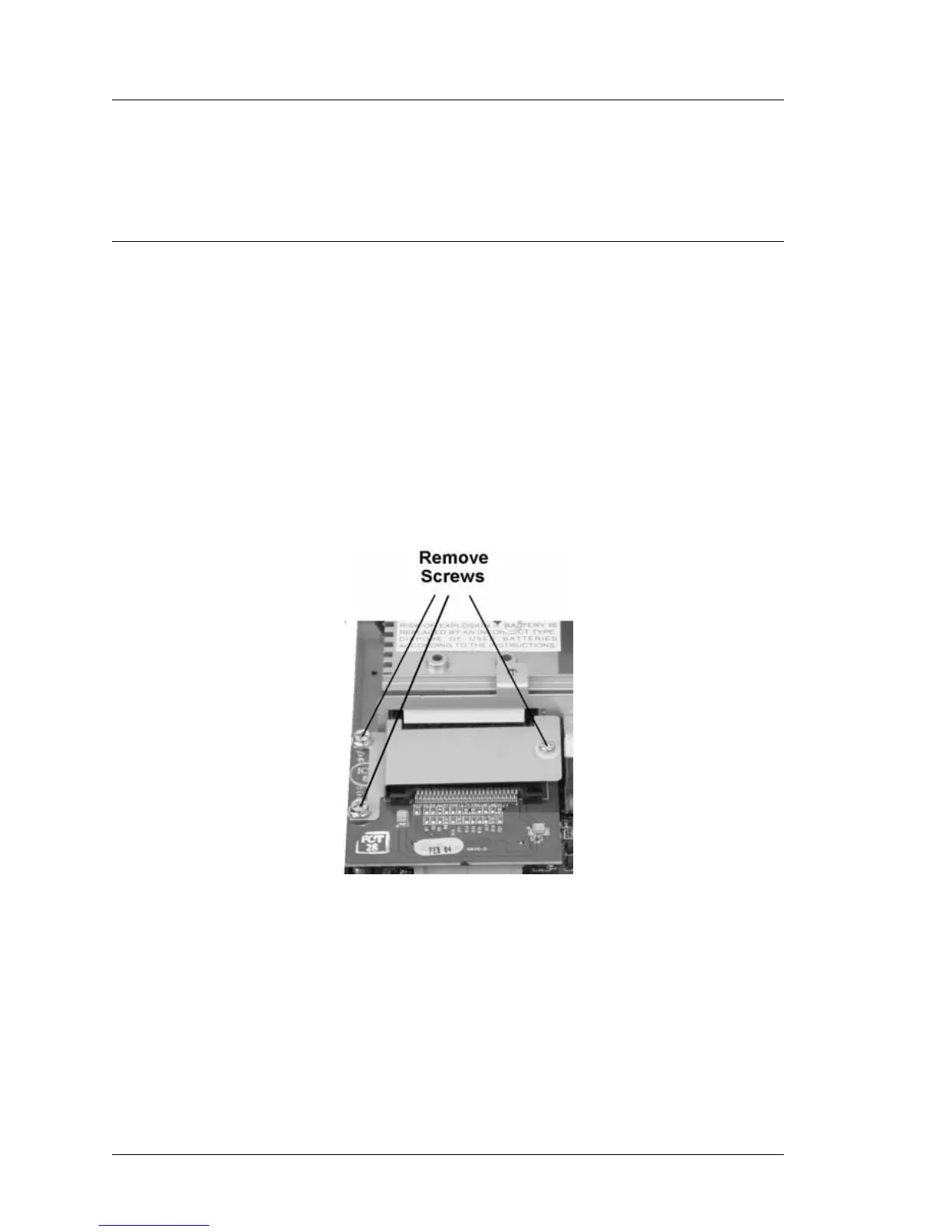
The CF Daughter Card is mounted to the base of the workstation with three
stand-off, two of which are mounted to the base and the third mounted to
system board. Some units will not have the screw mounted to the system
board.
You may remove the CF card prior to removing the daughter card, but this is
not required.
Removal and Installation
1. Remove the WS4 Cover.
2. Remove the system board RF shield.
3. Locate the CF Daughter card and remove the screws shown in Figure 2-13.
Figure 2-13: Removing the Compact Flash Daughter Card
4. Lift up on the daughter card to remove it from its system board socket, then
pull it slightly forward to allow the CF socket to clear the I/O panel
bracket.
5. To reinstall the daughter card, position it to allow the CF card or bracket to
project through the slot in the I/O bracket. When the holes in the daughter
card are positioned over each stand-off, press the card down to seat it in
system board socket J4. Reinstall the bracket and install the screws.



 To Next Page