3-16 Workstation 4 Setup Guide
Installing and Operating the Workstation 4
Personality Swap
Personality Swap
The following procedure describes how to remove the Compact Flash
personality card from an inoperative WS4 and install it in a replacement WS4.
If required, see page 3-14 to learn more about the CF card.
Tools Required
• 2.5mm hex wrench. Included with each Workstation 4 in the loose parts kit.
• Small or Medium Wire Cutters. Most installations use tie wraps to secure
cables to the cable cleats at the I/O panel. These tie-wraps must be removed
before a workstation can be replaced.
Procedure:
1. Remove all cables from the inoperative workstation’s I/O panel including
the AC Power Input.
• If may be helpful to create a diagram of where each cable is connected
as you remove it.
• If a cable is fastened to the cable cleats with tie-wraps, use the wire
cutters to clip them.
• If the WS4 is mounted to the optional stand, remove (but do not cut) the
tie wrap fastened with a screw to the base of the unit. This and other
tie-wraps used to bundle the cables can be re-used.
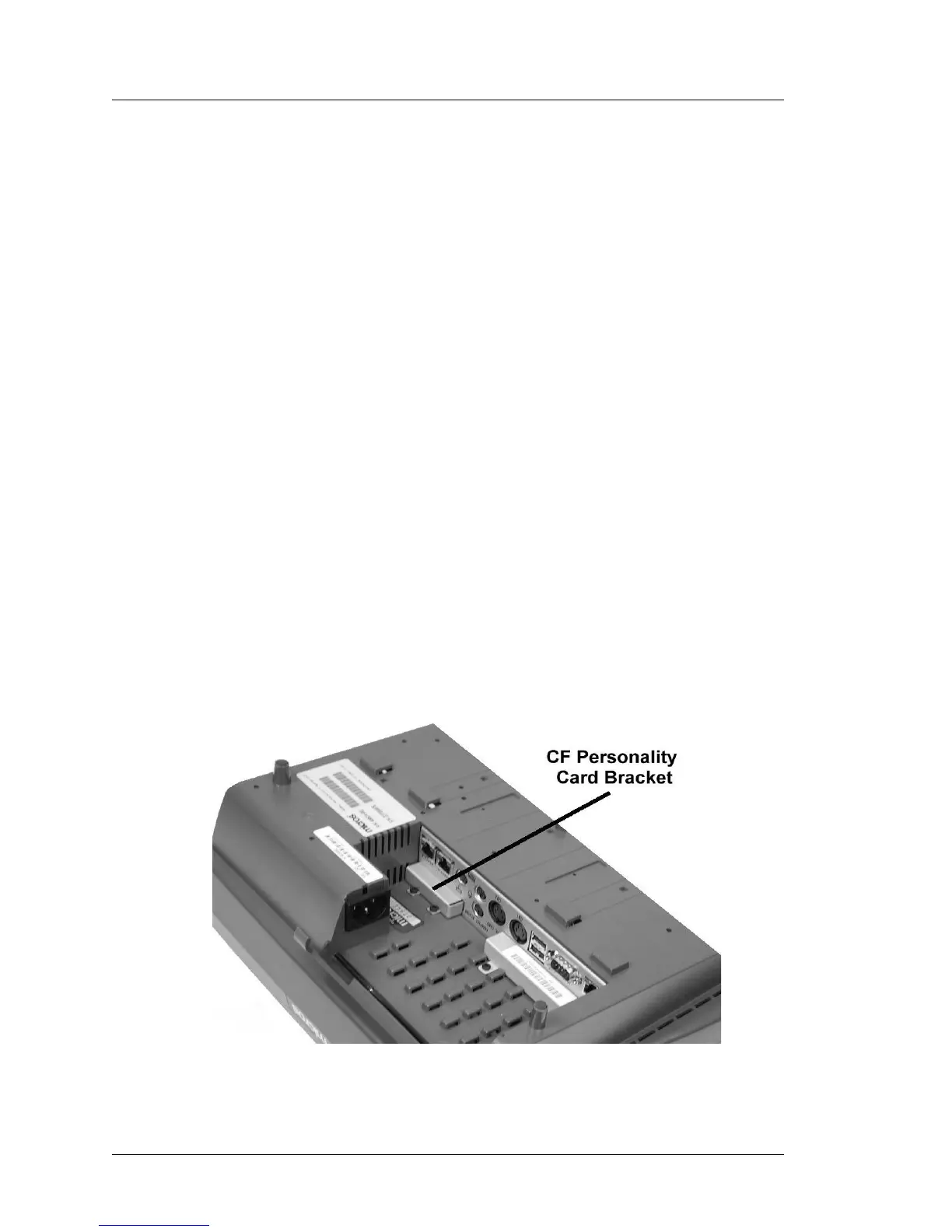
2. Place the inoperative unit face down on a counter surface to access the
Personality Card bracket. Figure 3-7.
Figure 3-7: WS4 Personality Card Location



 To Next Page