Workstation 4 Setup Guide 1-3
What is The Workstation 4?
The System
Compact Flash (CF) Personality Card
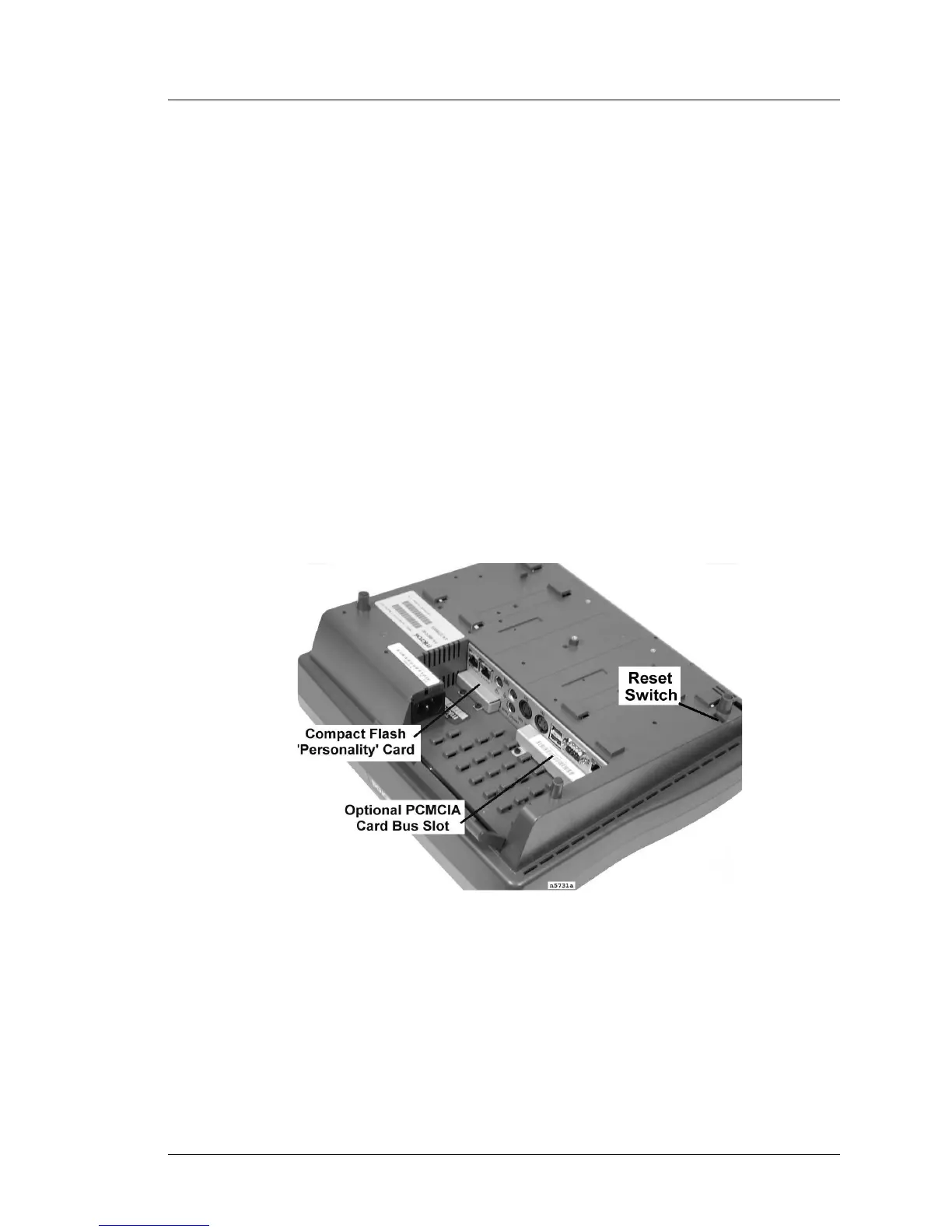
Figure 1-2 shows an underside view of the workstation featuring the I/O
Connectors, Compact Flash and PCMCIA access slots. More information
about the I/O Panel Connectors can be found in Chapter 3.
Required on the WS4, the CF card is secured behind a removable bracket at the
IO connector panel. The CF card contains the POS application, system registry,
and optionally, Stand Alone Resilient (SAR) totals. In other words, it contains
the ‘personality’ of the workstation. Should the workstation fail, the CF card
can be removed and installed in the replacement workstation.
Optional PCMCIA PC Card Bus Slot
The WS4 includes an optional PCMCIA Card Bus Slot. Windows CE device
driver support for the PCMCIA slot is limited, so all PC Cards are not
supported. An 802.11b wireless version of the WS4 is available.
Reset Switch
The Reset Switch can be activated by inserting a paper clip into the access
hole.
Figure 1-2: The Workstation 4 CF and PCMCIA Slots



 To Next Page