Technical Information
G1000 / G2000 Dishwashers
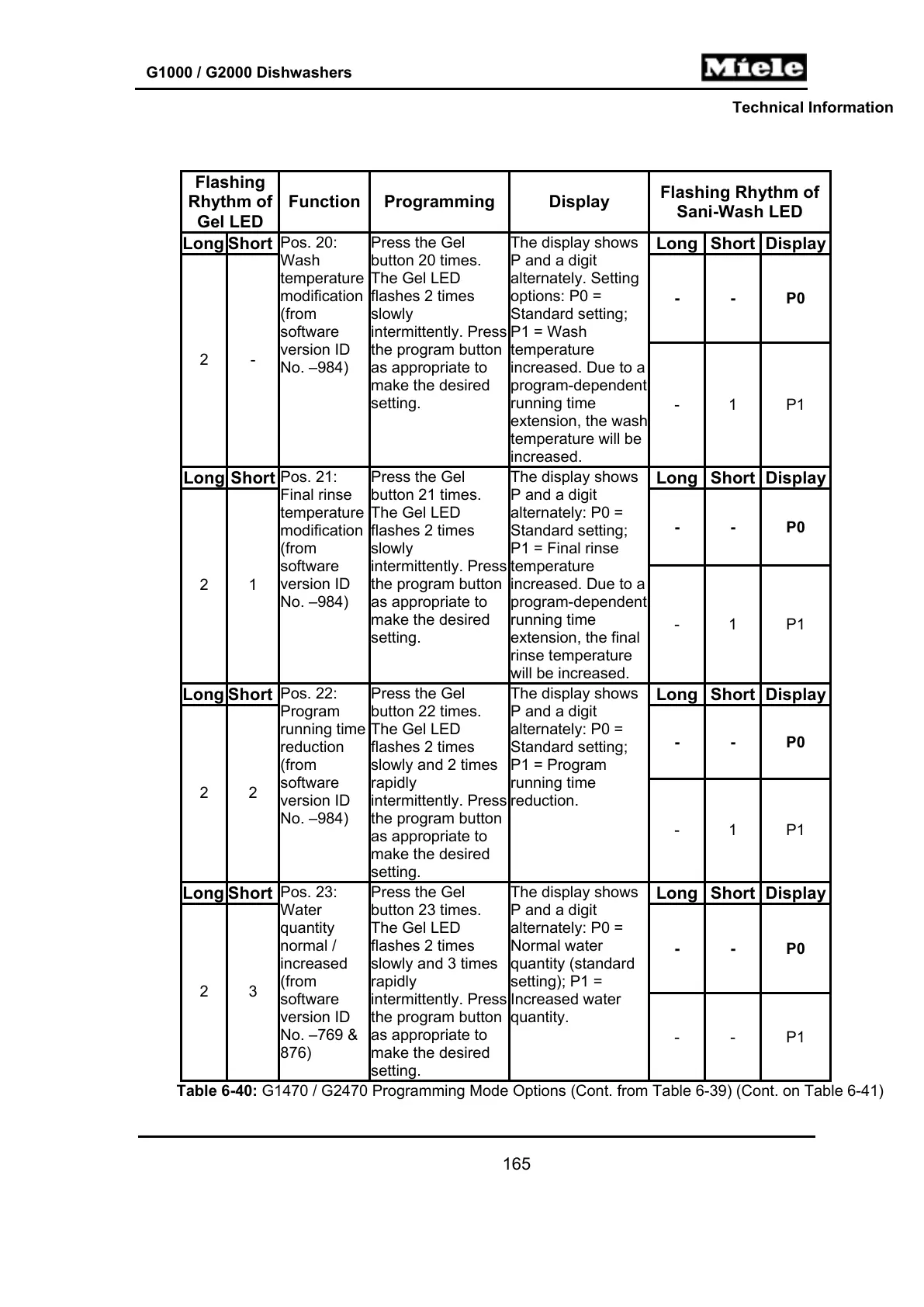
Flashing
Rhythm of
Gel LED
Function Programming Display
Flashing Rhythm of
Sani-Wash LED
Long Short Long Short Display
- - P0
2 -
Pos. 20:
Wash
temperature
modification
(from
software
version ID
No. –984)
Press the Gel
button 20 times.
The Gel LED
flashes 2 times
slowly
intermittently. Press
the program button
as appropriate to
make the desired
setting.
The display shows
P and a digit
alternately. Setting
options: P0 =
Standard setting;
P1 = Wash
temperature
increased. Due to a
program-dependent
running time
extension, the wash
temperature will be
increased.
-
1 P1
Long Short Long Short Display
- - P0
2 1
Pos. 21:
Final rinse
temperature
modification
(from
software
version ID
No. –984)
Press the Gel
button 21 times.
The Gel LED
flashes 2 times
slowly
intermittently. Press
the program button
as appropriate to
make the desired
setting.
The display shows
P and a digit
alternately: P0 =
Standard setting;
P1 = Final rinse
temperature
increased. Due to a
program-dependent
running time
extension, the final
rinse temperature
will be increased.
- 1 P1
Long Short Long Short Display
- - P0
2 2
Pos. 22:
Program
running time
reduction
(from
software
version ID
No. –984)
Press the Gel
button 22 times.
The Gel LED
flashes 2 times
slowly and 2 times
rapidly
intermittently. Press
the program button
as appropriate to
make the desired
setting.
The display shows
P and a digit
alternately: P0 =
Standard setting;
P1 = Program
running time
reduction.
- 1 P1
Long Short Long Short Display
- - P0
2 3
Pos. 23:
Water
quantity
normal /
increased
(from
software
version ID
No. –769 &
876)
Press the Gel
button 23 times.
The Gel LED
flashes 2 times
slowly and 3 times
rapidly
intermittently. Press
the program button
as appropriate to
make the desired
setting.
The display shows
P and a digit
alternately: P0 =
Normal water
quantity (standard
setting); P1 =
Increased water
quantity.
- - P1
Table 6-40: G1470 / G2470 Programming Mode Options (Cont. from Table 6-39) (Cont. on Table 6-41)
165



 To Next Page