Reviewing Sample Results
7-15
“Enter” button
When you have finished entering the all the interested sample information, CLICK
the
“Enter” button (or press [F4] of the external keyboard) to save the changes and return to the
“Sample Histogram Review” screen.
“Cancel” button
If you do not want to save the entered information, CLICK the “Cancel” button to return to
the ”Sample Histogram Review” screen without saving the changes.
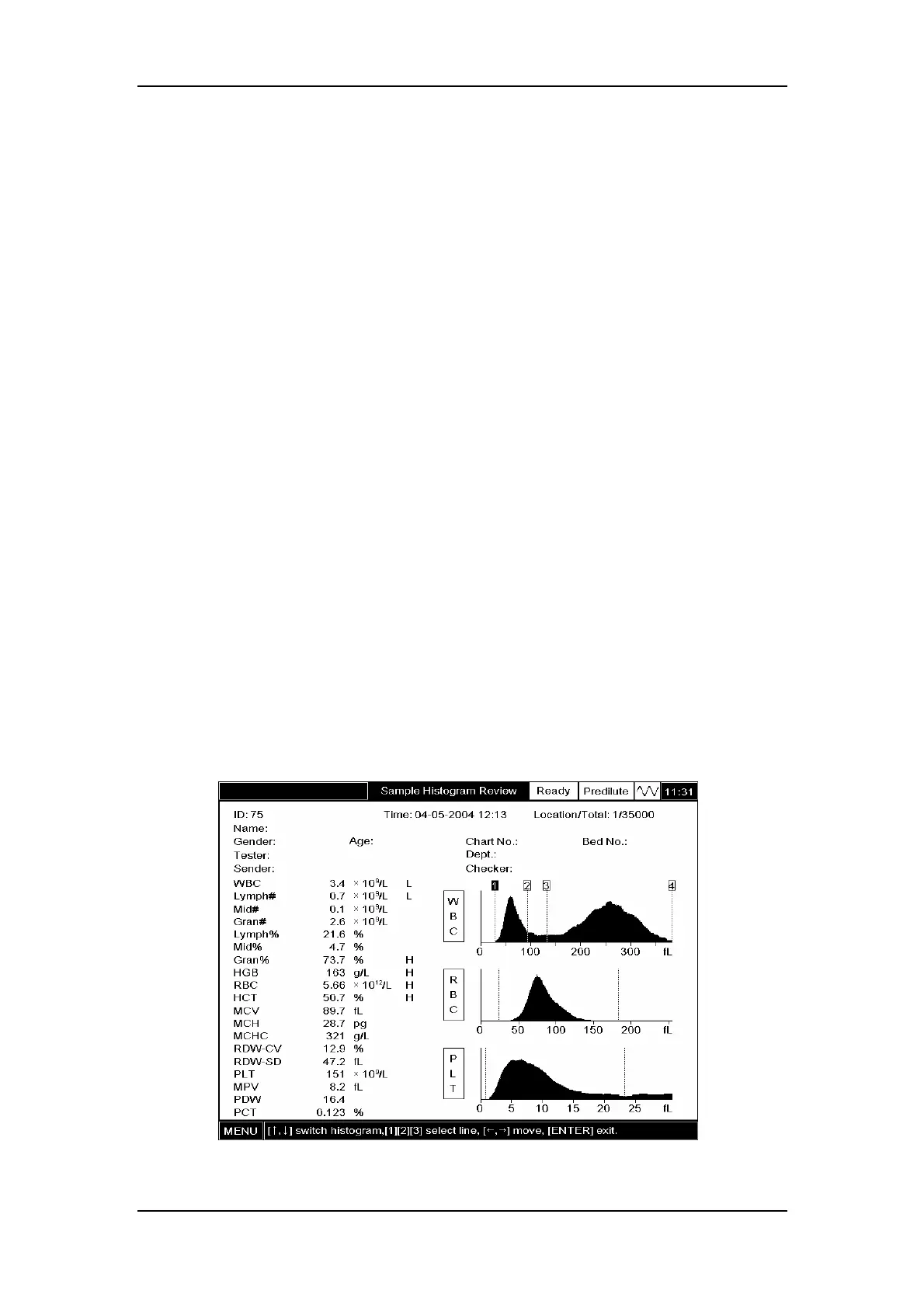
Adjusting histograms
If you are not satisfied with the obtained histograms, you can adjust them manually, provided
you have the administrator password.
The first three discriminators of the WBC histogram are adjustable. Note that if the WBC
result is less than 0.5 or non-numeric (***), the WBC histogram is not adjustable. The first two
discriminators of the RBC histogram are adjustable. Note that if the RBC result is less than
0.2 or non-numeric (***), the RBC histogram is not adjustable. The first two discriminators of
the PLT histogram are adjustable. Note that if the PLT result is less than 10 or non-numeric
(***), the PLT histogram is not adjustable.
Example 5:To move the third discriminator of the following WBC histogram to 100fL, follow
the procedure below to do so.
1. Press [ENTER] and the discriminator will become adjustable. See Figure7-23;
Figure7-23 WBC histogram with adjustable discriminators



 To Next Page