EasyManua.ls Logo

Mindray DC-80A - Page 21

Mindray DC-80A
305 pages
Print Icon
To Next Page IconTo Next Page
To Previous Page IconTo Previous Page
Loading...
Specifications 2-3
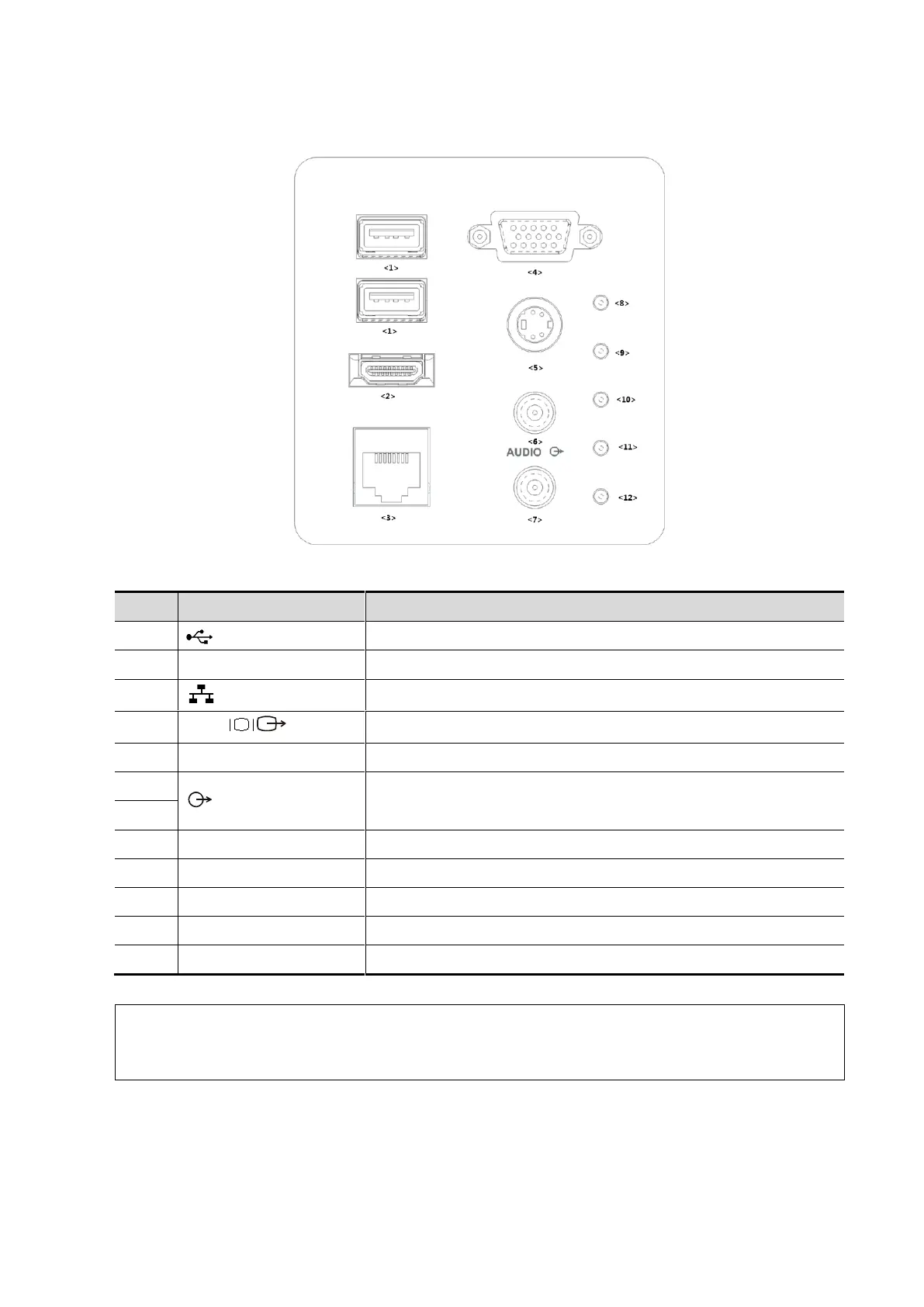
2.1.2.1 I/O panel
No.
Symbol
Function
<1>
USB ports.
<2>
HDMI
High definition multimedia interface.
<3>
Network port.
<4>
VGA
VGA signal output.
<5>
S-Video
Used for separate video output.
<6>
Audio signal output port, left channel.
Audio signal output port, right channel.
<7>
<8>
/
12V power indicator
<9>
/
5V power indicator
<10>
/
3.3V power indicator
<11>
/
LVDS_OK indicator
<12>
/
PHV protection indicator (reserved)
NOTE:
1.
The S-VIDEO port performs better with analog video printing.
2.
When connecting an external video device (HDMI/VGA), make sure the display
resolution setting is 1280x1024, otherwise the image quality may be degraded.

Table of Contents

Other manuals for Mindray DC-80A

Related product manuals