miniClima Schönbauer GmbH
Brunner Str. 21b, 2700 WIENER NEUSTADT, AUSTRIA, EU
Tel. | Phone: +43 2622 24964, +43 6991 24964 01, Voicemail: +43 6993 24964 01, Fax: +43 2622 24964 15, E-Mail: office@miniclima.com
www.miniclima.com, twitter.com/miniClima, www.linkedin.com/company/miniclima-schönbauer-gmbh, www.google.com/+Miniclima, www.facebook.com/miniclima
UID | VAT-ID: ATU61994435, EORI: ATEOS1000001229, DVR: 4008782
Firmenbuchnummer | Trade Register Number: 267137z (Landesgericht | Regional Court of Wiener Neustadt)
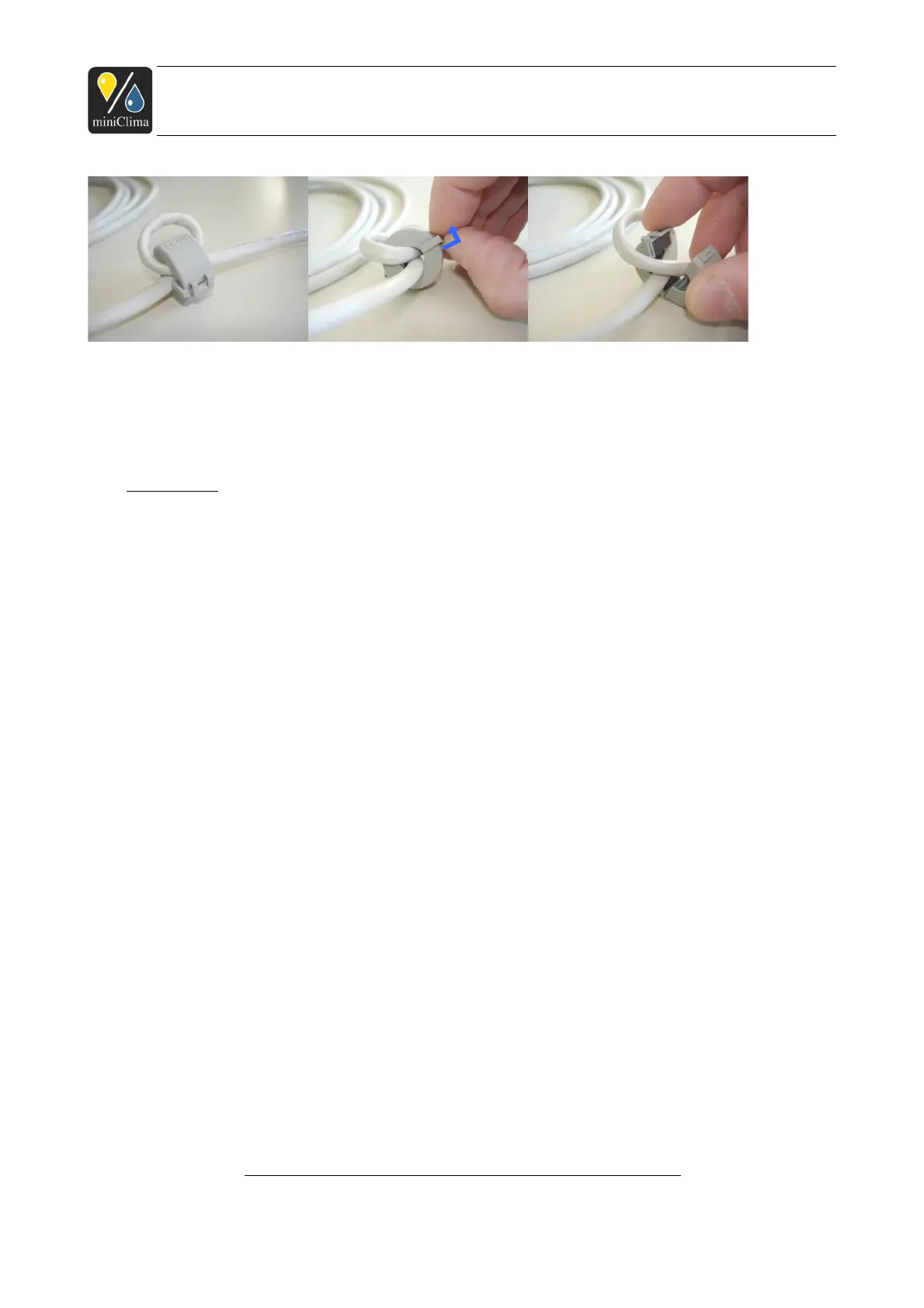
IMPORTANT: Do not forget to put the core(s) back on the cable before using the EBC: Wind the cable
through each core once - see the pictures above. The core(s) should be positioned next to the RJ45 plug of
the sensor cable or next to each of the RJ45 plugs of the control line respectively.
3.3.2 RH/T sensor
(Applies to EBCs used as master units only.)
Please see the printed note that has been added your delivery before handling the sensor.
IMPORTANT: The RH/T sensor has to be affixed at a suitable point inside the case, which ideally is in the
close surrounding of the humidity sensitive objects stored/presented in the case. The sensor does not
necessarily have to be placed in the visible part of the case, but even so, it has to be positioned on a spot
and under conditions that are comparable to those of the exhibit in the case. Especially lighting installations
and their effect on the temperature of the air surrounding the sensor may have a heavy impact on the
functioning of a correct humidity control. Do not cover, wrap, or in any other fashion separate the sensor from
the air that surrounds the exhibit.
By default the sensor comes complete with housing, a 2.5m or 5m cable, a RJ45 plug and a ferrite core. As
neither all parts of the sensor housing nor the plug can be detached from the cable, you need a borehole of
min. Ø 13mm in the case wall so as to be able to lead the cable (sensor sided) through. IMPORTANT: The
chip of sensor is an easily damageable electronic component and it juts out a bit from the housing. Therefore
it is important to take good care to not harm it when leading it through the wall! It is also essential to take
care for an airtight lead-through of the sensor cable through the wall of the case.
Once the sensor is positioned and mounted inside the case, verify that the EBC is still not plugged to the
mains connection. Then plug the sensor cable to its jack on the front plate of your EBC, labelled Sensor &
Control in. With the sensor plugged in, the EBC is already defined to be a master unit.
IMPORTANT: Do not plug or unplug the sensor to/from the EBC during operation! Always turn the EBC off,
Applies analogously to the individual products of series EBC10/11/12 (Rev.3). As of 24.11.2014. Subject
to modification.
miniClima - Manual_EBC10-11-12(Rev.3)_en
19 / 54



 To Next Page