Line Keys and Programmable Keys
BUSY LAMP FIELD (BLF) KEY
The BLF feature on the IP phones allows a specific extension to be monitored for state changes.
BLF monitors the status (busy or idle) of extensions on the IP phone.
For example, a Supervisor configures BLFs on his phone for monitoring the status of a
co-worker’s phone use (busy or idle). If the co-worker’s phone is in an idle state, the BLF key’s
LED on the Supervisor’s phone is off. If the co-worker is on a call or when the co-worker picks
up his phone to make a call, the BLF key’s LED on the Supervisor’s phone turns on and is
solid, indicating that the worker’s phone is in use and busy.
CONFIGURING A BLF KEY USING THE MITEL WEB UI
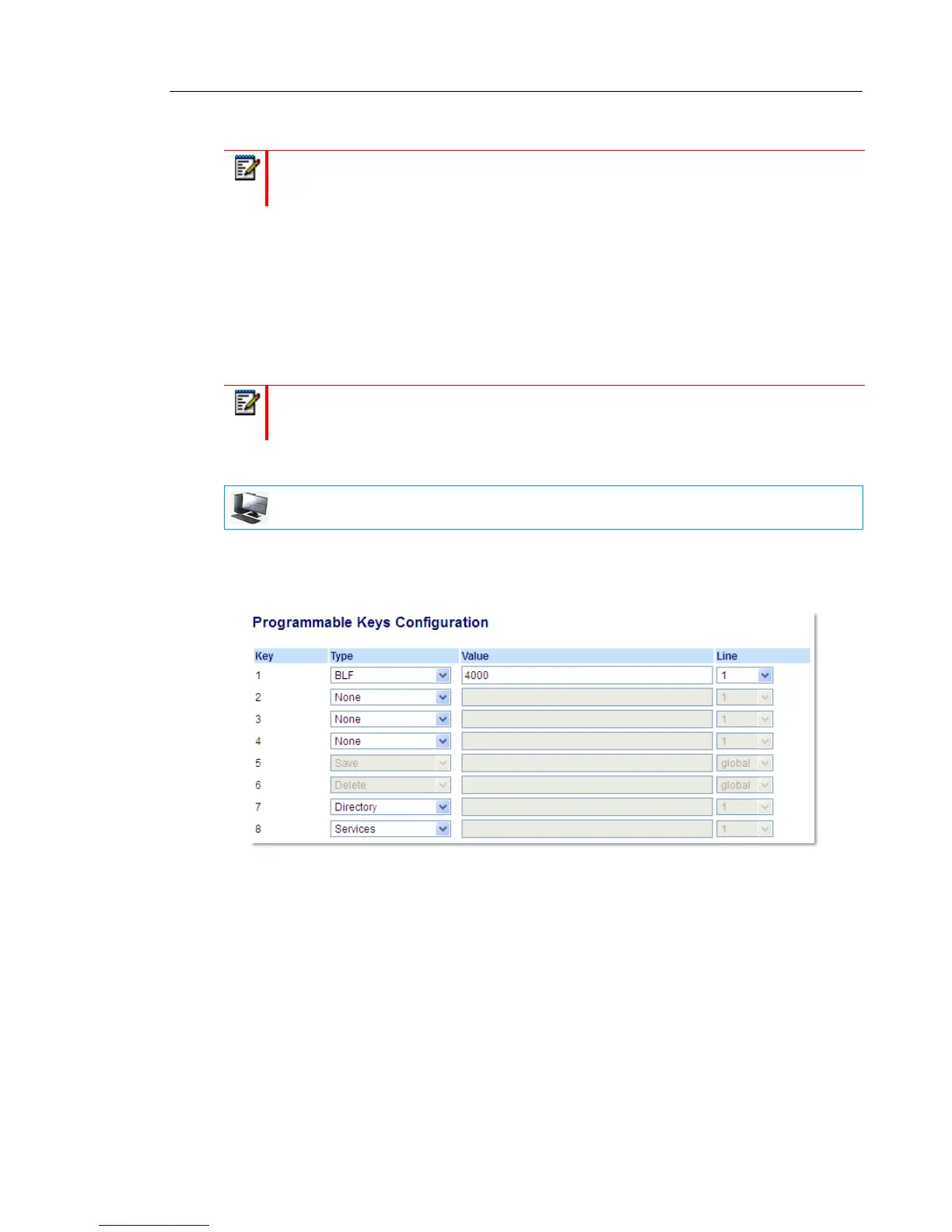
1. Click on Operation > Programmable Keys.
or
Click on Operation > Expansion Module <N>.
Programmable Keys
2. Select from Key 1 through Key 8.
3. In the Type field, select BLF to apply to the key.
4. In the Value field, enter the phone number or extension you want to monitor.
5. In the Line field, select a line for which to apply this key. Valid values are:
• global
• 1 through 24
Note: BLF feature availability is dependant on your call manager. Contact your System
Administrator for more information.
Note: You can also use a BLF-configured key to automatically dial the BLF-monitored
extension. Contact your System Administrator for more information.
MITEL WEB UI



 To Next Page