Mitel 700 DECT Phone User Guide
14
DISPLAY ARRANGEMENT
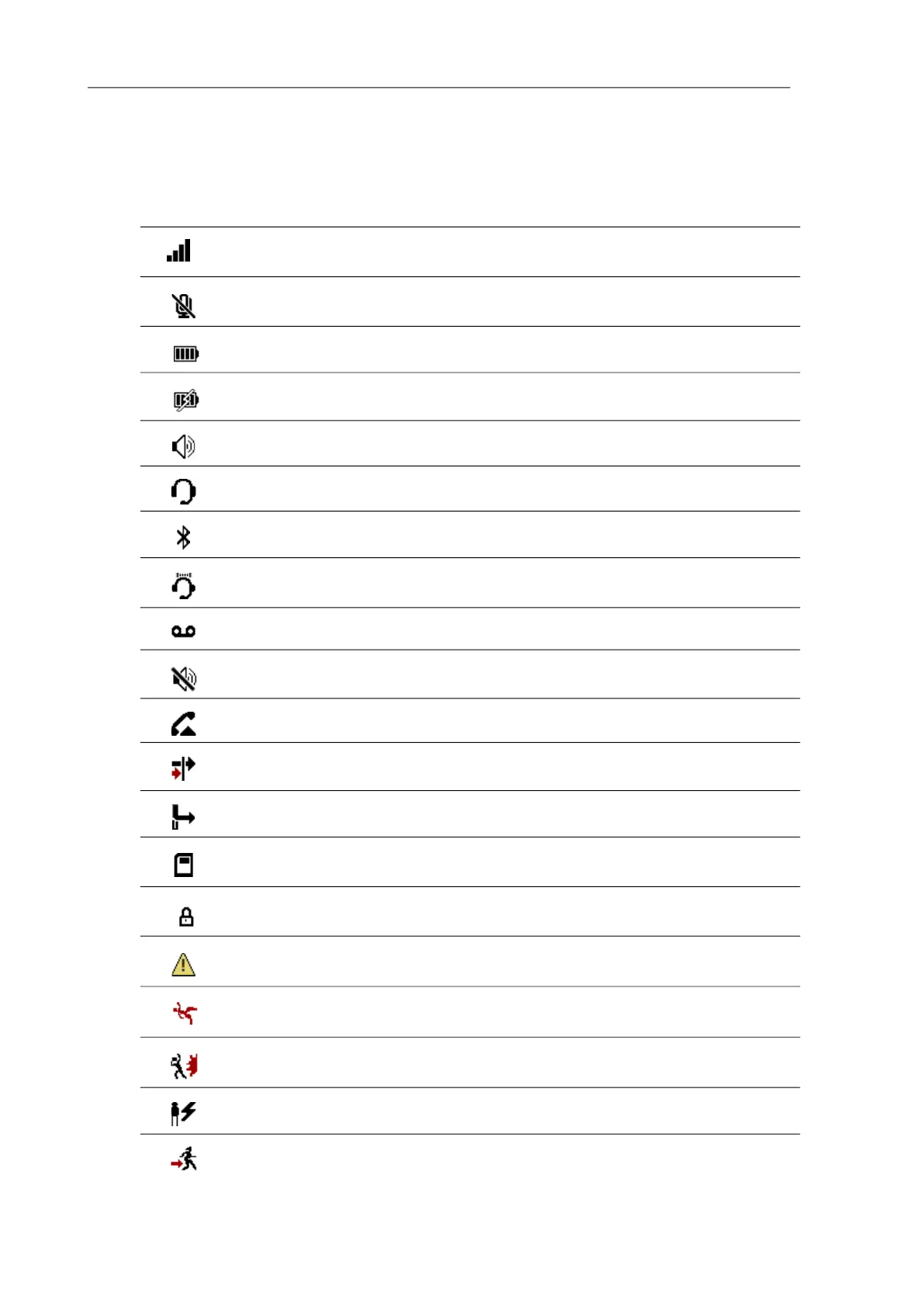
The following symbols are shown on the upper display line:
SYMBOL DESCRIPTION
Signal strength
Microphone switched off (DECT phone muted)
Battery charge status
Battery charging
Loudspeaker switched on
Corded headset is plugged
Bluetooth headset ready to use (not Mitel 712dt)
Bluetooth enabled (not Mitel 712dt)
Voice box message (if available)
Ringer switched off
Call key pressed
Call filter active
Call diversion active
Devices with microSD-Card (not Mitel 712dt)
Enhanced security icon
Security attack icon
Alarm sensor Mandown active (Mitel 732d and 742d)
Alarm sensor Shock detection active (Mitel 732d and 742d)
Alarm sensor No movement alarm active (Mitel 732d and 742d)
Alarm sensor Escape alarm active (Mitel 732d and 742d)



 To Next Page