IPB-5000A
6. Discription of Display Screens
6-6
(4) MONITOR Screen
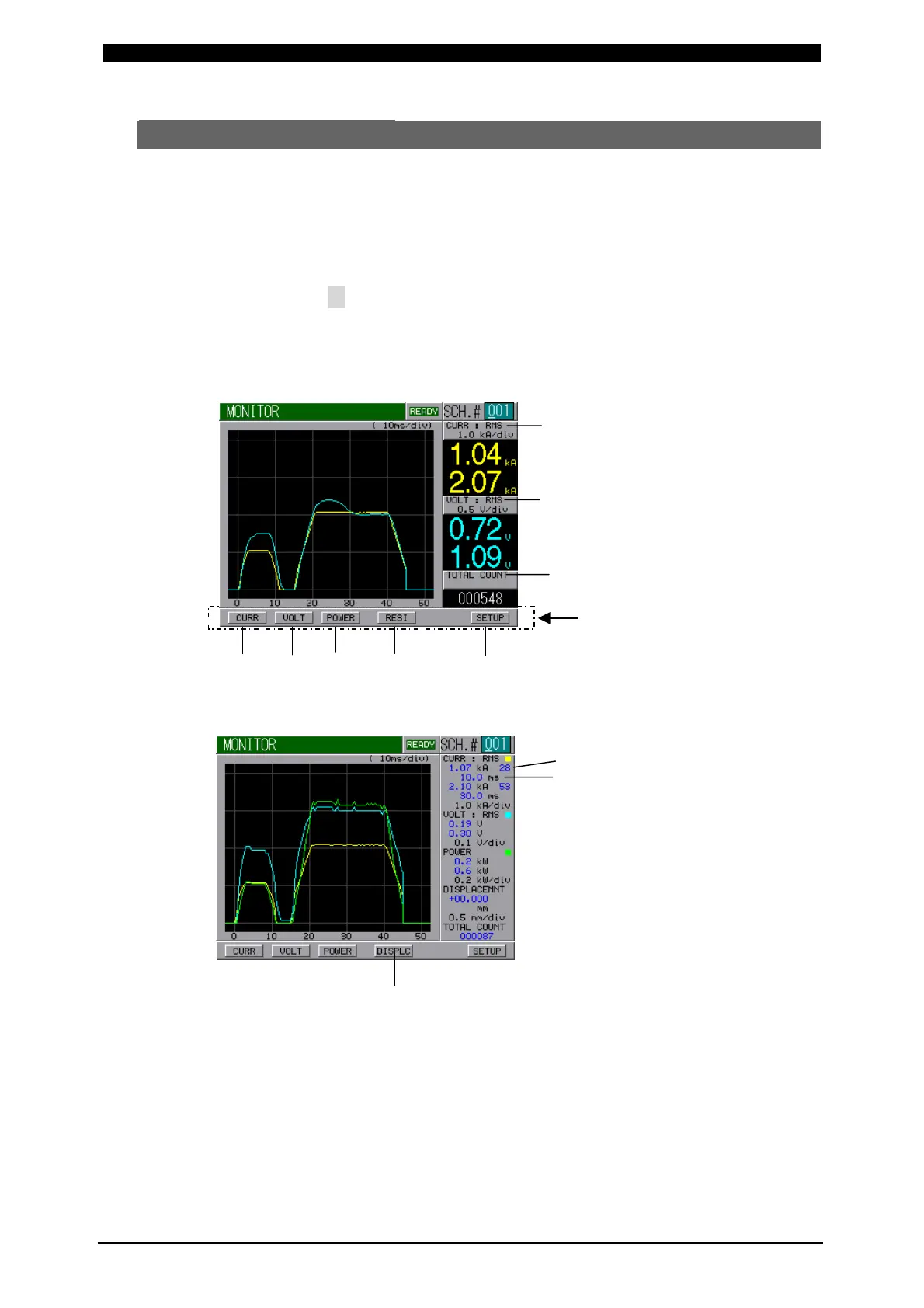
In this screen, you can confirm the working condition during welding. The monitored
data, that is, Current, Voltage, Power and Resistance in every schedule are
displayed.
Current is indicated in yellow solid line, Voltage is cyan, Power is green and
Resistance is magenta.
Move the cursor ( ) to Function Key ((a) to (f)) to be selected and press ENTER
Key to display the desired screen. Press one more time ENTER Key to erase the
displayed data.
[When displaying data of two or less]
Function Key
[When displaying data of three or more]
(a) CURR
The waveform of Current can be displayed.
(b) VOLT
The waveform of Voltage can be displayed.
(c) POWER
The waveform of Power can be displayed.
RMS (Effective Value)
RMS (Effective Value)
(f)
(a)
(b) (c) (d) (e)
(h)
(i)
(g)


 To Next Page