IPB-5000A
6. Discription of Display Screens
6-18
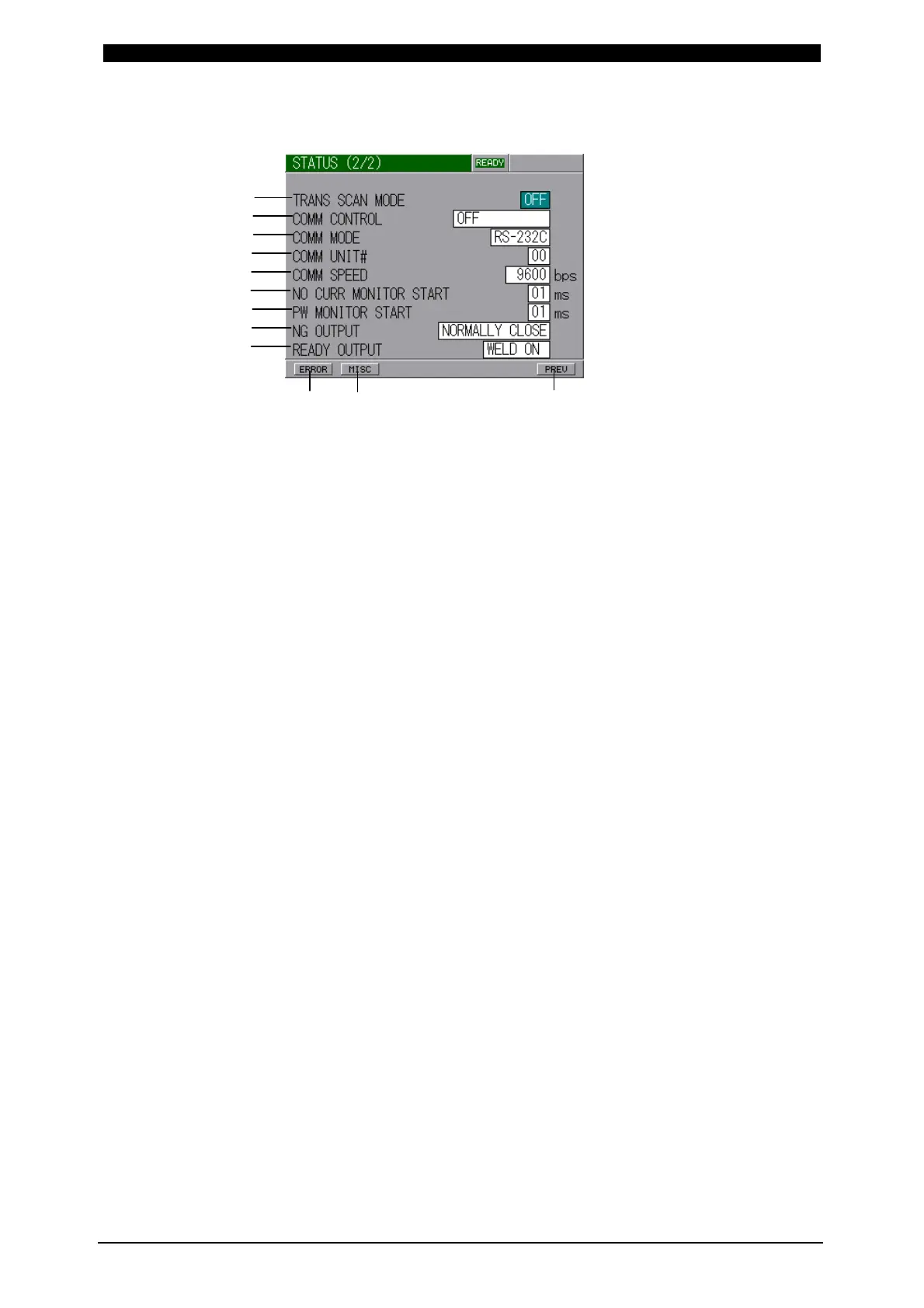
② STATUS (2/2) Screen
(a) TRANS SCAN MODE
Set the scan mode of transformers.
Does not work in Model with Displacement sensor.
OFF : No scan mode is used.
ON : A SCHEDULE is performed.
1-2 : Consecutive 2 SCHEDULE’s are performed.
1-3 : Consecutive 3 SCHEDULE’s are performed.
1-4 : Consecutive 4 SCHEDULE’s are performed.
1-5 : Consecutive 5 SCHEDULE’s are performed.
Select a scan mode of ON, 1-2, 1-3, 1-4 or 1-5 for setting each scan mode
when the transformer selector MA-650A is connected.
Concerning the time chart by settings, refer to 9.(8)Behavior in TRANS
SCAN MODE.
(b) COMM CONTROL
Selects a communication function.
OFF : No communication
DATA OUTPUT : One-way communication
BI-DIRECTION : Both-way communication
(c) COMM MODE
Selects a communication mode.
RS-232C : Communication by RS-232C
RS-485 : Communication by RS-485
(d) COMM UNIT#
Input No. of an equipment (ID#).
The range is 00 to 31.
(e) COMM SPEED
Selects a communication speed.
9600 : Communication at 9600bps
19200 : Communication at 19200bps
38400 : Communication at 38400bps
(a)
(b)
(c)
(d)
(e)
(f)
(g)
(h)
(i)
(j) (k) (l)


 To Next Page