FX312 & FX412 VERSION 2.0
13
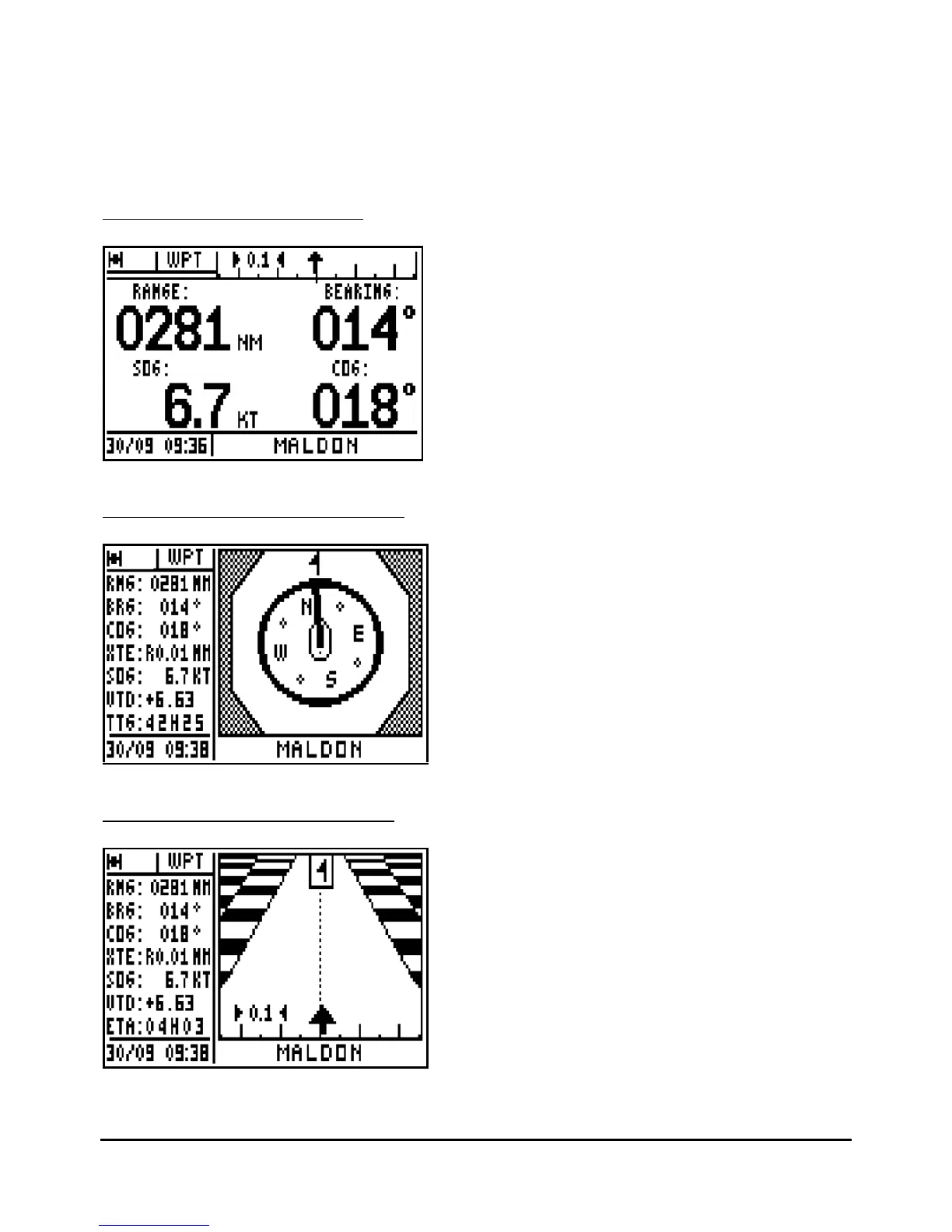
Note 2 : In the DATA and 3D ROAD screens, the cross track error is displayed by a bargraph.
This bargraph has 3 scales with automatic change, 0.1, 0.5, 2.5 in the chosen unit (kilometer,
nautic mile or miles). The scale is displayed either at the right or at the left of the arrow. Its value
corresponds to the distance between the 2 small arrows.
3.3.1
–
GOTO WAYPOINT DATA
The arrow in the bargraph represents
your position according to your cross
track error. On the first line are displayed
the range and the bearing to the
waypoint. On the second line, the speed
and course over the ground.
To follow the direct course, sail in order
to keep the arrow in the vertical position
pointing up in the middle of the bargraph.
3.3.2
–
GOTO WAYPOINT COMPASS
The compass pointer indicates the
vessel course, with the icon representing
the waypoint.
3.3.3
–
GOTO WAYPOINT 3D ROAD
The arrow representing your vessel turns
according to your course and the bearing
to the waypoint. The arrow also moves
horizontally according to the amount of
cross track error. Every graduation is
equal to 0,25 KM or NM or MI. Keep the
arrow centered and pointing to the
top for
the most direct track to your waypoint.
The icon representing your destination
waypoint moves down the display as you
approach it.



 To Next Page