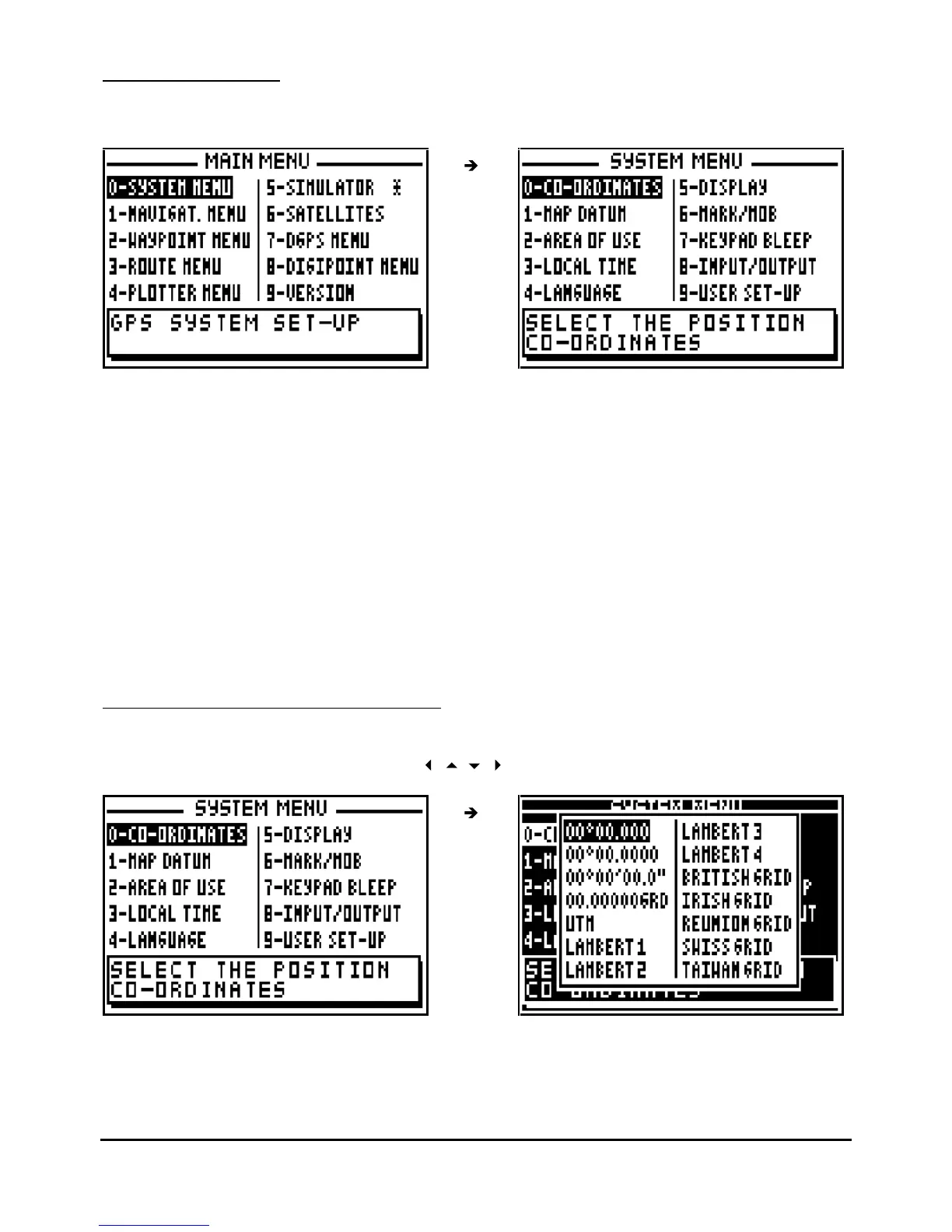
In the SYSTEM MENU the a
vailable options are:
-
0
-
the choice of geographical co
-
ordinate
-
1
-
the choice of map datums
-
2
-
the selection of area of use
-
3
-
the selection of time difference
-
4
-
the selection of language
-
5
-
the units of Altitude/ECP display for the P
OS and NAV functions
-
6
-
the working mode of the MARK/MOB key
-
7
-
the selection of audible BEEP for the keyboard
-
8
- the configuration of data input and data output (NMEA)
- 9 -
display summary of User Set Up options (SYSTEM MENU)
Note: The window
situated at the bottom of the screen explains the selected option.
7.1.1
–
GEOGRAPHICAL CO
-
ORDINATES
From the SYSTEM MENU, press the key
0
(or select 0-CO-ORDINATES and press
Enter
).
Select the type of co
-
ordinates using the
arrow keys and pres
s
Enter
.



 To Next Page