18
Note : In some cases, it is not possible to modify a waypoint, for instance when the waypoint
selected is already active or of it belongs to the active route,…
3.9.
–
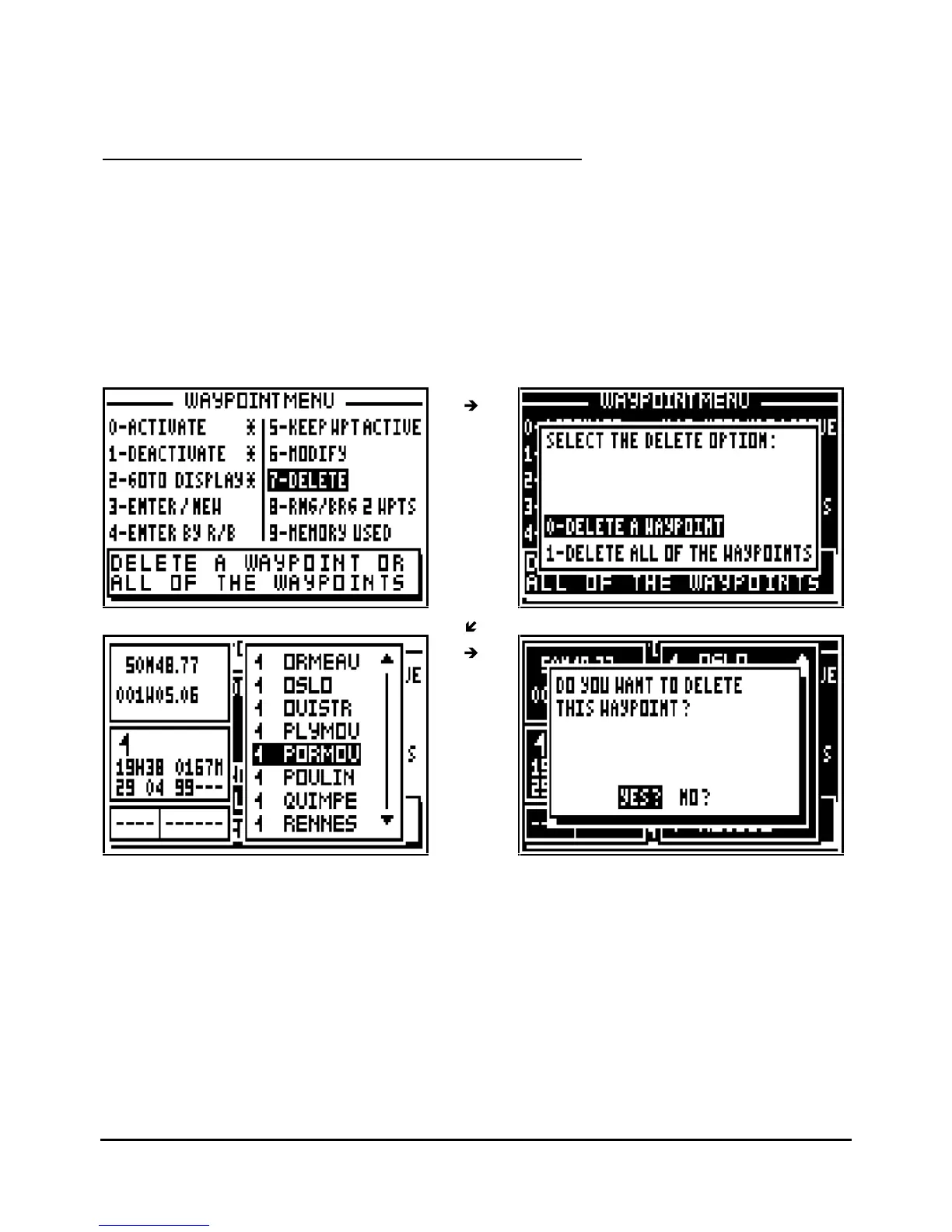
DELETE A WAYPOINT OR ALL OF THE WAYPOINTS
From the GOTO WAYPOINT function, press the
Menu
key then press key 7 (or select 7-
DELETE and press
Enter
).
To delete only one waypoint press key 0 (or select 0-DELETE A WAYPOINT and press
Enter
),
the list of your waypoints is displayed. Select the waypoint to be deleted, press
Enter
then
select YES? and confirm by pressing
Enter
.
Note : It is not possible to delete the active waypoint or a waypoint which belongs to one or
several routes.
Tip: If you do not want to delete the waypoint, press the
Pos
,
Nav
,
G
oTo
,
Plot
or
Menu
function
keys to cancel the operation.
To delete all your waypoints, press key 1 (or select 1-DELETE ALL OF THE WAYPOINTS and
press
Enter
) select
YES?
then confirm by pressing
Enter
.



 To Next Page