38
7
– SIMULATOR FUNCTION
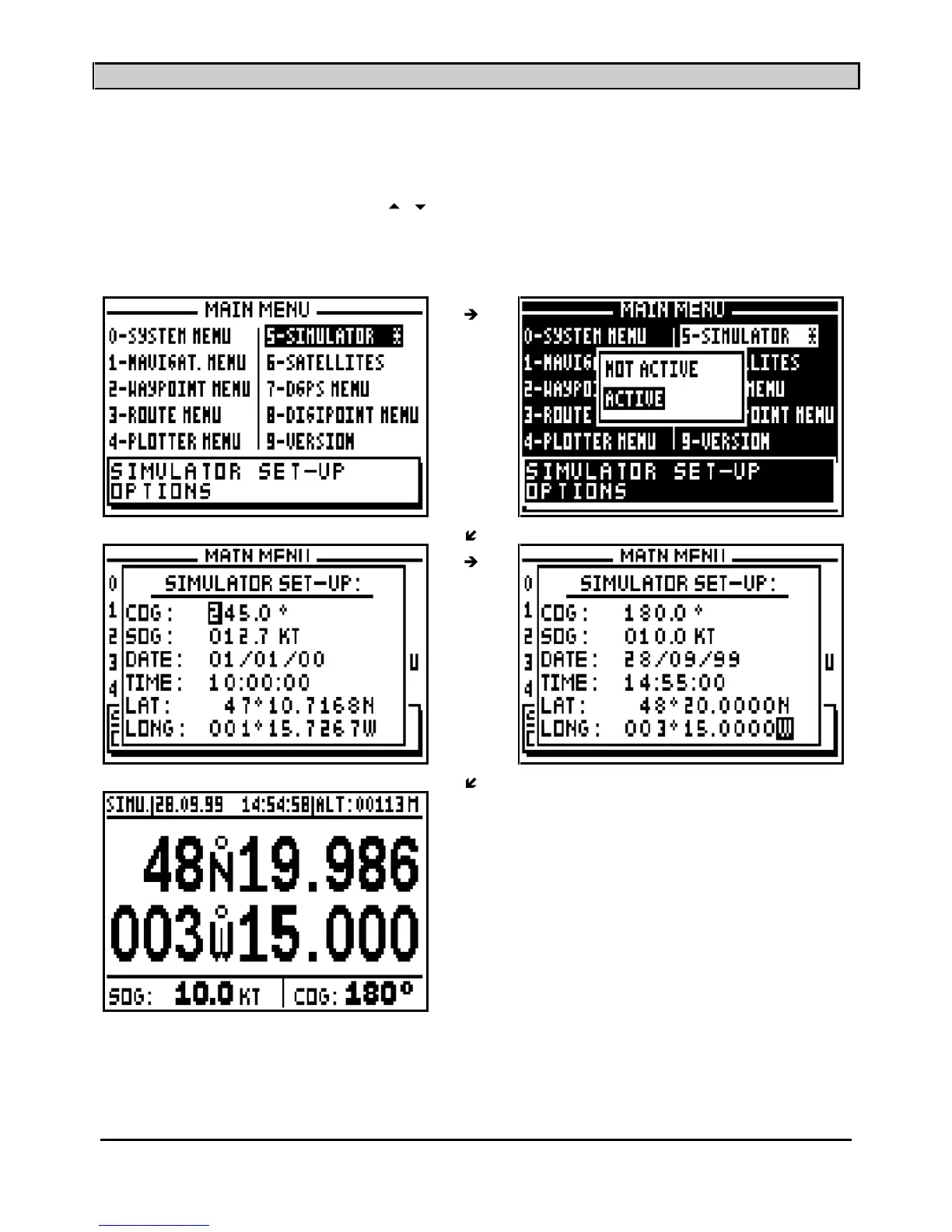
This function allows you to simulate all the na
vigation functions available in your GPS.
To activate the SIMULATOR function, from the MAIN MENU, press key 5 (or select 5-
Simulator
and then press
Enter
). Using the
arrow keys, select ACTIVE from the ACTIVE/NOT
ACTIVE window and press
Enter
. In the displayed window, enter the different navigation
parameters, e.g. COURSE, SPEED, DATE, TIME and the start position (LATITUDE and
LONGITUDE) then press the
Enter
key.
Note: When the simulator is active, the SIMU indication is displayed on the top left of the
screen. To stop the simulator function, select NOT ACTIVE from the ACTIVE/NOT ACTIVE
window and press the
Enter
key.
____________________



 To Next Page