Section 5 --- Equipment
Cayman 2005
200
To Play a DVD:
Press the POWER button on the DVD player. Select DVD on the DVD remote. Turn ON the TV and
select channel 3. Press DVD on the Video Selector Box in the section marked main T.V. Open the tray
and place the disc on the tray label side up. Press PLAY on the DVD remote. Adjust the volume using
the TV remote.
To Play a DVD on the Surround Sound System:
Turn on the TV and Surround Sound System. Select Channel 3 on the TV and press DVD on the
Video Selector Box in the section marked MAIN TV. Press the SOURCE button on the Surround Sound
remote until DVD displays. Place a DVD on the tray, label side up and press PLAY on the Surround
Sound remote. For full surround effect reduce TV volume to zero using the TV remote and adjust the
surround volume using the Surround Sound remote.
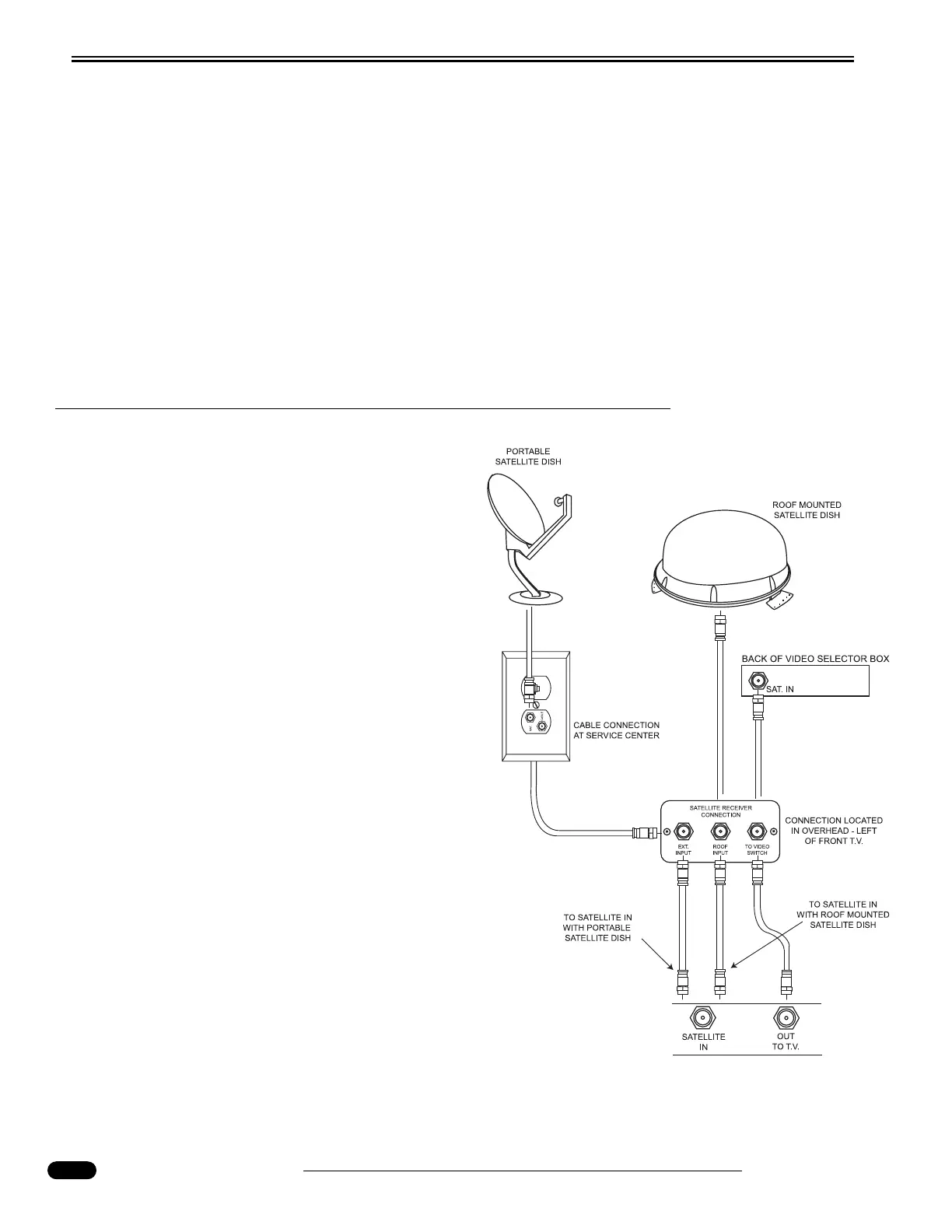
DIGITAL SATELLITE PREP
The motorhome is pre-wired for a roof-mounted or
a portable Digital Satellite System. The pre-wire con-
sists of a Satellite Receiver Connection, coax, a wire
for the Antenna Up indicator on the dash, a 12 Volt DC
power connection and a phone cable for Pay-Per-View
programming.
Installing the satellite dish:
The coax and wire for the Antenna Up indicator are
located in the ceiling behind the first ceiling light in
the living room. The satellite dish should be mounted
just forward of the ceiling light to secure the mounting
base of the satellite to the backing plate that is built
into the roof. Install satellite according to installation
instructions provided with the satellite dish.
Connecting the satellite receiver (IRD):
• Connect a coax from the Roof Input on the
Satellite Receiver Connection in the overhead
cabinet above the pilot seat to the Satellite In con-
nection on the back of the receiver.
• When using a portable satellite dish connect a
coax from the Exterior Input on the Satellite
Receiver Connection to the Satellite In on the
back of the satellite receiver.
• Connect a coax from Satellite Out on the back of
the satellite receiver to To Video Switch on the
Satellite Receiver Connection.
060248c
Satellite
Receiver




 To Next Page