Electrical Systems - Chassis --- Section 9
Cayman 2005
297
Turn indicator and headlight high/low dimmer control:
• Push the lever forward to activate right turn indicator circuits when the ignition is on.
• Pull the lever back to activate left turn indicator circuits when the ignition is on.
• Pull the lever up to select high/low beam circuits when the headlights are on.
Hazard Flashers:
• The flasher button is located on the steering column.
• To turn on the four way flashers, pull out on the flasher button. The turn signal alarm will
sound.
• To turn off the flashers, push the button in.
CONSOLE
Transmission Shift Selector
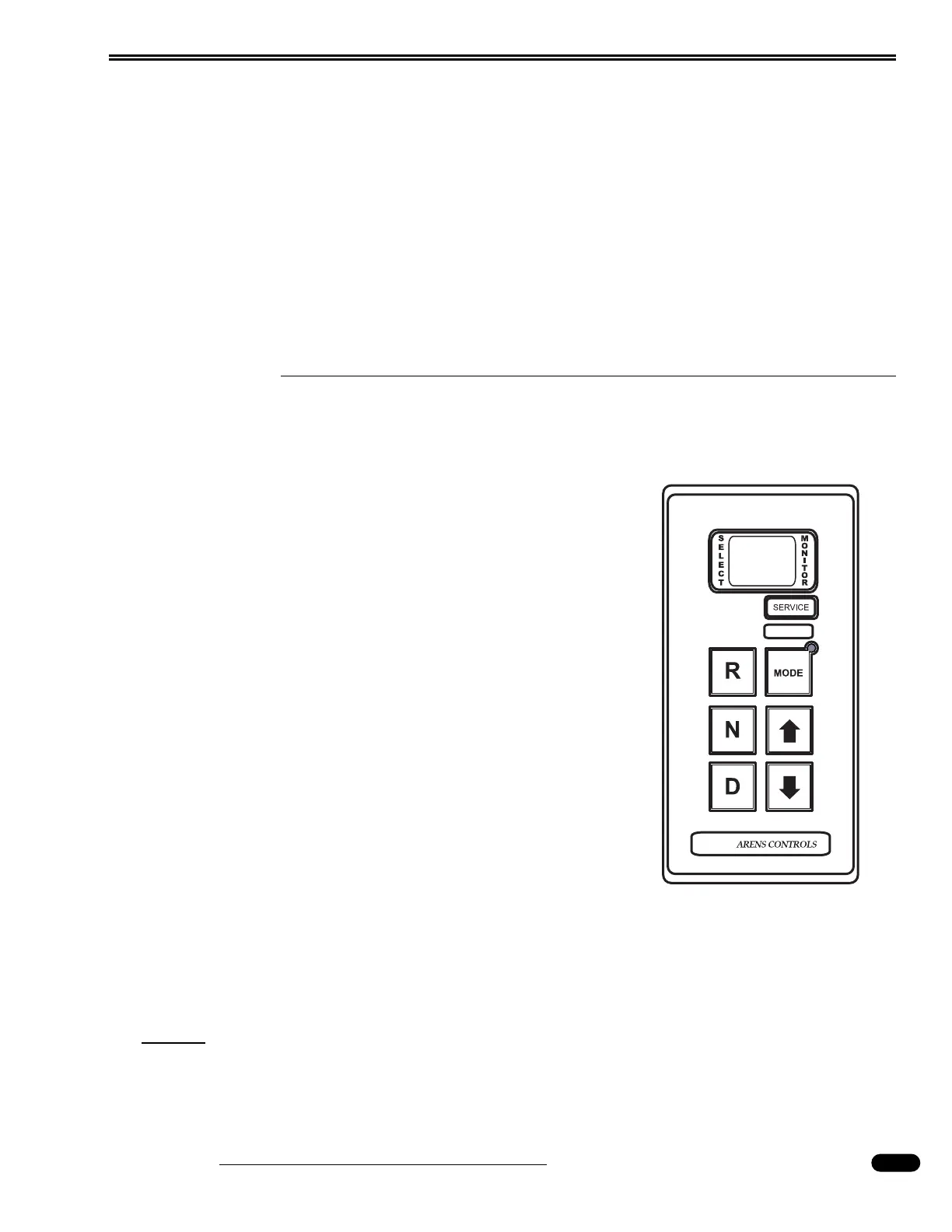
1. Transmission Key Pad:
The function of each position of the keypad push-button
shifter is as follows:
• Select NEUTRAL by pressing N. The area around the N but-
ton has a raised ridge so the driver can orient his hand to
the Neutral button by touch.
• Select REVERSE gear by pressing R.
• Select the forward DRIVE range by pressing D. The
SELECT and MONITOR will indicate "D1", indicating the
transmission is in 1st gear. Throughout the subsequent up
shifts or downshifts, the SELECT and MONITOR will indi-
cate the gear the transmission is in.
• The UPSHIFT and DOWNSHIFT arrow buttons are used to
select a higher (if not in fifth gear) or lower (if not in first
gear) forward range. These buttons are not functional in
NEUTRAL or REVERSE. One press changes the gear select-
ed by one range.
• The Mode button enables economy mode.
To Enter Economy Mode:
Press the MODE button. The LED will illuminate.
To Exit Economy Mode:
Press the MODE button. The LED will extinguish.
NOTE:
When the Auxiliary Braking device is used, the display will change to a default read-
ing of D-3. This setting is pre-selected at the factory and can only be altered by an
authorized Allison Service center. The transmission is not actually in third gear. This is
only a reference point so the transmission will optimize engine-braking efficiency.
080386b



 To Next Page