Section 8 --- Electrical Systems - House
Cayman 2005
266
Battery Charging w/ the Inverter
The inverter will automatically begin charging when AC power is supplied from shore service or
the generator. The charger uses a three-stage cycle to charge the batteries. If desired the charger may be
turned off.
To Turn the Charger OFF or Back ON:
• Press the switch marked CHARGE on the remote panel.
INFORMATION:
Complete instructions and guidance can be found in the Owner's Information File Box.
Please refer to the information booklet provided from the manufacturer.
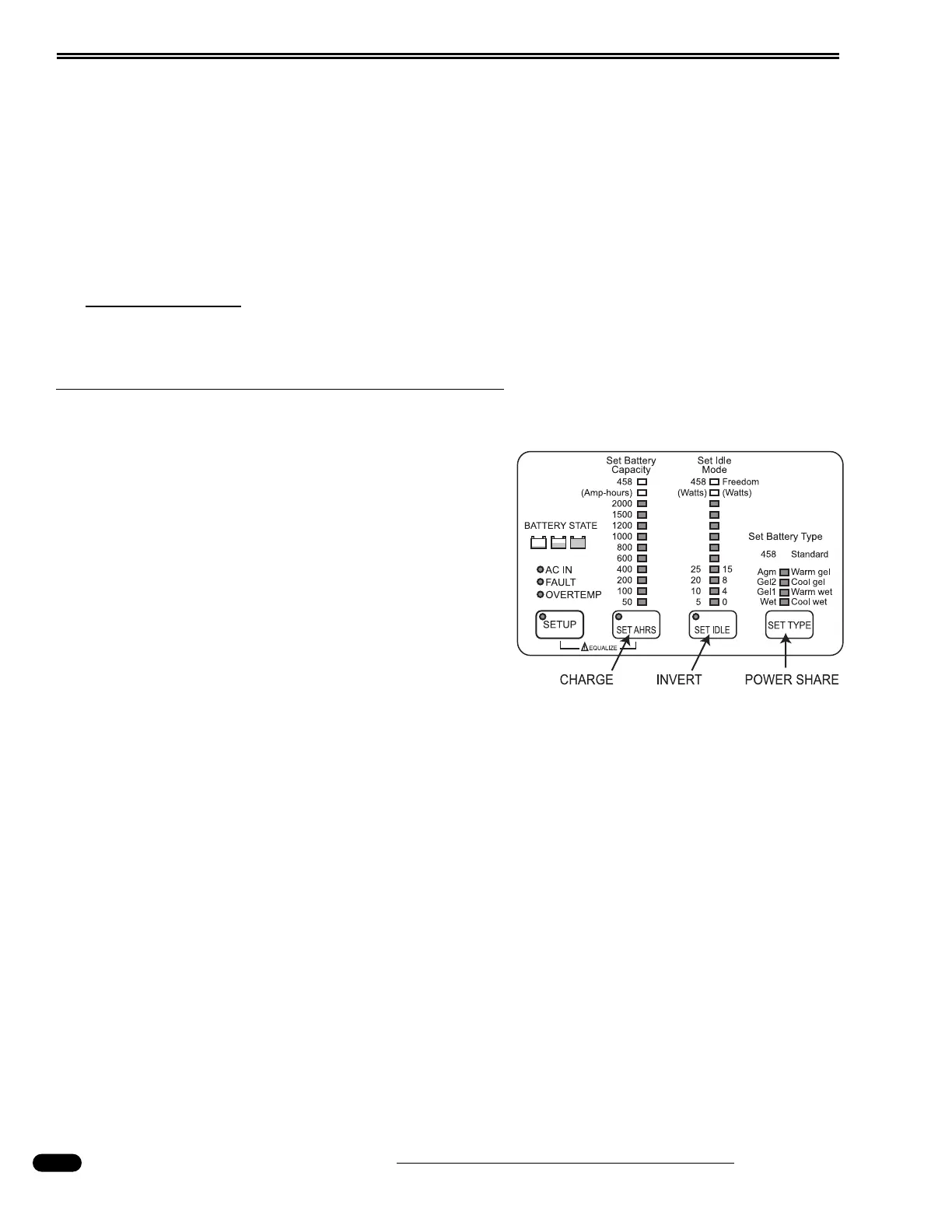
Remote Panel
The remote panel monitors the inverter status
and is used to change variable settings. The panel
uses LED lights to monitor values when hooked to
shore power, inverting or in the set-up mode.
LED Indications When Hooked to Shore
Power:
• DC Volts represents DC output voltage at the
inverter.
• DC Amps represents the amount of DC charge
current.
LED Indications When Inverting:
• DC Volts represents DC battery voltage at the inverter.
• DC Amps represents the amount of DC discharge current.
LED Indications When in Set-up Mode: (Press and hold
SET-UP for five seconds):
• DC Volts represents the amount of Amp Hours of the battery bank.
• DC Amps represents the amount of load (measured in watts) needed to activate the inverter.
• Incoming AC Breaker Amps represent battery type and operating temperature.
060169
Remote panel in set-up mode.




 To Next Page