35
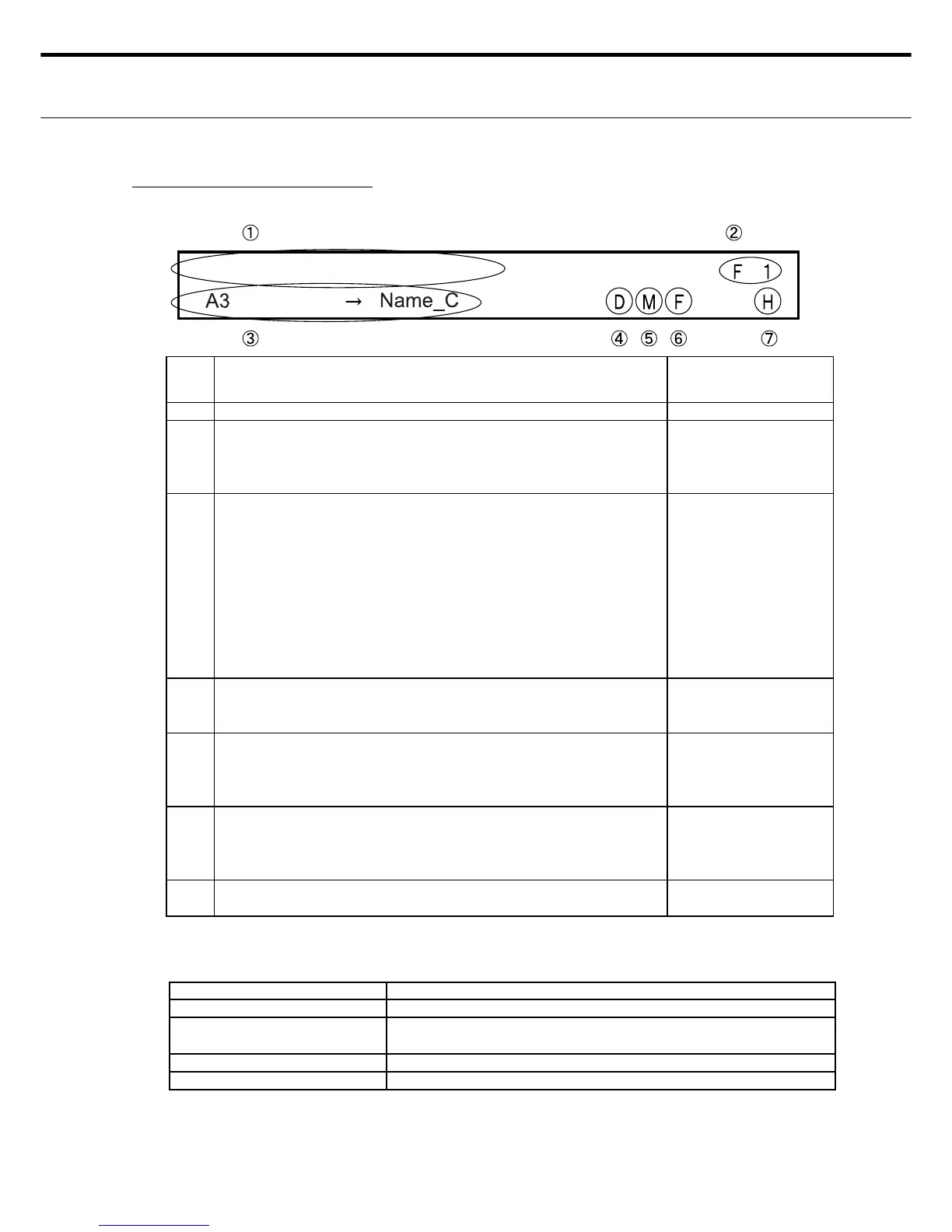
ع SELECT CUTTING FORMAT
٤ Explains the LCD display information for selecting the cutting format.
٤ CUTTING FORMAT SWITCH OPERATION
USABLE SWITCHES FUNCTION DESCRIPTION
UP/DOWN Use to move number upward or downwards per ԙ above.
SET Use to store the setting shown on the display ("H" appears in
Ԟ after using SET).
CLEAR Use to display default (reset) value.
MENU Setting entry mode : Shifts to Menu screen 1
Note 1: Data is not stored if the MENU switch was pressed before the SET switch was
pressed.
Note 2: If error such as Cover-Open were detected prior to pressing the SET switch, then af-
ter canceling the error, operation shifts to Standby Mode without saving the changes
you made.
No. DISPLAY DESCRIPTION
CHANGE IN DIS-
PLAY INFO
Ԙ Shows the cutting format selection status. NO/YES
ԙ Select the cutting format. Number changes each time you
press up/down switch.
Select F1 to F8 for a fi xed format, fF1 to fF8 for a free format,
or sF1 to sF8 for a format without long blade cut..
Ye s
Ԛ When F1 - F8 for fi xed format is selected
Shows the "paper size ψ fi nished cut paper size" setting
stored in the format No. selected above in ԙ .
When fF1 - fF8 for free format is selected
Shows the setting of "cut length", "trim margin length", and
"number of prints per sheet with the long blade cut" stored in
the format No. selected above in ԙ .
When sF1 - sF8 for format without long blade cut is selected
Shows the "paper length" setting stored in the format No. se-
lected above in ԙ .
NO
ԛ Shows if trim margin was set for the format No. selected above
in ԙ .
D: Trim margin YES • Blank Box: Trim margin NO
NO
Ԝ Shows the cut start position setting stored in the format No. se-
lected above in ԙ .
• M: Cut reference position Mark
• Blank box: Cut reference position Paper edge
NO
ԝ Shows the paper size thickness setting stored in the format No.
selected above in ԙ .
• U: Paper thickness Thin • F: Paper thickness Regular
• A: Paper thickness Thick
NO
Ԟ Here, "H" appears if the setting being displayed is stored.
A blank appears here if the setting is being changed.
YES (Display "H"/
blank)
Note: Only ԙ can be selected by the user.



 To Next Page