MiiNePort E2/E3 Web Console Configuration
Disconnection request from local site
When the MiiNePort is in data mode, the user can drive the DTR signal to OFF, or send +++ from the local serial
port to the MiiNePort. The MiiNePort will enter command mode and return NO CARRIER via the serial port, and
then input ATH to shut down the TCP connection after one second.
+++ command cannot be divided. The “+” character ca
n be changed in register S2, and the guard time,
that prefixes and suffixes the +++ in order to protect the raw data can be changed in register S12.
Disconnection request from remote site
After the TCP connection has been shut down by the remote Ethernet modem or PC, the MiiNePort will send the
NO CARRIER signal via the serial port and then return to command mode.
AT Commands
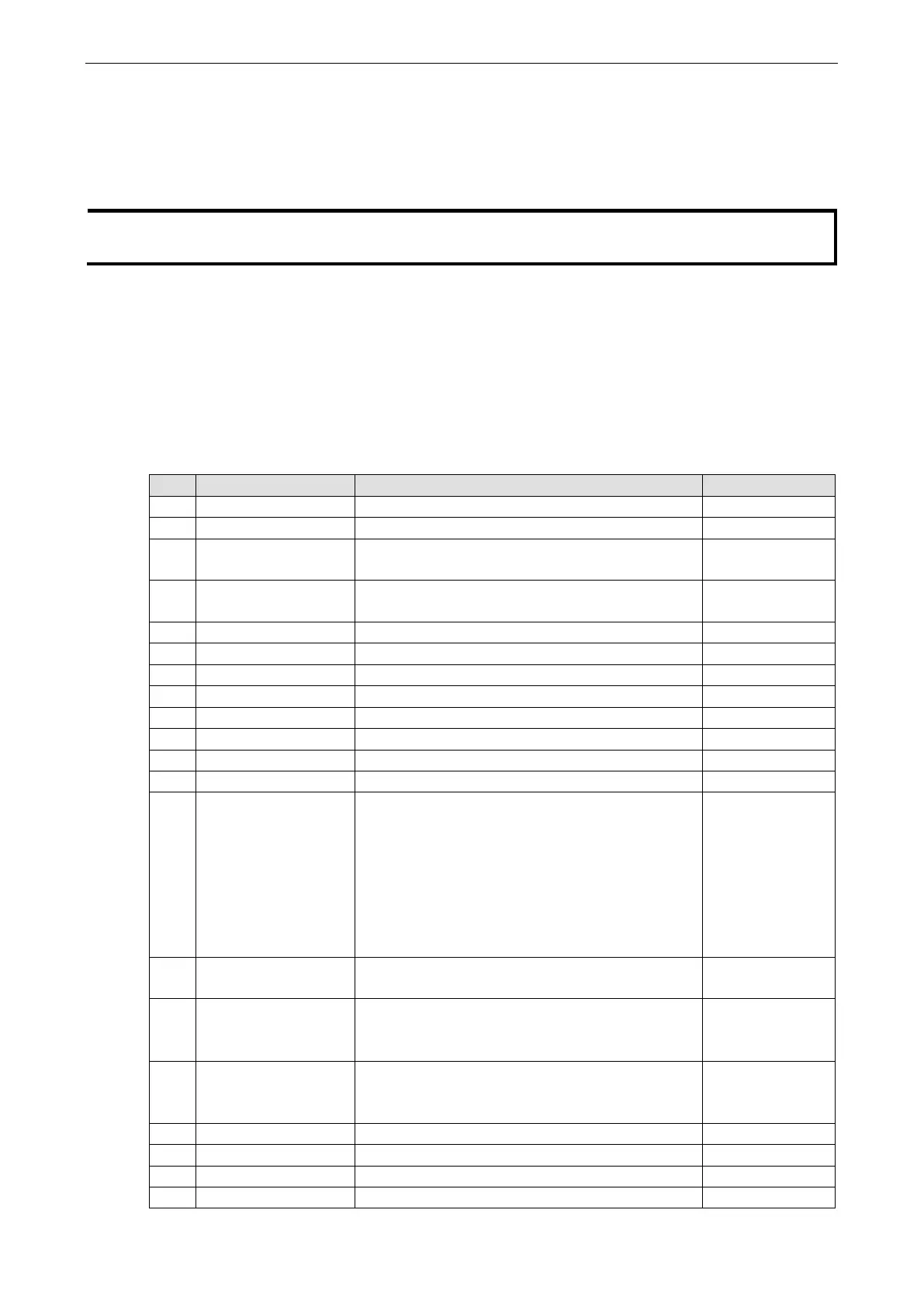
The MiiNePort supports the following common AT commands used with a typical modem:
No. AT command Description Remarks
1 ATA Answer manually
2 ATD <IP>:<Port> Dial up the IP address: Port No.
3 ATE ATE0=Echo OFF
ATE1=Echo ON (default)
4 ATH ATH0=On-hook (default)
ATH1=Off-hook
5 ATI, ATI0, ATI1, ATI2 Modem version reply “OK” only
6 ATL Speaker volume option reply “OK” only
7 ATM Speaker control option reply “OK” only
8 ATO Online command
9 ATP, ATT Set Pulse/Tone Dialing mode reply “OK” only
10 ATQ0, ATQ1 Quiet command (default=ATQ0)
11 ATSr=n Change the contents of S register See “S registers”
12 ATSr? Read the contents of S register See “S registers”
13 ATV Result code type
ATV0 for digit code
ATV1 for text code
0=OK
1=connect (default)
2=ring
3=No carrier
4=error
14 ATZ Reset (disconnect, enter command mode and restore
the flash settings)
15 AT&C Serial port DCD control AT&C0=DCD always on
AT&C1=DTE detects connection by DCD on/off
(default)
16 AT&D Serial port DTR control AT&D0=recognize DTE always
ready AT&D1, AT&D2=reply DTE when DTR On
(default)
17 AT&F Restore manufacturer’s settings
18 AT&G Select guard time reply “OK” only
19 AT&R Serial port RTS option command reply “OK” only
20 AT&S Serial port DSR control reply “OK” only



 To Next Page