11-3re p o r t & LI s t s
1
2
3
4
5
6
7
8
9
10
11
12
13
14
A
re p o r t & LI s t s
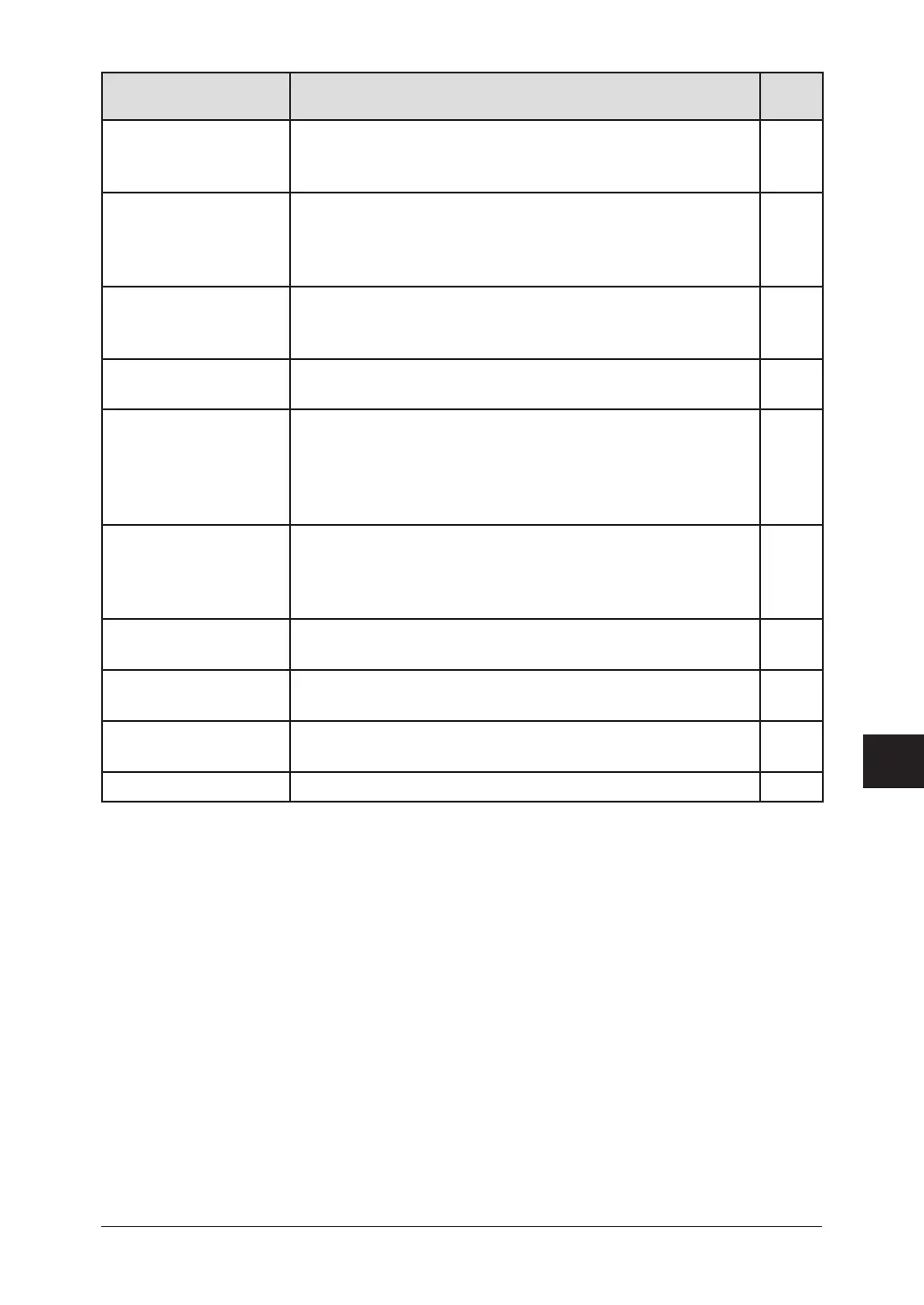
Name Description
Refer
page
F-Code Box List Lists each box’s identifier number, box name (if any), sub-
address, password, box type and each box’s settings.
To print this list, press <Menu>, <5>, <1>, <1>, <3>, <Enter>.
6-1 to
6-12
F-Code Doc. List Lists the each box’s identifier number, box name (if any),
box type and each file number (or document number) that is
stored.
To print this list, press <Menu>, <5>, <1>, <1>, <4>, <Enter>.
6-1 to
6-12
Batch Box List Lists each box’s identifier number, destination name, fax
number and day and time the transmission should start.
To print this list, press <Menu>, <5>, <1>, <1>, <5>, <Enter>.
4-14 to
4-16
Batch Doc. List Lists the documents’ file numbers.
To print this list, press <Menu>, <5>, <1>, <1>, <6>, <Enter>.
4-14 to
4-16
Fax Forward List List the each transfer rule’s identifier number, remote fax’s
number where you want documents to be transferred, on/off
setting, time period and auto print setting.
To print a program list, press <Menu>, <5>, <1>, <1>, <7>,
<Enter>.
5-12 to
5-13
Macros List Lists the each key’s macro key number and the name of the
job stored in the macro key.
To print a program list, press <Menu>, <5>, <1>, <1>, <8>,
<Enter>.
8-4
Scanner Settings List Lists the current scanner settings.
To print this list, press <Menu>, <5>, <1>, <1>, <9>, <Enter>.
2-9
*1
Store Doc. List Prints how much memory each stored document is using.
To print this list, press <Menu>, <5>, <1>, <2>, <0>, <Enter>.
11-6
Network Settings List Lists the current network settings.
To print this list, press <Menu>, <5>, <1>, <2>, <2>, <Enter>.
2-9
*2
Tx confirmation report Prints after each document transmission. 11-5
*1 For details of scanner settings, refer to the PDF manual on the GDI Printer / Scanner Driver CD
supplied with the machine..
*2 The optional NIC (Network Interface Card) is required.







 To Next Page