12-17Ma I n t e n a n c e & pr o b L e M s o L v I n G
1
2
3
4
5
6
7
8
9
10
11
12
13
14
A
Ma I n t e n a n c e & pr o b L e M s o L v I n G
“Check Message” printouts
When there is a problem with a fax call and your machine detects an error, it produces
an error printout headed by the words “Check Message”. This printout lists the follow-
ing information about the fax transaction:
•Theresultingerrorcode(See“Errorcode”nextpage.)
•Acommunicationserrormessage(See“Whaterrormessagescanmean”below.)
•TheTTI(orphonenumber)ofthefaxmachinewithwhichyourmachinehad
attempted to communicate.
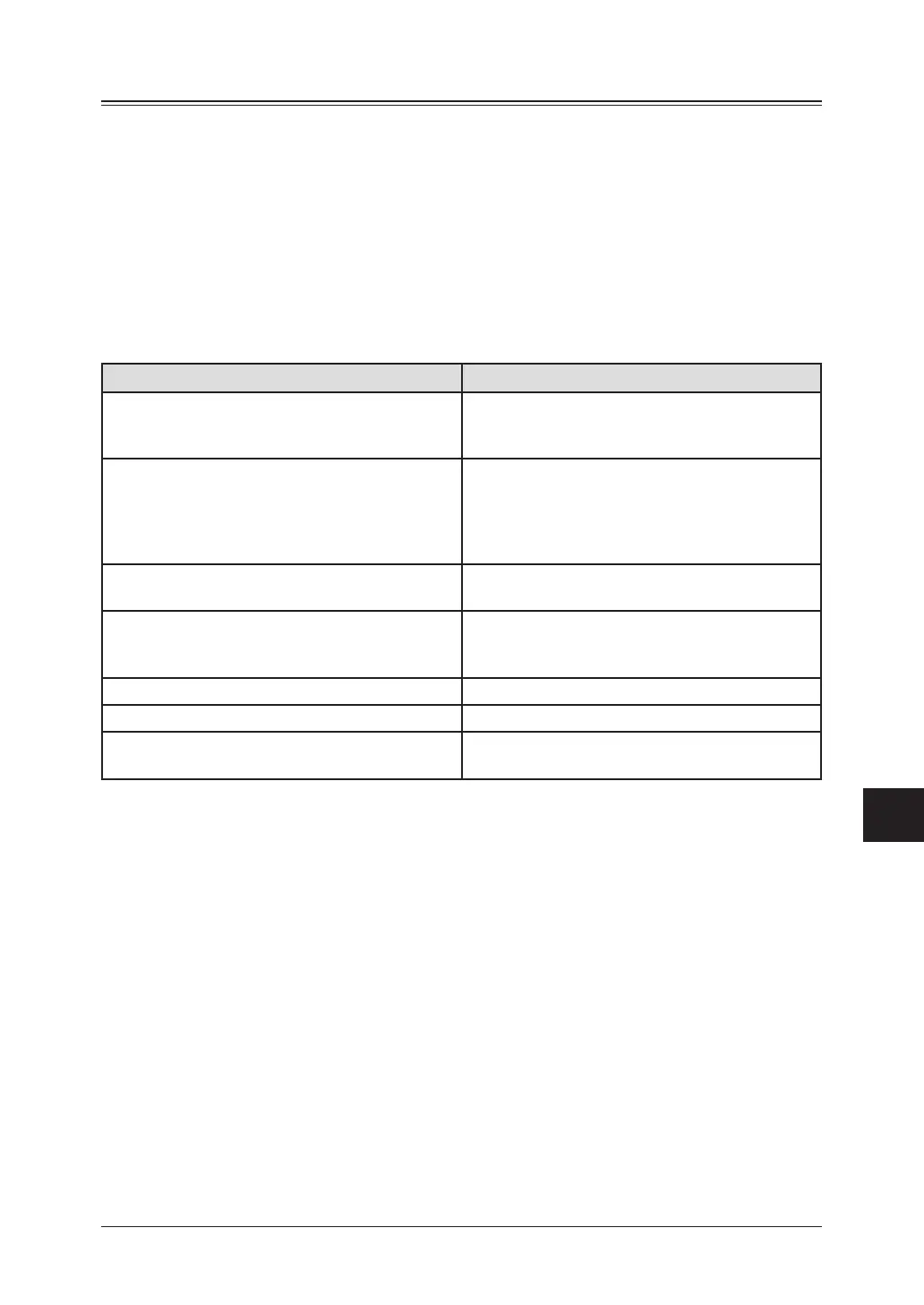
What error messages can mean
The error messages on Check Message printouts can mean a variety of things. Here is a
brief summary:
Error message
Possible meanings
Check condition of remote fax. • Remotemachinemalfunctioned
• No“Handshake”signalsfromremotefax
• Wrongphonenumberreached
Repeat transmission. • Poorphonelineconditions
• No“Handshake”signalsfromremotefax
• Documentmisfeedormiscount
• Unabletoreachremotemachineafterattempt-
ing specified number of redial tries
Line is busy. • Remotemachine’slinewasbusy
• Remotemachine’slinedidn’tanswer
Check received documents. • Remoteconrmationsignalnotreceivedfrom
remote fax
• Poorlineconditionscausedapoorimage
Memory full. • Remotefax’smemoryisfull
Dialing number is not set. • Storedphonenumberfailedtodialproperly
Stopped. • Someonepressed<Stop>attheremotefaxin
the middle of the “Handshake”







 To Next Page