4-5
4.2 Remote Control u sing Modem
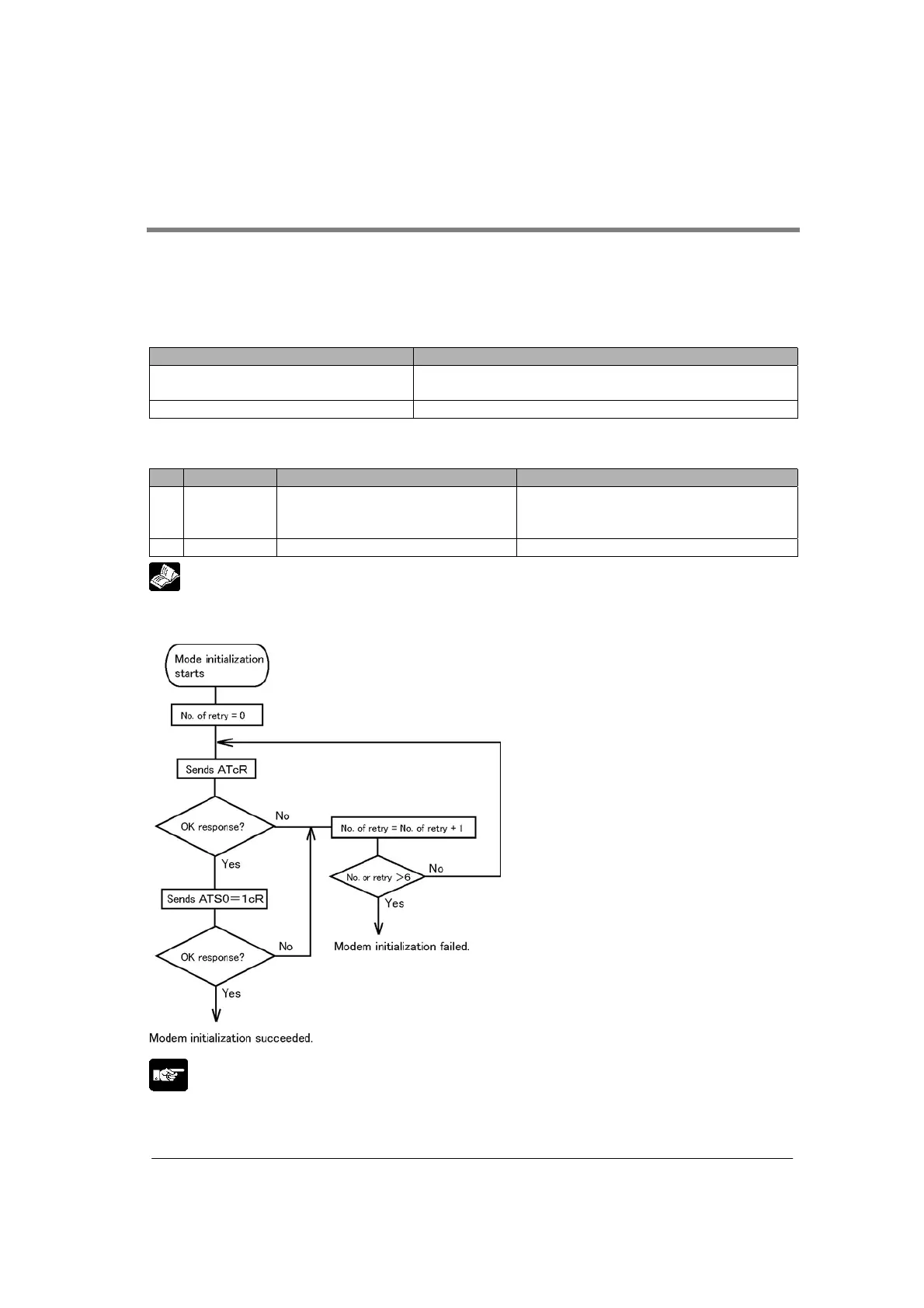
Modem initialization
When the operation mode is set to the general-purpose serial communication/computer link mode, the
modem can be initialized by specifying “able” for the modem initialization setting in the communciation
condition settings.
There are 2 methods to set communication conditions as below.
Type Timing for modem initialization command issue
Method by MCU setting - When the power turns on.
- When the mode is changed from PROG. to RUN.
Method by F159 (MTRN) instruction When F159 (MTRN) instruction is executed.
Threre are 2 commands for modem initialization as below. Firstly command 1 is sent to the
modem and then command 2.
Command Description Status of modem initialization
1. ATcR Initialization command H0: Not processed
H0100: Initializing now
H0200: Initialization completed.
2. ATSO=1cR Respond at the sound of a beep H20FF: Initialization failed.
Reference:
The status can be confirmed by using F161 (MRCV) instruction. <8.3 MCU Status Monitor>
Operation flow of modem initiliazation
Note:
The initialization can be executed again if the above modem initialization command is issued even if the
initialization has been completed once. In case any commands other than the above 2 commands are
issued, any AT command can be issued in the general-purpose serial communication mode.



 To Next Page