8-7
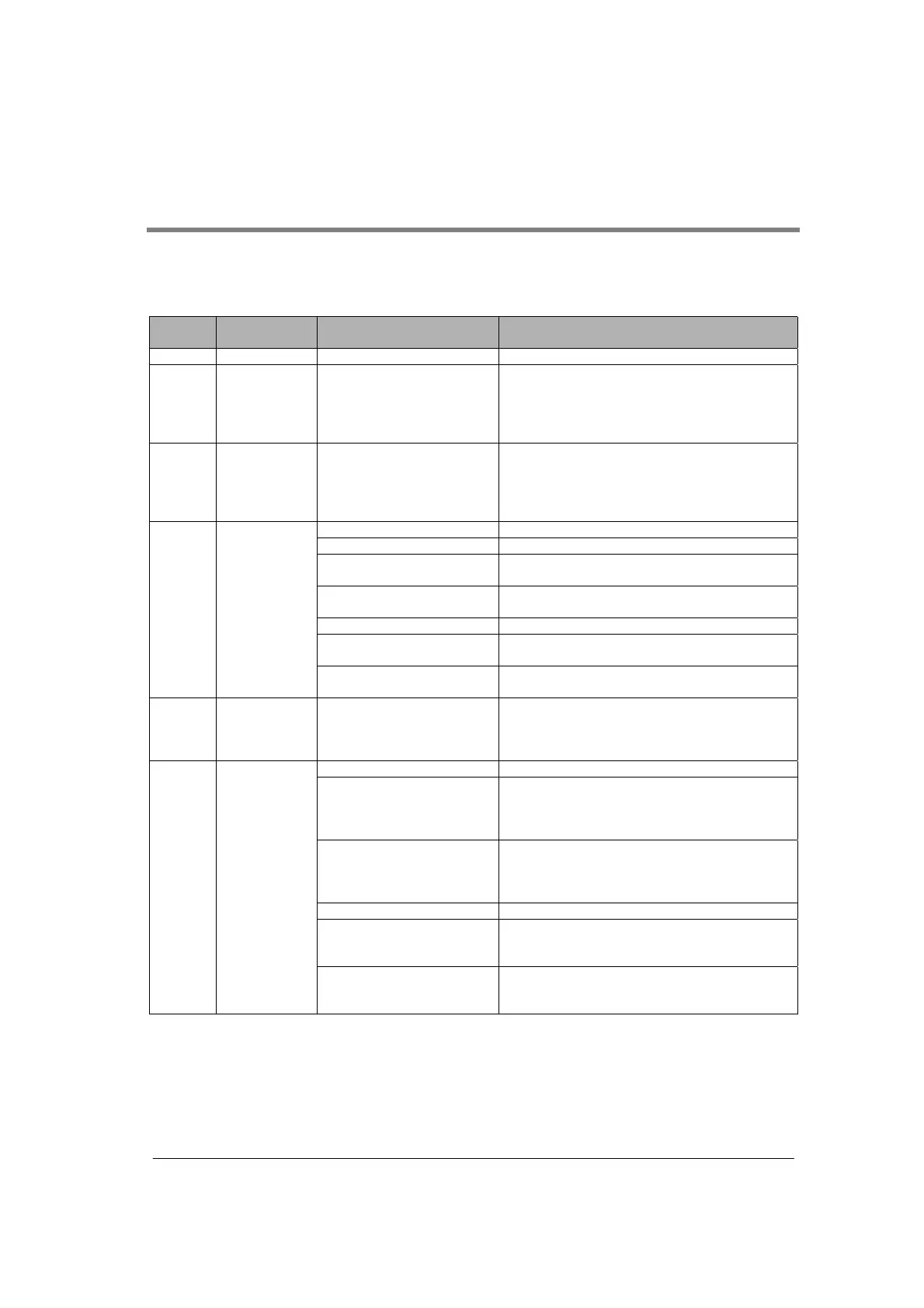
8.3 MCU Status Monitor
The operation mode, the error of the installed communication blocks, or operation status of Multi
Communication Unit (MCU) can be checked using F161 (MRCV) instruction.
The statuses that can be checked are shown below. The status for each port (COM. 1 port, COM. 2 port)
can be read.
Address
Confirmed
status
Setting content and value Description
1
st
word - - The system assures.
2
nd
word Operation
mode
K0: Computer link mode
K1: General-purpose serial
communication mode
K2: PC(PLC) link mode
K7: In initializing modem
The operation modes specified for the COM. ports
can be cofirmed.
3
rd
word Discrimination
of
communication
blocks
K0: Communication block is
not installed.
K232: AFP2803 (RS232C)
K422: AFP2804 (RS422)
K485: AFP2805 (RS485)
The installed communication blocks can be
confirmed.
Lower byte
Bit 0: Receive buffer overrun Occurs only when an error occurs in the hardware.
Bit 1: Framing error
Note1-1)
Becomes “1” when the character bit and the stop
bit differ from the setting.
Bit 2: Parity error
Note1-1)
Becomes “1” when the parity of the received data
differs from the setting.
Higher byte
Bit 8: Receive buffer overflow Becomes “1” when the received message length
exceeds 2048 bytes.
4
th
word Reception
error code
Note1)
Bit 9: Receive buffer full error
Note1-2)
Becomes “1” when the messsages that CPU has
not completed to receive exceeds 8 messages.
5
th
word No. of
occurrences of
reception error
Note2)
H0 to HFFFF Counts the No. of occurrences of reception errors
(overrun, framing error, parity error).
Lower byte
Bit 0: Setting error of mode
speed setting switch
Becomes “1” when the mode setting of the mode
speed setting switch is not acceptable.
1. When setting to OFF˹OFF
2. When setting COM. 2 port to PC link mode
Bit 1: this is the operation
mode setting exceeding the
usage restrictions for the unit
Note5)
Becomes “1” when the setting exceeds the
restrictions on the installation of the unit.
Higher byte
Bit 8: Error in communication
condition setting values
Becomes “1” when the setting value of the
communication condition specified by F159
(MTRN) instruction is out of the specification.
6
th
word Setting error
code
Note3)
Bit 9: Error in transmission
data length
)
Becomes “1” when the data length of the message
transmitted by F159 (MTRN) instruction exceeds
2048 bytes.



 To Next Page