5-2
5.1 Overview of Func ation
5.1.1 What is PC(PLC) Link
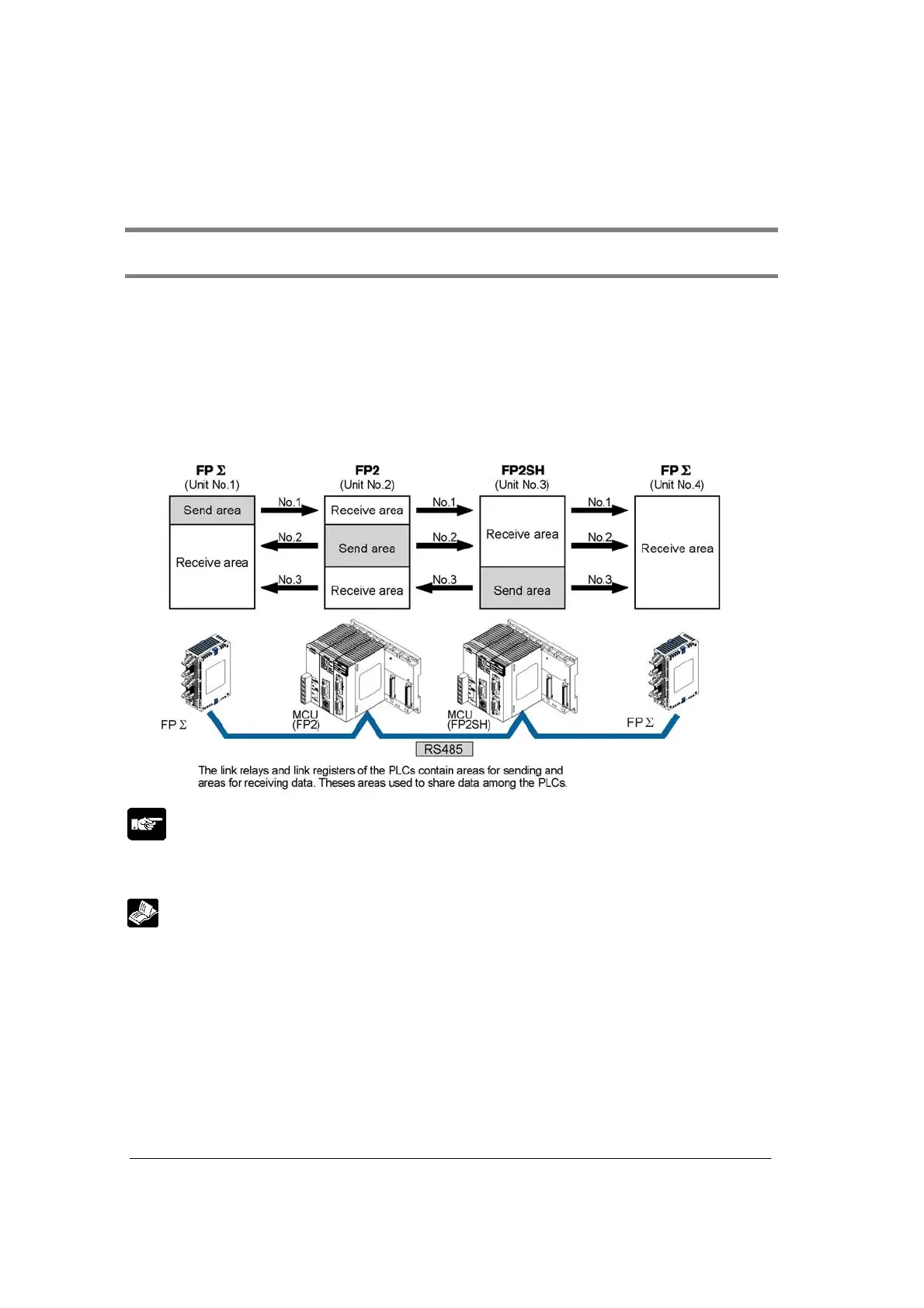
• The PLC link is an economic way of linking the maximum of 16 PLCs which are corresponding to
MEWNET-W0, using a twisted-pair cable.
• Data is shared between FP2, FP2SH and FPΣ using link relays (L) and link registers (LD).
• The statuses of the link relays and link registers of one PLC are automatically fed back to the other
PLCs on the same network.
• PC(PLC) link is not the default setting. Therefore, the mode setting switch must be set to “PLC Link” in
order to use this function. PC(PLC) link is only available for the COM.1 port.
• Unit numbers and l/ink areas are allocated using the unit No. setting switch or setting tool.
Note:
• Different hardwares are used for MEWNET-W0 and MEWNET-W/MEWNET-W2. They cannot be
mixed in the same network.
Reference:
For the details on the PC(PLC) link of FPΣ, refer to <Chapter 7 in FPΣ User’s Manual ARCT1F333>.



 To Next Page