5-12
5.3 Monitoring
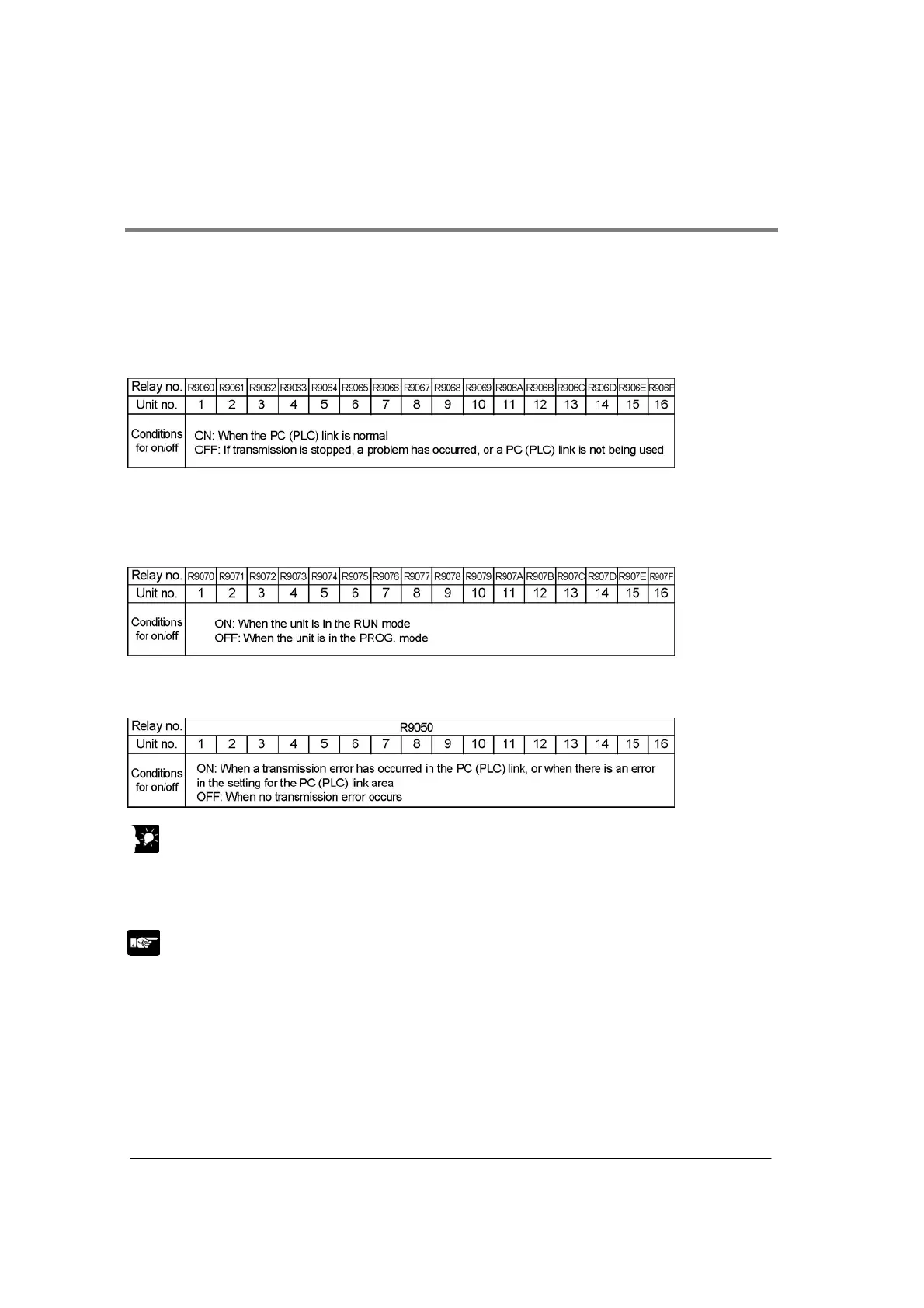
When using a PC(PLC) link, the operation status of the links can be monitored using the following relays.
Transmission assurance relays
For PC(PLC) link 0: R9060 to R906F (correspond to unit no. 1 to 16)
For PC(PLC) link 1: R9070 to R907F (correspond to unit no. 1 to 16)
If the transmission data from a different unit is being used with the various PLCs, check to make sure the
transmission assurance relay for the target unit is on before using the data.
Operation mode relays
For PC(PLC) link 0: R9070 to R907F (correspond to unit no. 1 to 16)
For PC(PLC) link 1: R9080 to R908F (correspond to unit no. 1 to 16)
The operation modes (RUN/PROG.) can be checked for any given PLC.
PLC link transmission error relay R9050 (link 1) to R9054 (link 5)
This relay goes on if a problem is detected during transmission.
Key Point: Monitoring the PLC link status
In FPWIN GR, the PLC link status items, such as the transmission cycle time and the number of times
that errors have occurred, can be monitored by selecting the PLC link switch on the FPWIN GR Status
Monitor screen.
Note:
Remote programming of the linked PLCs is not possible.



 To Next Page