6-13
Reception process
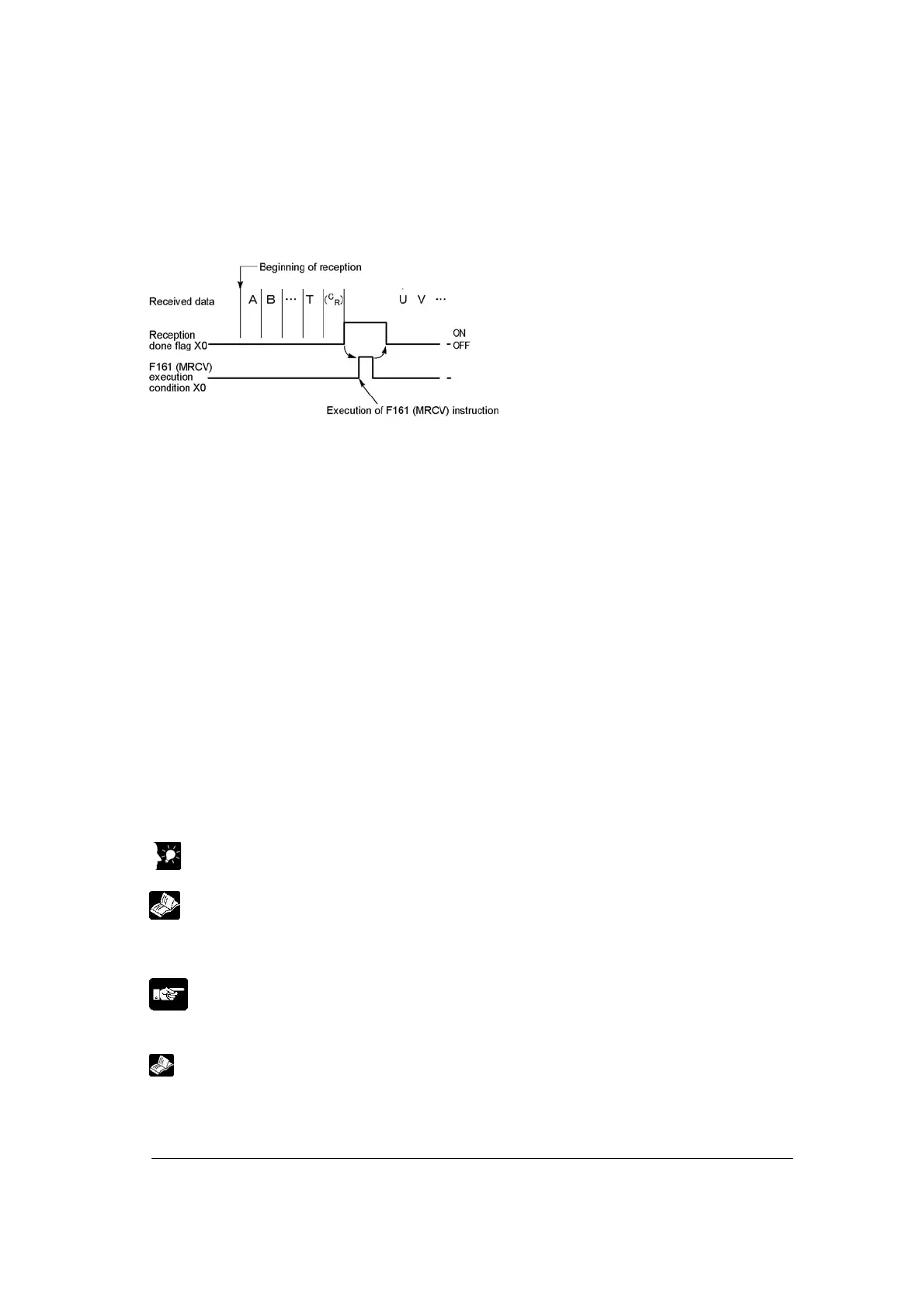
When data is sent from an external device, the data is stored in the buffer in MCU as below.
(1) Header and terminator is not stored.
(2) When the terminator is received, the “reception done” flag X0 (X2) turns on, and subsequently the
next data received are stored in the MCU internal buffer. 8 data of 2048 bytes can be received
consecutively.
(3) Data is copied in the area specified using the operand when F161 (MRCV) instruction is executed,
and the “reception done” flag X0 (X2) turns off.
However, note that the “reception done” flag X0 (X2) actually turns off at the beginning of the next scan
or later when the I/O is refreshed.
When multiplex reception is carried out, the reception done status (status which X0 (X1) is on) remains
after the received data are copied using MRCV instruction, therefore, the received data cannot be copied
by rising the “reception done” signal.
For repeated reception of data, perform the following steps 1 to 3:
1. Receive data
2. Reception done X0 (X2): on
3. Execute F161 (MRCV) instruction to read the received data from MCU
Prepare for reception
Any special preparation is not necessary to receive data, however, if you want to clear the receive buffer
when the first data is received, Y1E (Y1F) must be turned on and the communication channel must be
reset. After the completion of the resetting, XE (XF) turns on. Then turn off the request to reset Y1E
(Y1F). In this case, the area specified using F161 (MRCV) instruction is not cleared.
Key Point:
The contact numbers in parentheses refer to COM port 2.
Reference: <9.2 Appendix (Time Chart)>
Note: Followings can be set using F159 (MTRN) as well as the data reception.
1. Monitoring of communication conditions
2. Monitoring of MCU status
Reference: <Chapter 8 Applications>
<9.6 F159 (MTRN)/F161 (MRCV) instructions>



 To Next Page