Interface (Ports & Jacks)
A - 2 Interface (Ports & Jacks)
A
Notebook Ports and Jacks
Item Description
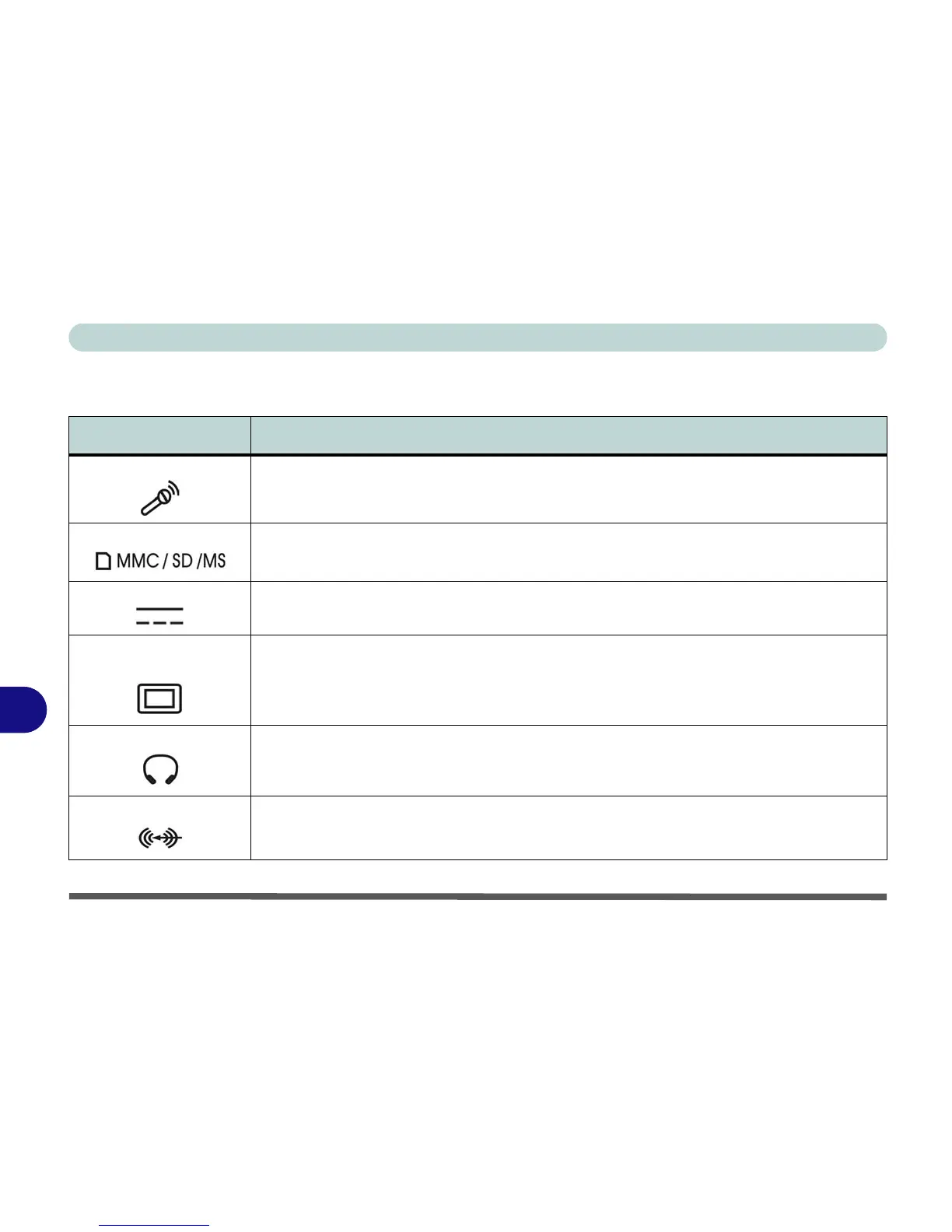
Built-In Microphone The built-in microphone allows you to record on your computer
Card Reader Port The card reader allows you to use some of the latest digital storage cards. Push the card into the
slot and it will appear as a removable device.
DC-In Jack Plug the supplied AC/DC adapter into this jack to power your computer.
External Monitor (VGA)
Port
This port allows you to connect an external monitor, or Flat Panel Display, to get dual video or
simultaneous display on the LCD and external monitor/FPD (see “Display Devices” on page B -
5).
Headphone-Out Jack Headphones or speakers may be connected through this jack. Note: Set your system’s volume to
a reduced level before connecting to this jack.
Line-In Jack The Line-In jack allows you to play audio sources through the computer’s speakers.


 To Next Page