Copyright © 2022 NEXCOM International Co., Ltd. All Rights Reserved.
68
Appendix E: Signal Connection of DI/DO
VTC 7260 Series User Manual
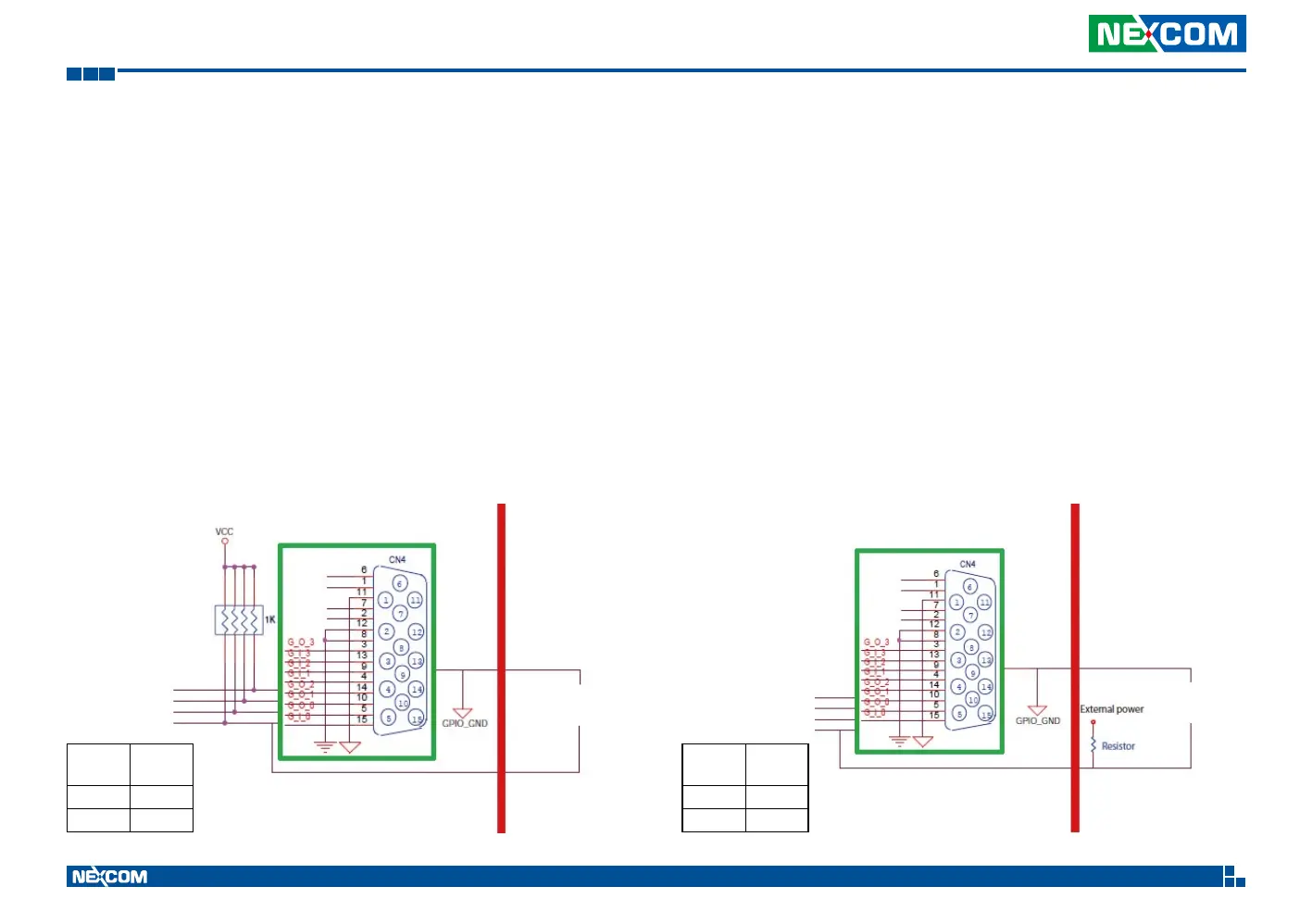
Dry Contact
The SW2 switch needs to switch to “Low” state. The GPO signal will not have
a pull up resistor internally.
The figure below shows how to connect an external source to one of the
output channels.
Digital Output
CN12 connector for GPO signal (digital signal output). The CN12 connector
has 4 digital output channels by default.
The signal connection of CN12 supports two connected methods for output
signal type. One is Low level (driven to 0V from GPO signal) other is High
level (high voltage is provided from external device).
Wet Contact (default)
The SW2 switch needs to switch to “ON” state. The GPO signal will have a
pull up resistor to Vin Voltage internally.
The figure below shows how to connect an external source to one of the
output channels.
GPO
Register
Port
1 HIGH
0 GND
GPO
Register
Port
1 HIGH
0 GND
Internal External Internal External


 To Next Page