SERVICE MANUAL
21
www.norcold.com
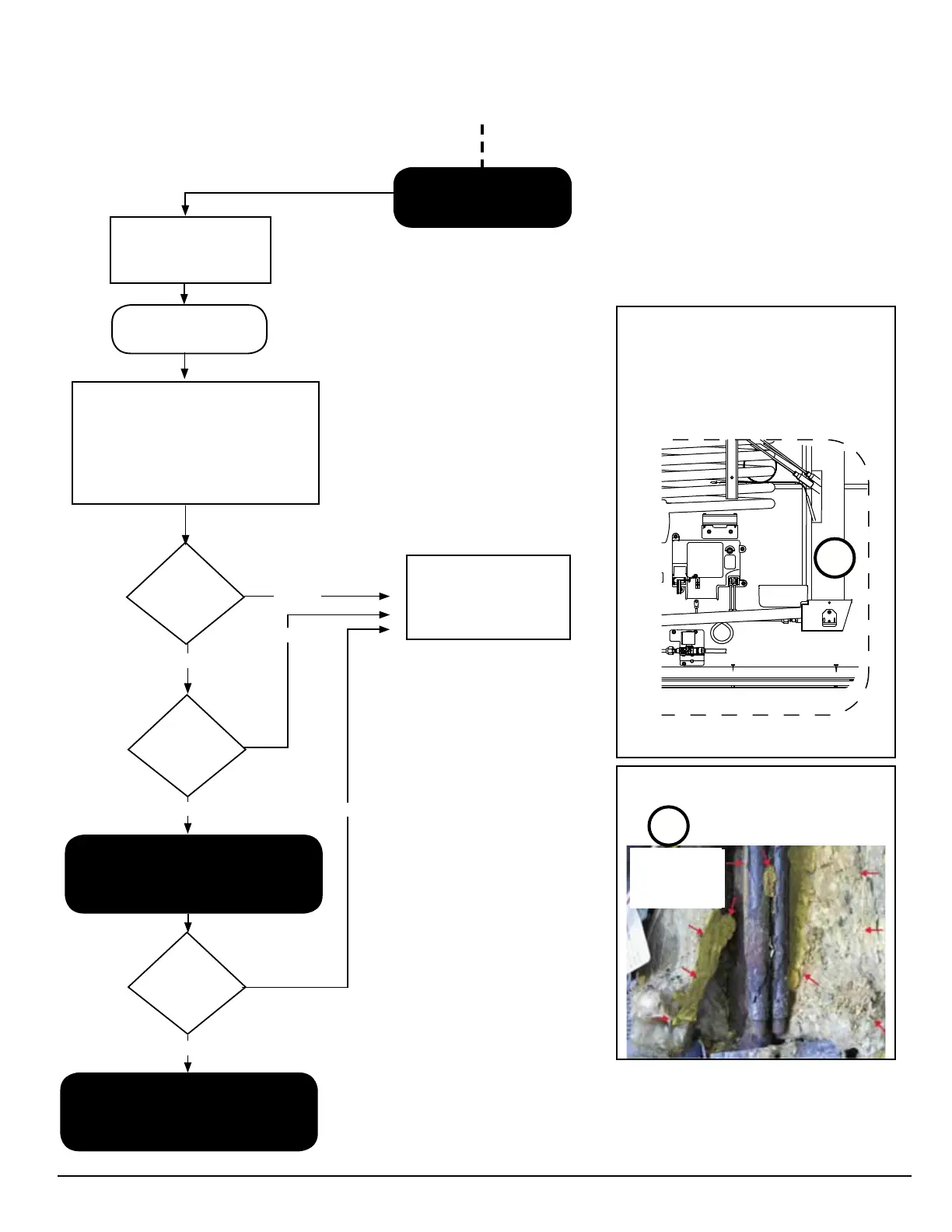
Temperature Monitor Control (TMC) - Red Light on Solid
Fault Codes, cont’d.
1. Remove the insulation canister (A) and
remove the insulation.
Removing Insulation
2. Inspect for powdery, yellow residue (B).
B
From Previous Page
Inspect for cooling unit
leak.
Red light on TMC is
ON solid
Is yellow,
powdery residue
visible?
Using litmus paper, inspect boiler area
for leaks.
Can you
smell ammonia?
Did litmus
paper indicate a
leak?
REPLACE COOLING
UNIT
Yes
Yes
Yes
No
No
No
Example of Chromate Leaking
B
1. Carefully remove insulation canister
and insulation from around boiler
(A).
2. Visually inspect exposed boiler area
for any powdery, yellow residue
indicating leaking chromate (B).
3. Smell around boiler area for
ammonia.
Red arrows
pointing to yellow,
powdery residue -
indicates chromate
leak
NOR000212A-1
A
C
Go to TMC Lockout State on next
page.



 To Next Page