22
www.norcold.com
2118, 2118IM, 2118IMD Series
Fault Codes, cont’d.
C
From Previous Page
Do not attempt this TMC validation unless
you have already followed the “TMC Red
Light On Solid” instructions and deter-
mined that the cooling unit does not have
a leak. Otherwise, there is a serious risk
of re that can result in property damage,
personal injury, or death.
Clear the Temperature Monitor Control (TMC) Lockout
State
Clear the TMC lockout state (red light ON solid) shown below to
validate TMC functionality. The TMC is the black box control por-
tion of the High Temperature Monitor System.
In order to clear the lockout state (red light
ON solid), the conditions below must be
met. DO NOT remove the plastic cover of
the TMC.
1. Red light of the TMC is ON (solid).
2. The boiler area of the cooling unit (where the thermocouple
is mounted) has cooled to less than 250° F.
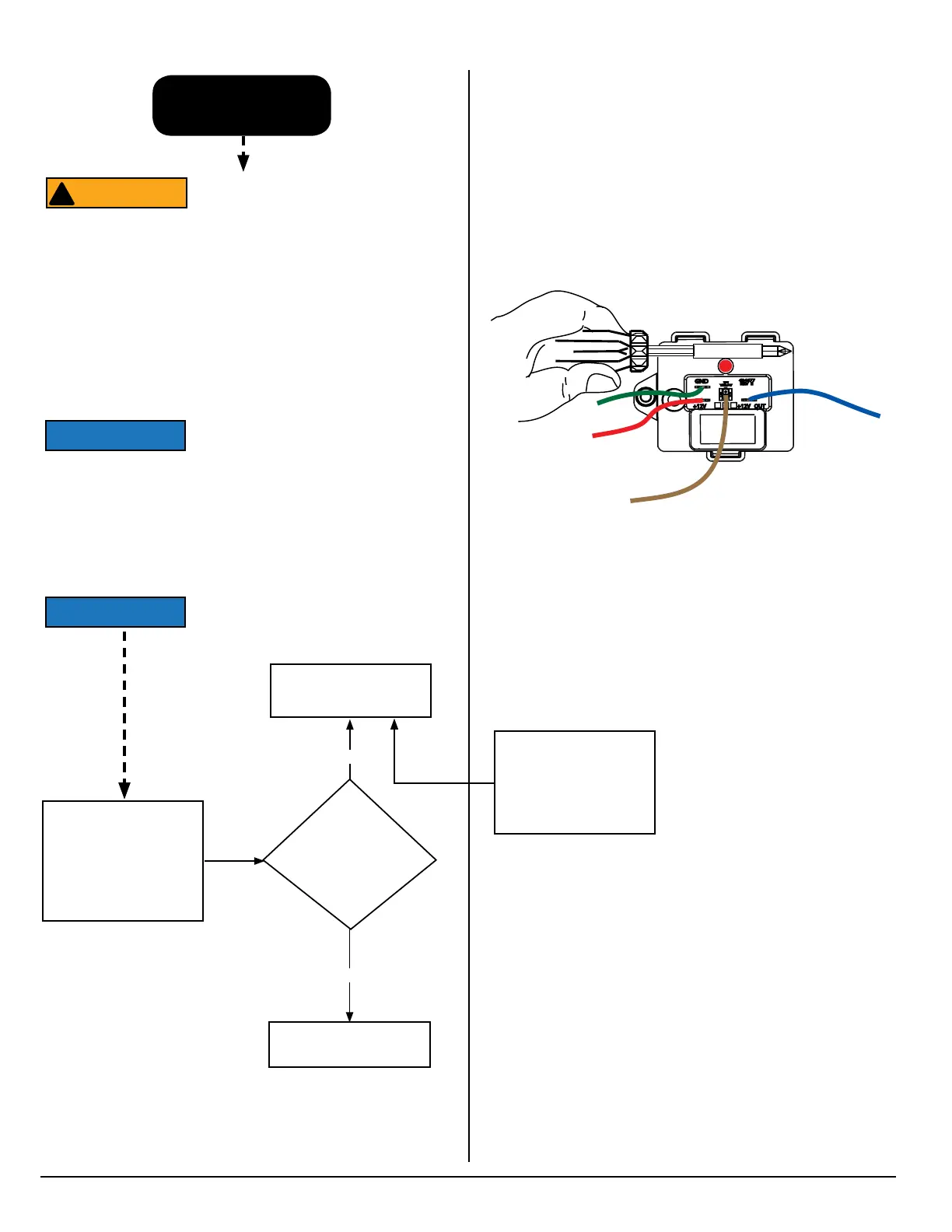
3. A magnet has been positioned as shown in Fig. 16 for ve
(5) seconds.
If lockout state does not clear in ve (5)
seconds, try using a stronger magnet.
ATTENTION
!
Did the refrigerator cool
properly?
Once the TMC lockout
state has been cleared:
1. Run the refrigerator in
AC mode.
2. Monitor operation for
24 hours.
Yes
No
REPAIR COMPLETE
Repeated lockouts (red
light ON solid) indicate
potential cooling unit
failure - CONTACT
TECHNICAL SUPPORT
REPLACE COOLING
UNIT
+12V
GND
T/C
YELLOW
634677
REV E
+12V OUT
Fig. 16 - Magnet position
■ Once the lockout state has been cleared, the red light of the
TMC will turn off.
■ If the refrigerator is not on, turn it on to further validate the TMC
conguration.
NOR000249A



 To Next Page