BA_v2_eagle_parallel_EN_1-0
35
opeRaTion
7.2 Inhibiting coins/activating narrow coin channel
Using the two switch blocks on the coin validator you can inhibit on site each of the 16 coin
channels of the activated memory block or each coin assigned to certain coin channels, which
means that the inhibited channels are not used for payment on the machine:
• Accept coin unrestrictedly: all channels assigned are enabled
• Narrow the acceptance band of a coin: inhibit normal channel
• Inhibit coin: inhibit all channels assigned
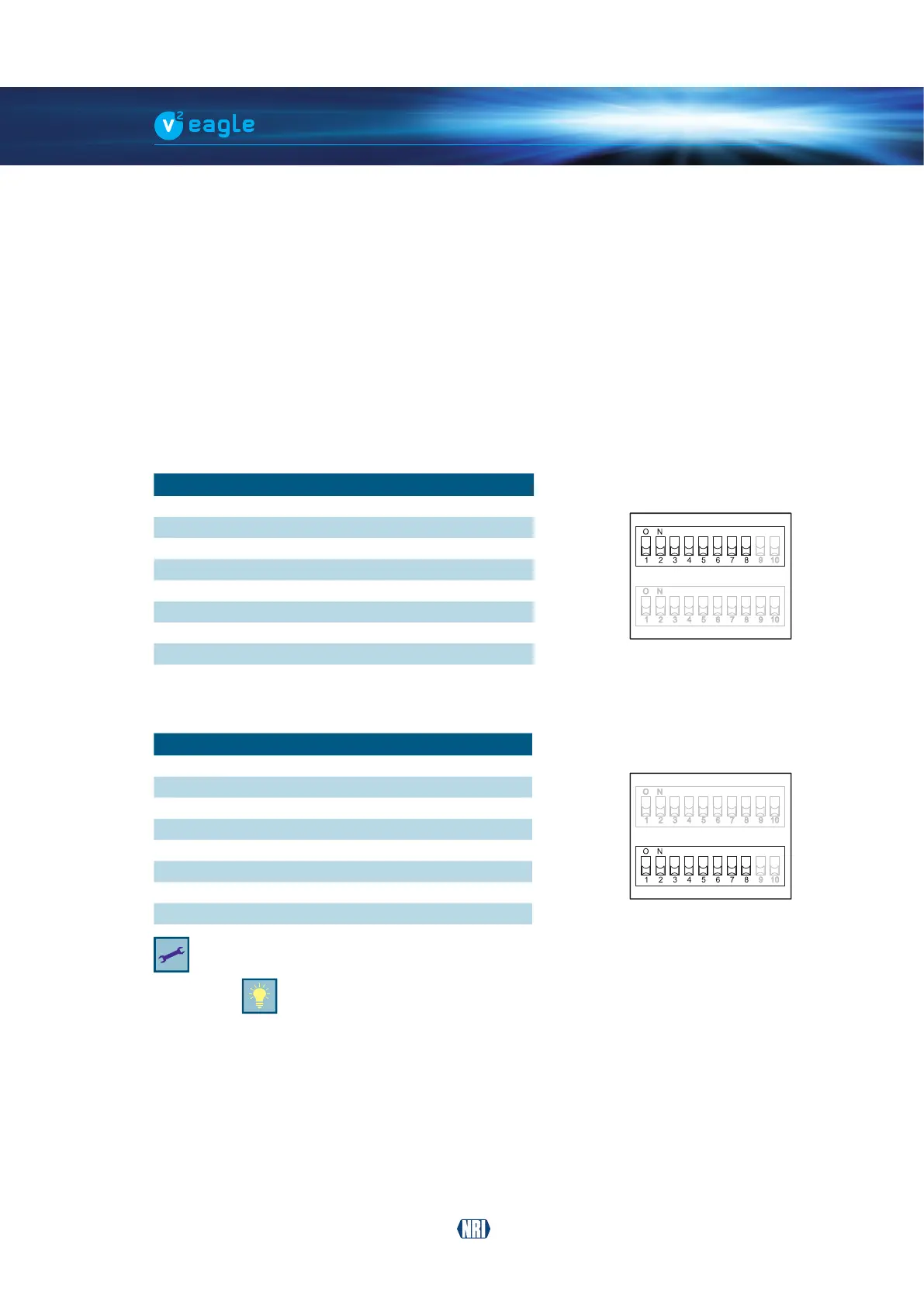
The 16 DIL switches inhibit the following coin channels:
7.2.1 Inhibit functions – switch block S1
DIL switch
Function OFF ON
S1.1 Coin channel 1 accepts inhibited
S1.2 Coin channel 2 accepts inhibited
S1.3 Coin channel 3 accepts inhibited
S1.4 Coin channel 4 accepts inhibited
S1.5 Coin channel 5 accepts inhibited
S1.6 Coin channel 6 accepts inhibited
S1.7 Coin channel 7 accepts inhibited
S1.8 Coin channel 8 accepts inhibited
7.2.2 Inhibit functions – switch block S2
DIL switch
Function OFF ON
S2.1 Coin channel 9 accepts inhibited
S2.2 Coin channel 10 accepts inhibited
S2.3 Coin channel 11 accepts inhibited
S2.4 Coin channel 12 accepts inhibited
S2.5 Coin channel 13 accepts inhibited
S2.6 Coin channel 14 accepts inhibited
S2.7 Coin channel 15 accepts inhibited
S2.8 Coin channel 16 accepts inhibited
Please refer to the label on the rear of the device to see which coin has been assigned to which
coin channels in the factory (cf. Chap. 4.4 Label – switch functions/coin channel assignment, p. 17).
This assignment may have been changed by means of the conguration tool.
Apart from this, there is a brief description of the individual switching functions
on the back of the device.
If all coins are to be accepted for payment on the machine without restriction, the DIL switches
S1.1–S1.8 and S2.1–S2.8 of the two switch blocks are set to OFF (down). If you want to inhibit
a coin channel, you only need to set the associated DIL switch upwards to ON.


 To Next Page