Chapter 8: Horizontal Control Commands76
Clear Horizontal Tab Settings Commands (IBM/E)
⻬ ML320 E/I, ML321 E/I ⻬ ML320 Turbo, ML321 Turbo ⻬ ML520, ML521
⻬ ML390 Turbo, ML391 Turbo ⻬ ML590, ML591
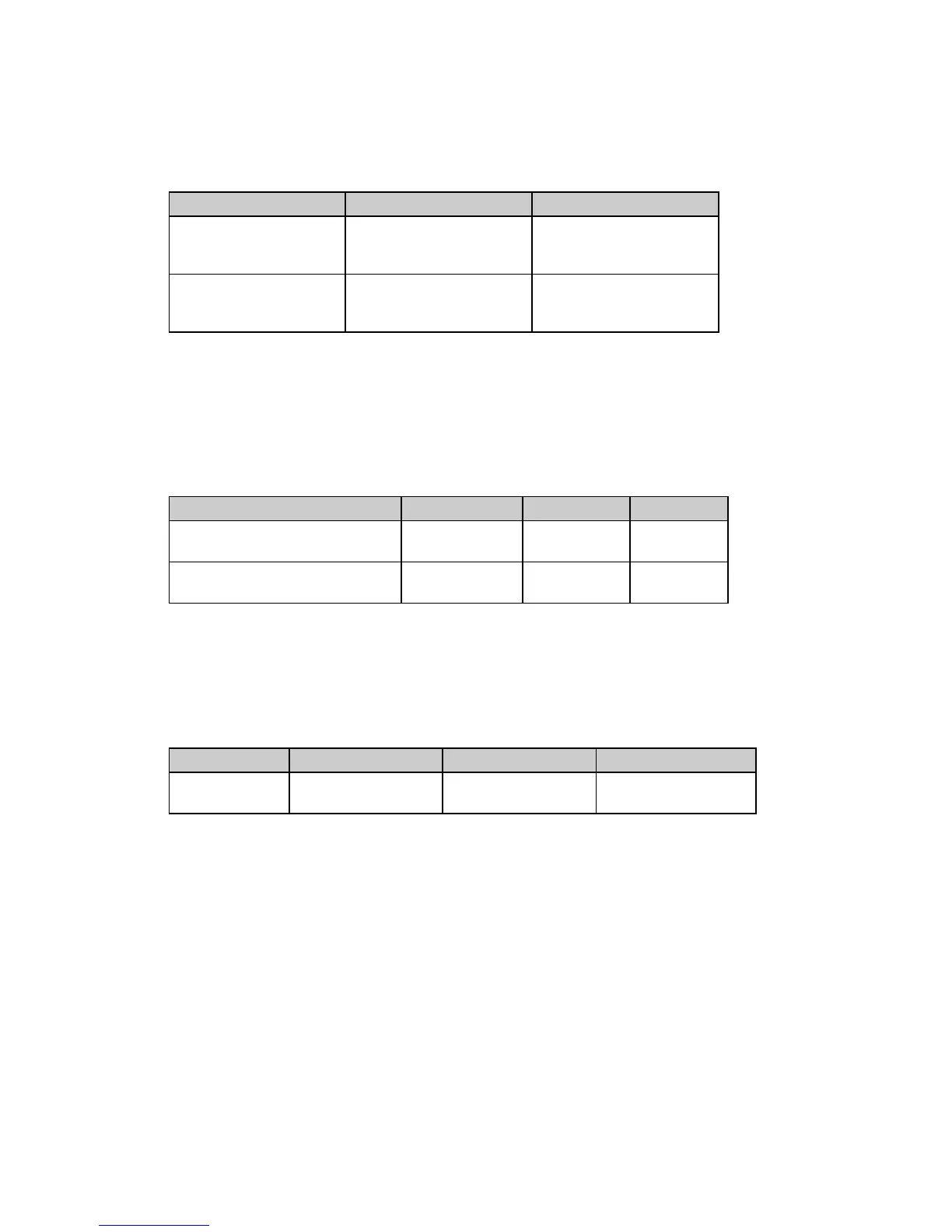
Function IBM Epson
Clear Horizontal Tab
ASCII: ESC D NUL NUL
Dec: 27 68 0 0
Hex: 1B 44 00 00
ASCII: ESC D NUL NUL
Dec: 27 68 0 0
Hex: 1B 44 00 00
Reset Horizontal Tabs
to Default
ASCII: ESC R
Dec: 27 82
Hex: 1B 52
Not applicable
In the IBM emulation, the ESC D NUL command will clear all horizontal tabs, including the
default tabs. In the Epson and MICROLINE Standard emulations, these commands will clear out
the tab settings and return the printer to the default horizontal tab settings (every eight spaces).
Clear Horizontal Tab Settings Commands (ML)
⻬ ML320 Std., ML321 Std. ⻬ ML320 Turbo, ML321 Turbo ⻬ ML520, ML521
Function ASCII Dec Hex
Clear Horizontal Tabs Set
by Characters
ESC HT CR 27 9 13 1B 09 0D
Clear Horizontal Tabs Set
by Dot Columns
ESC ETX 0 CR 27 3 48 141 1B 3 30
8D
Horizontal Print Position Commands
Indent from Left Margin Command (IBM/ML)
⻬ ML320 E/I, ML321 E/I ⻬ ML320 Turbo, ML321 Turbo ⻬ ML520, ML521
⻬ ML320 Std., ML321 Std.
Function ASCII Decimal Hexadecimal
Indent from
Left Margin
ESC % B n
1
n
2
n
3
n
4
27 37 66 n
1
n
2
n
3
n
4
1B 25 42 n
1
n
2
n
3
n
4
This command causes the printing to be indented from the left margin by the number of dot
columns you specify (relative to home position, 0001).






 To Next Page