Chapter 4: Character Style Commands32
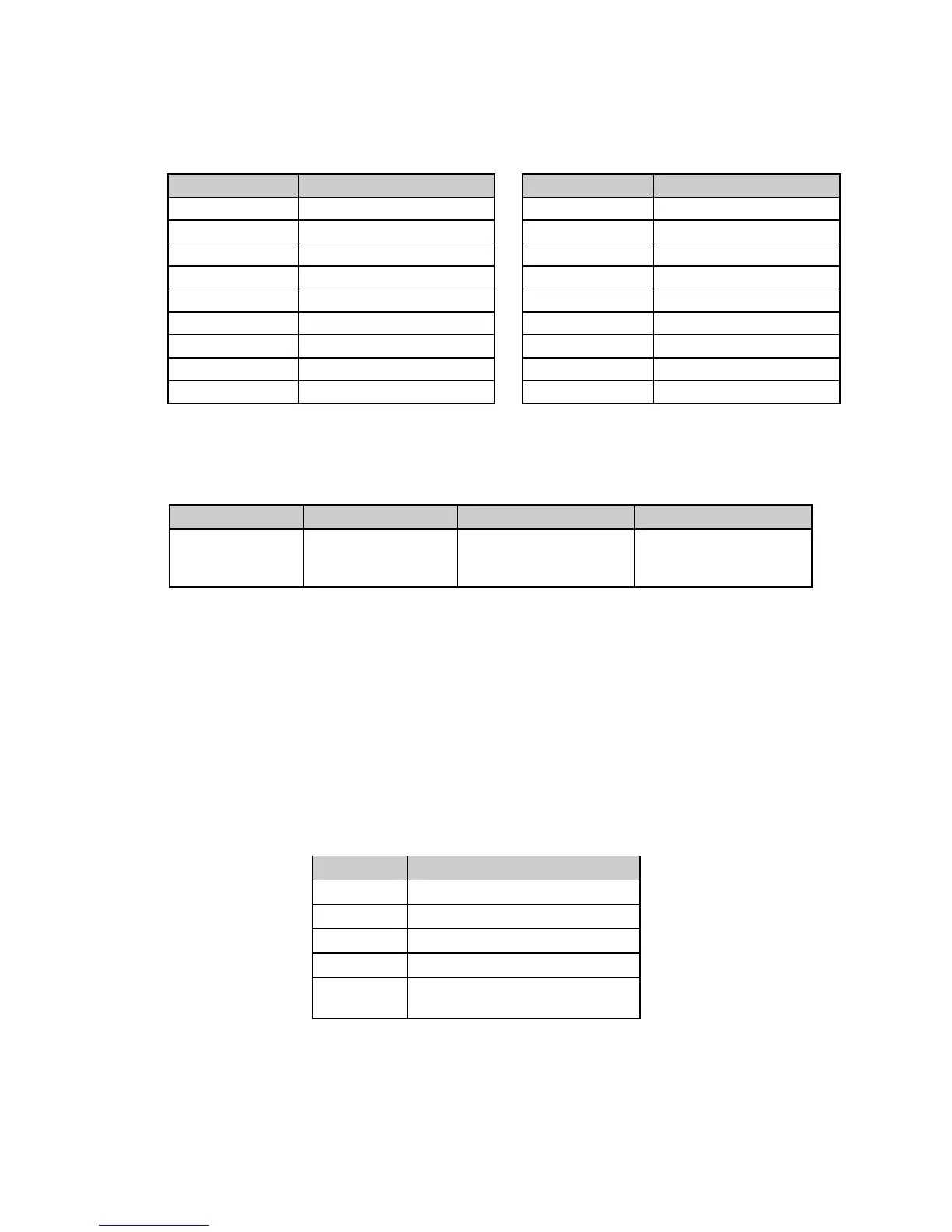
Table 28: IBM ESC I Command —
Print Modes Coresponding to n Values for 24-Pin Models ML590 & ML591
Dec. Value of n Print mode Dec. Value of n Print mode
0 10 cpi Utility Resident 14 12 cpi LQ DLL
2 10 cpi LQ Resident 16 17.1 cpi Utility Resident
3 Proportional LQ Resident 18 17.1 cpi LQ Resident
4 10 cpi Utility DLL 20 17.1 cpi Utility DLL
6 10 cpi LQ DLL 22 17.1 cpi LQ DLL
7 Proportional LQ DLL 24 15 cpi Utility Resident
8 12 cpi Utility Resident 26 15 cpi LQ Resident
10 12 cpi LQ Resident 32 20 cpi Utility
12 12 cpi Utility DLL 24 20 cpi Utility
Select Font Command (IBM)
⻬ ML390 Turbo, ML391 Turbo
Function ASCII Decimal Hexadecimal
Select Typeface,
Character Pitch
and Spacing
ESC [ l L
n
H
n
H
i
L
i
H
fwd
L
fwd
f
a
27 91 108 L
n
H
n
H
fid
L
fid
H
fwd
L
fwd
f
a
1B 5B 6C L
n
H
n
H
i
L
i
H
fwd
L
fwd
f
a
This command can be used to select a typeface, plus a character pitch or proportional spacing.
Parameters L
n
and H
n
Parameters L
n
and H
n
are used to set which of the following parameters will be activated. The
value calculated by the equation
L
n
+ (H
n
x 256)
is used to determine how the various parameters will be treated:
Table 29: IBM ESC [ l Command —
Parameter Activated for Calculated L
n
, H
n
Values
Value Parameters Activated
0 or 1 Command invalid
2 or 3 F
id
valid; F
wd
and f
a
unchanged
4F
id
and F
wd
valid; f
a
unchanged
5F
id
, F
wd
and f
a
valid
6 or more F
id
, F
wd
and f
a
valid; parameter
data dumped after 6 bytes
Parameters H
fid
and L
fid
Parameters H
fid
and L
fid
are used to select the font to be used. The value determined from the
equation
(H
fid
x 256) + L
fid






 To Next Page