Page: 46
Service Guide ML395/395C
Chapter 3 Maintenance & Disassembly
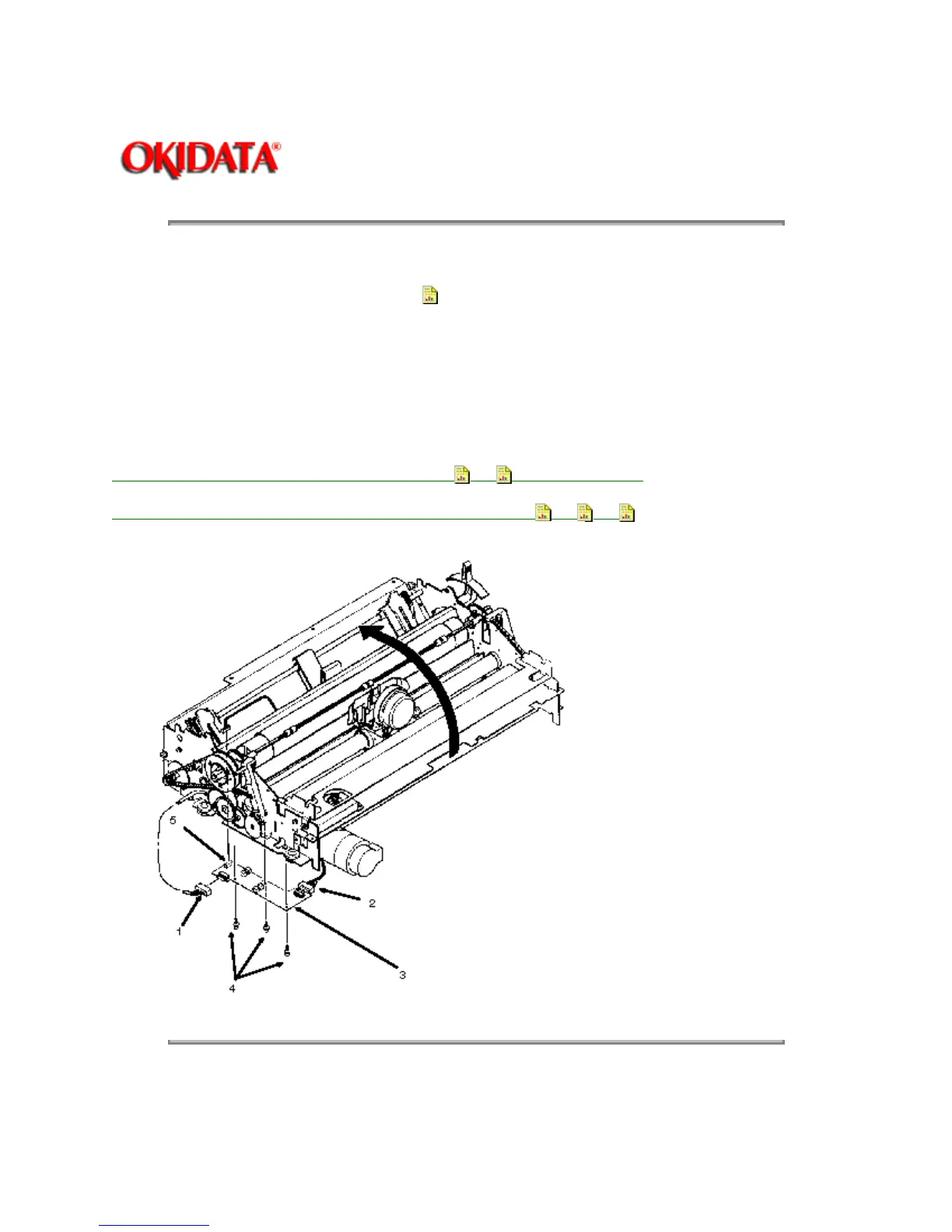
3.2.12 Sensor Board
1. Remove the printer mechanism (3.2.09).
2. Raise the front of the printer mechanism.
3. Disconnect cables CN2 (1) and CN3 (2) from the sensor board (3).
4. Remove the three sensor board mounting screws (4).
5. Disconnect connector CN1 (5) and detach the sensor board.
P/N 55050501 PCB: Sensor Board RSPL B.2.06
, 09 (LQEW or LPRW)
P/N 56619104 Cord: Sensor PCB Connection RSPL B.2.06 , 09 , 12
Copyright 1997, Okidata, Division of OKI America, Inc. All rights reserved. See the OKIDATA Business
Partner Exchange (BPX) for any updates to this material. (http://bpx.okidata.com)



 To Next Page