Page: 55
Service Guide ML395/395C
Chapter 3 Maintenance & Disassembly
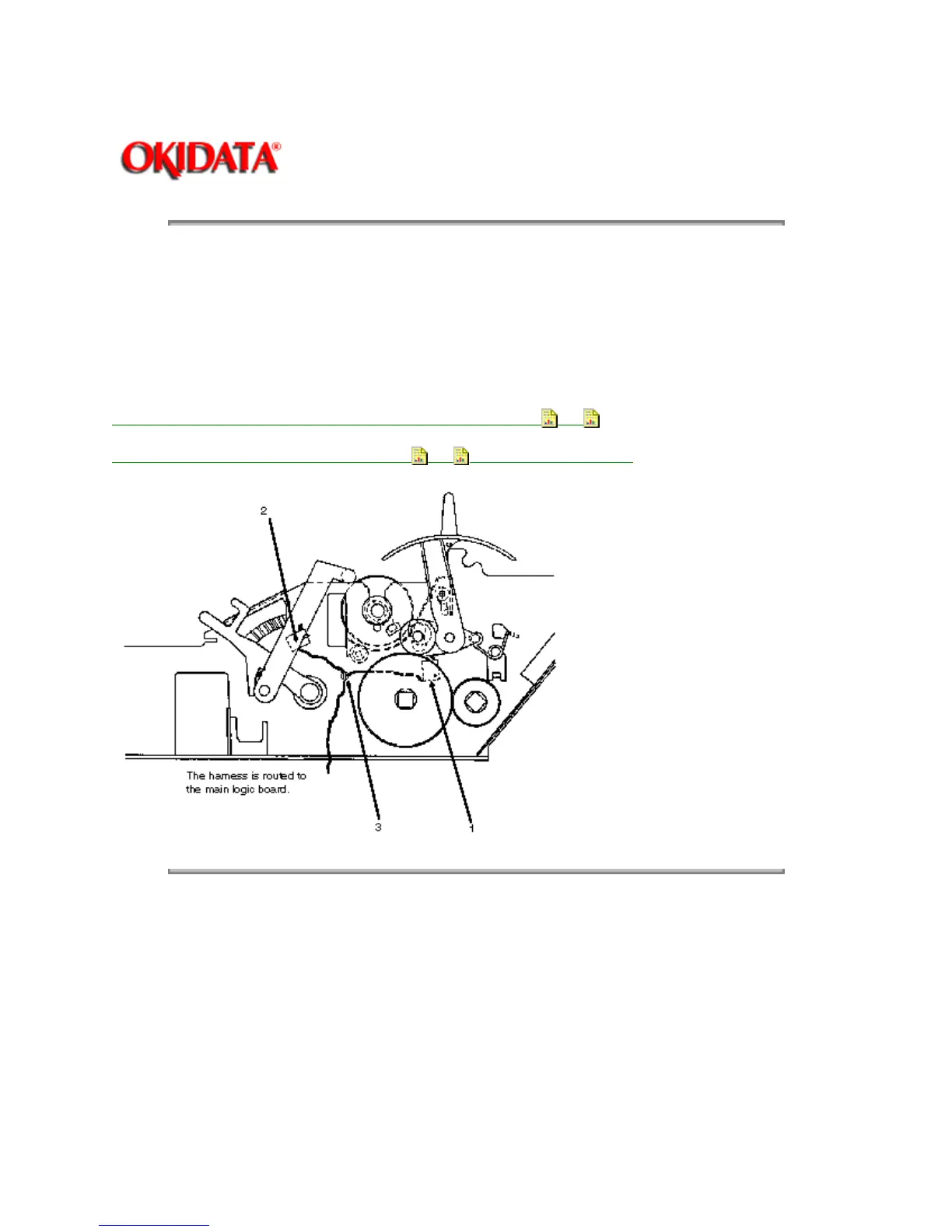
3.2.21 Printhead Gap / Release Lever Microswitches
1. Remove the mounting screw to remove the release lever microswitch (1).
2. Push down on the mounting tab and remove the printhead gap microswitch (2).
3. Using a needle nose pliers, detach the nylon cable clamp (3) and remove the harness and
switches from the printer mechanism.
P/N 53068602 Indicator: PH Gap (Adj Bracket) RSPL B.2.07
, 11
P/N 56209901 Switch: Micro RSPL B.2.07 , 11 (Adj & Release Lever)
Copyright 1997, Okidata, Division of OKI America, Inc. All rights reserved. See the OKIDATA Business
Partner Exchange (BPX) for any updates to this material. (http://bpx.okidata.com)



 To Next Page