Fax Function
3
3-40 d-Color MF222 plus/MF282 plus/MF362 plus/MF452 plus/MF552 plus
3.3
Operation flow
The following describes a flow to send a fax. For details, refer to page 3-43.
1 Creating data
% Create data to be sent using application software.
2 Configuring the fax driver
% Select a fax driver, and change the setting if necessary.
3 Entering a destination to send data
% Enter a destination to send data.
Checking the cable connection
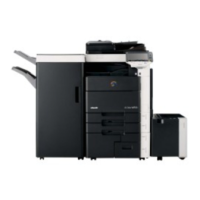
1 Check that a modular cable is connected to the LINE port of
this machine.
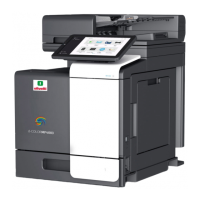
2 Check that a LAN cable is connected to the LAN port of this
machine and the green LED is on.



 To Next Page