d-Color MF222 plus/MF282 plus/MF362 plus/MF452 plus/MF552 plus 3-67
3.7 Using the guidance function
3
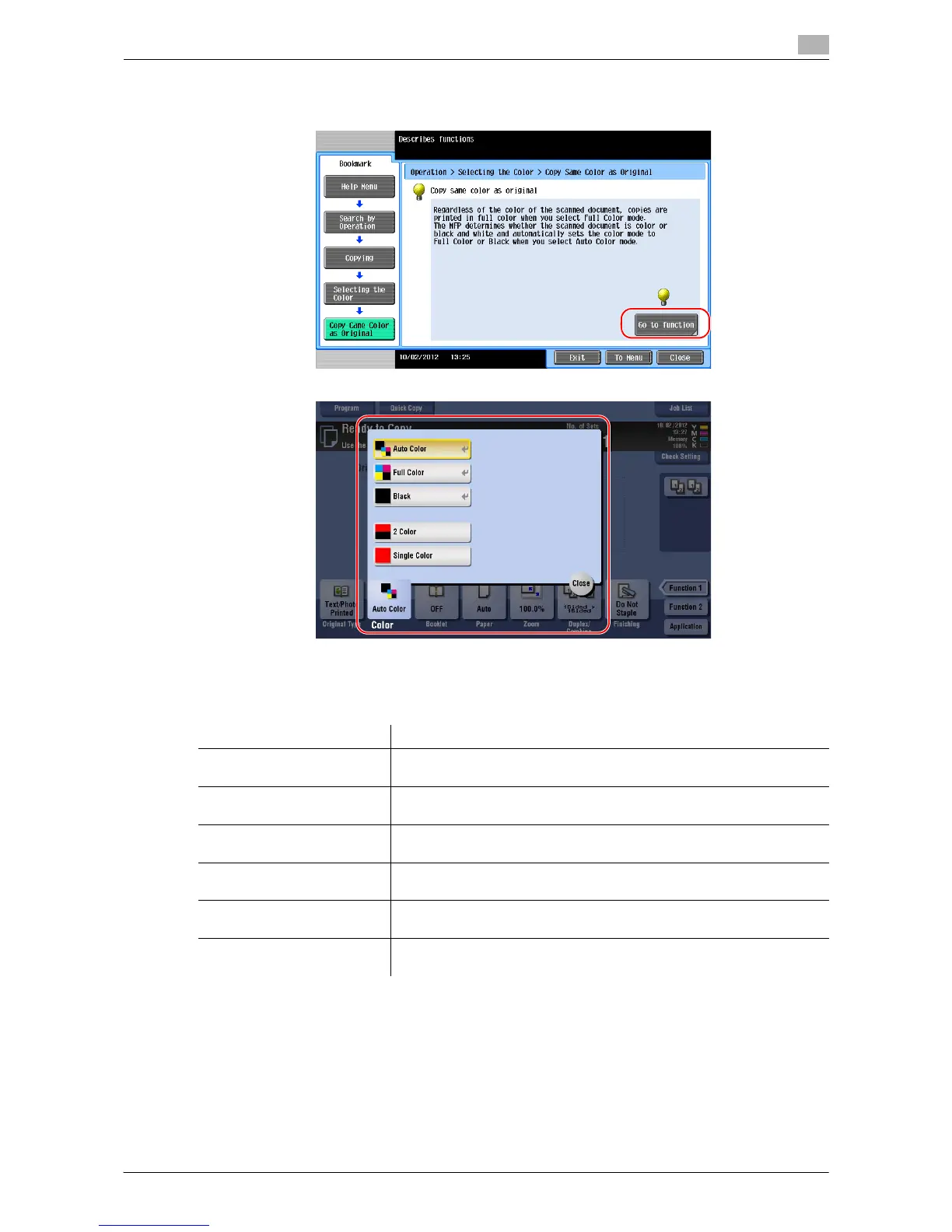
4 Tapping [Go to function] opens the setting screen of a target function, enabling you to configure the
settings immediately.
Help Menu list
The Help Menu provides the following information:
Name Description
[Function] Tap this button to display the guidance menu that has been sorted ac-
cording to the function names to be displayed on the screen.
[Search by Operation] Tap this button to display operation examples and explanations of this
machine sorted by function.
[Other Functions] Tap this button to display the guidance menu of the functions and set-
tings that make it easier to use this machine.
[Name and Function of Parts] Tap this button to check the name or function of each part of this ma-
chine.
[Service/Admin. Information] Tap this button to display the service or administrator information, ad-
ministrator name, extension number, and E-mail address.
[Consumables Replace/
Processing Procedure]
Tap this button to check the consumables replacement or punch scrap-
ping procedure with moving images.



 To Next Page