d-Color MF222 plus/MF282 plus/MF362 plus/MF452 plus/MF552 plus 3-45
3.4 Copy Function
3
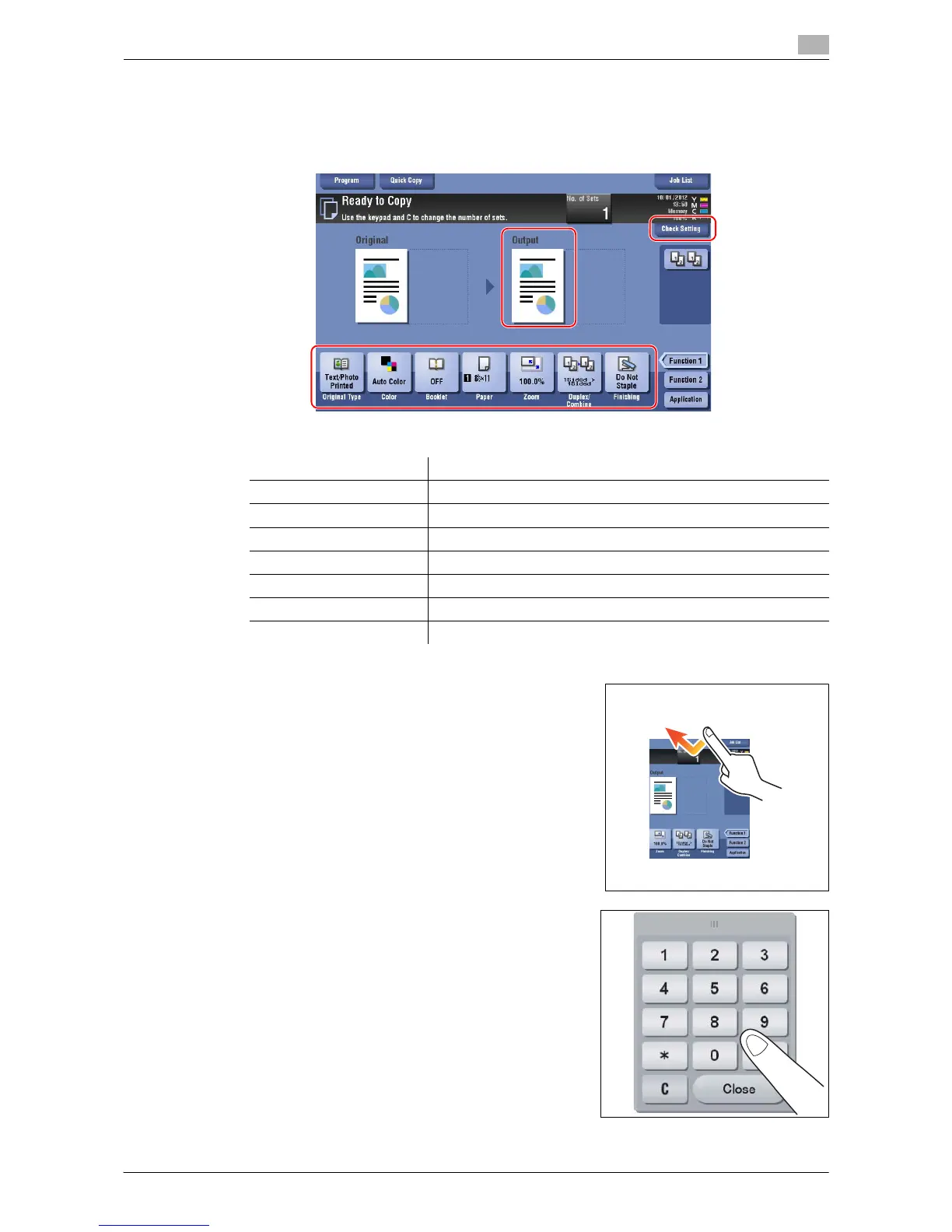
4 Check the basic settings.
% Check the output image configured as specified while viewing the output illustrations displayed on
the Touch Panel.
% Tapping [Check Setting] can check detailed settings.
% To change the setting, tap the desired key on the Touch Panel.
5 Tap the input area for entering the number of copies.
6 Enter the number of copies using the keypad, and press the
Start key.
Settings Description
[Original Type] Specify the original type of the original.
[Color] Specify the color to output an image.
[Density] Adjust the copy density.
[Paper] Specify the output paper.
[Zoom] Specify the zoom ratio.
[Duplex/Combine] Specify double-sided copying or combine copying.
[Finishing] Configure the offset, punch, or staple setting for output paper.



 To Next Page