135
8
Customizing the settings/functions of your camera
CARD SETUP
—
Formatting the card
Lets you format a card. Formatting prepares cards to receive data.
Non-Olympus cards or cards formatted on a computer must be formatted with the
camera before they can be used.
All data stored on the card, including protected images, is erased when the
card is formatted. When formatting a used card, confirm there are no images
that you still want to keep on the card.
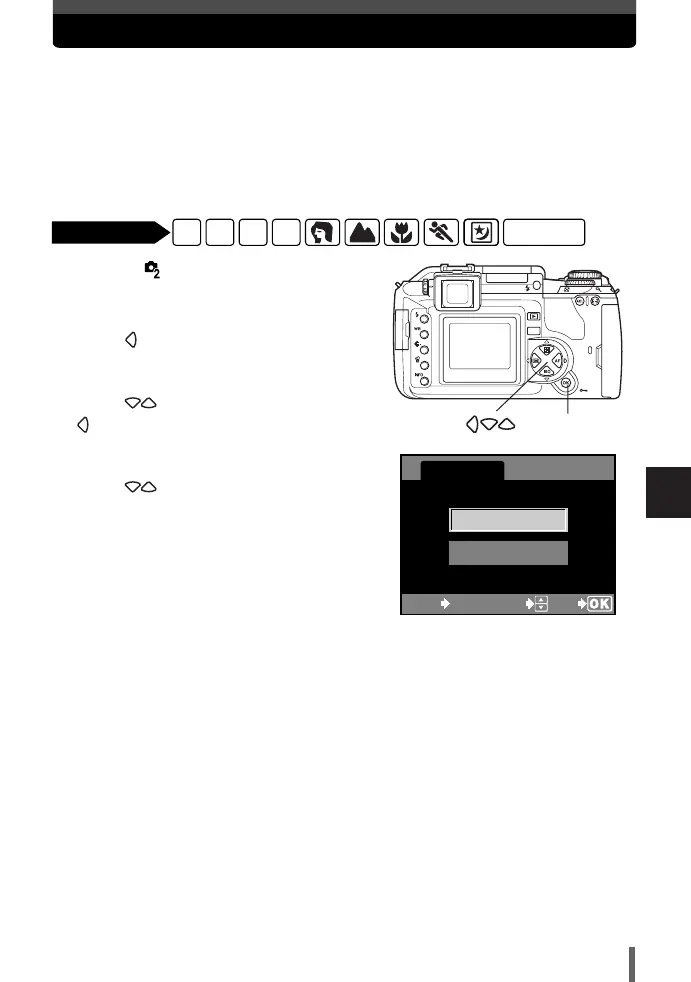
1
Menu TTCARD SETUP
~ “How to use the menus” (P. 25)
2
Press .
● The CARD SETUP screen is displayed.
3
Press to select FORMAT. Press
.
● The FORMAT screen is displayed.
4
Press to select YES. Press OK.
● FORMAT is performed.
FORMAT
ALL ERASE
CARD SETUP
CANCEL SELECT
GO
MENU
P A S M
SCENE
Available modes
OK button
08E-300EN-P123 04.10.22 11:32 AM Page 135












 To Next Page