_______________________________________________________________________________________
ORVED S.P.A Rev.01 – 09/2019 – cod. 1500735-00EN – User Manual for
IDEA
vacuum packing machines
Pag. 20 a 76
To do this, use the "EASY" accessory for external vacuum.
Phase
Description Image
1
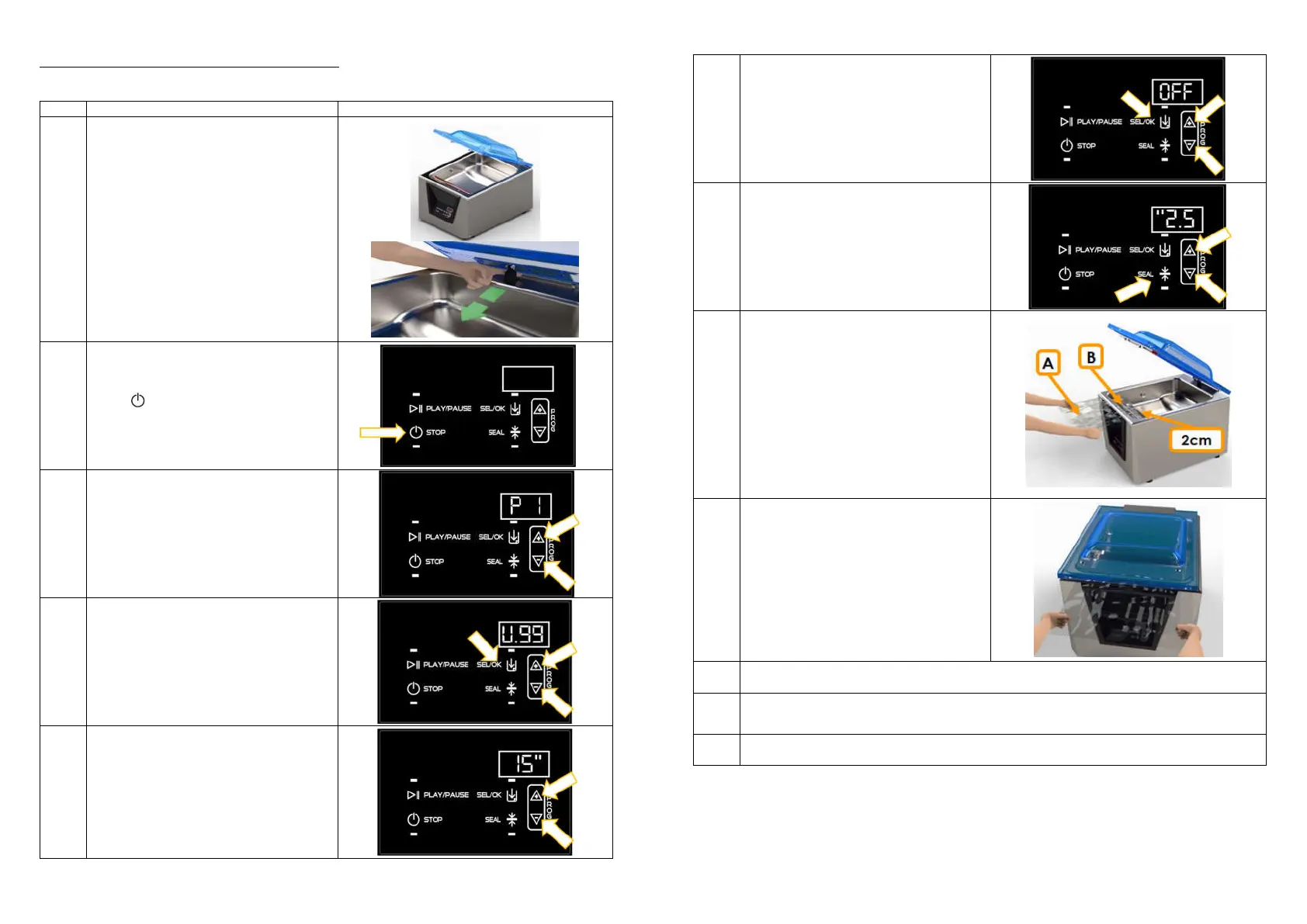
Lift the lid to limit switch and clip the piston,
pulling it forward.
Open the lid and make sure the vacuum
chamber and product to be packaged are
dry.
Do not remove the fillers from the vacuum
chamber.
Take care not to dirty or wet the inner part
near the bag opening.
2
Keep pressed for 5”, to turn the vacuum
packing machine on.
3
Select one of the 10 programs P1 – P10, using
UP/DOWN buttons.
4
Press SEL/OK to select the parameter
Vacuum and press UP/DOWN to set a value
between 10% and 99%.
Any vacuum level lower than the maximum,
reduces or cancel the preservation effect,
due to the residual air remained in the bag.
5
If the vacuum was set to 99%, then press
UP/DOWN buttons again to set the additional
vacuum level between 1” and 60”.
_______________________________________________________________________________________
ORVED S.P.A Rev.01 – 09/2019 – cod. 1500735-00EN – User Manual for
IDEA
vacuum packing machines
Pag. 21 a 76
6
Press SEL/OK button and choose the
parameter GAS and press UP/DOWN buttons,
to set the value to OFF
7
Press SEAL button to set the sealing time
between 0,1” and 6,0”, depending to the
vacuum bag in use.
8
Choose the channelled vacuum bag,
depending on the use (preservation or
cooking) best suited to the dimensions of the
product: the product should not take more
than 2/3 of the bag actual volume.
Put the vacuum bag (A) containing the
product to be packed centrally on the
sealing bar (B). The fringe has to overpass the
sealing bar about 2cm.
Place the accessory EASY as described on
the Kit Easy instructions.
Insert products cooled to +3°C to achieve the
best result.
9
Lower the lid, maintaining the channelled
bag in horizontal position.
The vacuum cycle starts automatically.
Interrupt the vacuum cycle, in case you
notice any liquid flowing towards the
chamber, through the channelled bag
10
Press SEAL button, to switch in advance form vacuum to sealing phase.
IDEA 31 and IDEA 41: Gas injection cannot be used.
11
STOP
button at any time, it is possible to interrupt the vacuum cycle immediately and the
vacuum chamber is uncompressed.
The lid opens automatically. The machine comes back to the selected program.
12
End of cycle. The lid opens automatically.
Remove the packed products, paying attention not to touch the sealing bar, as it may be still hot.



 To Next Page