Section 6 Transport Adjustment and Parts Replacement
6 - 2
May 1992
MX-5050 Operation and Maintenance Manual
6.1 Transport Access
The PCB Assemblies and main transport parts are located inside the
machine. Therefore, to adjust these parts, certain panels must first be
removed. Refer to § 2.4 for instructions on accessing these parts.
6.2 Brake Torque Adjustment
The brake adjustment is performed with the machine turned off.
The brake torque values are different for the supply side and take up side.
Since the torque values for both sides are adjusted at one time, the adjusted
torque is the best compromise for both sides.
Necessary Tools
10.5" NAB Reel
String (2m)
Spring Scale (500g)
1. Turn off the power to the machine.
2. Place an empty NAB reel (10") on the Supply Reel Table.
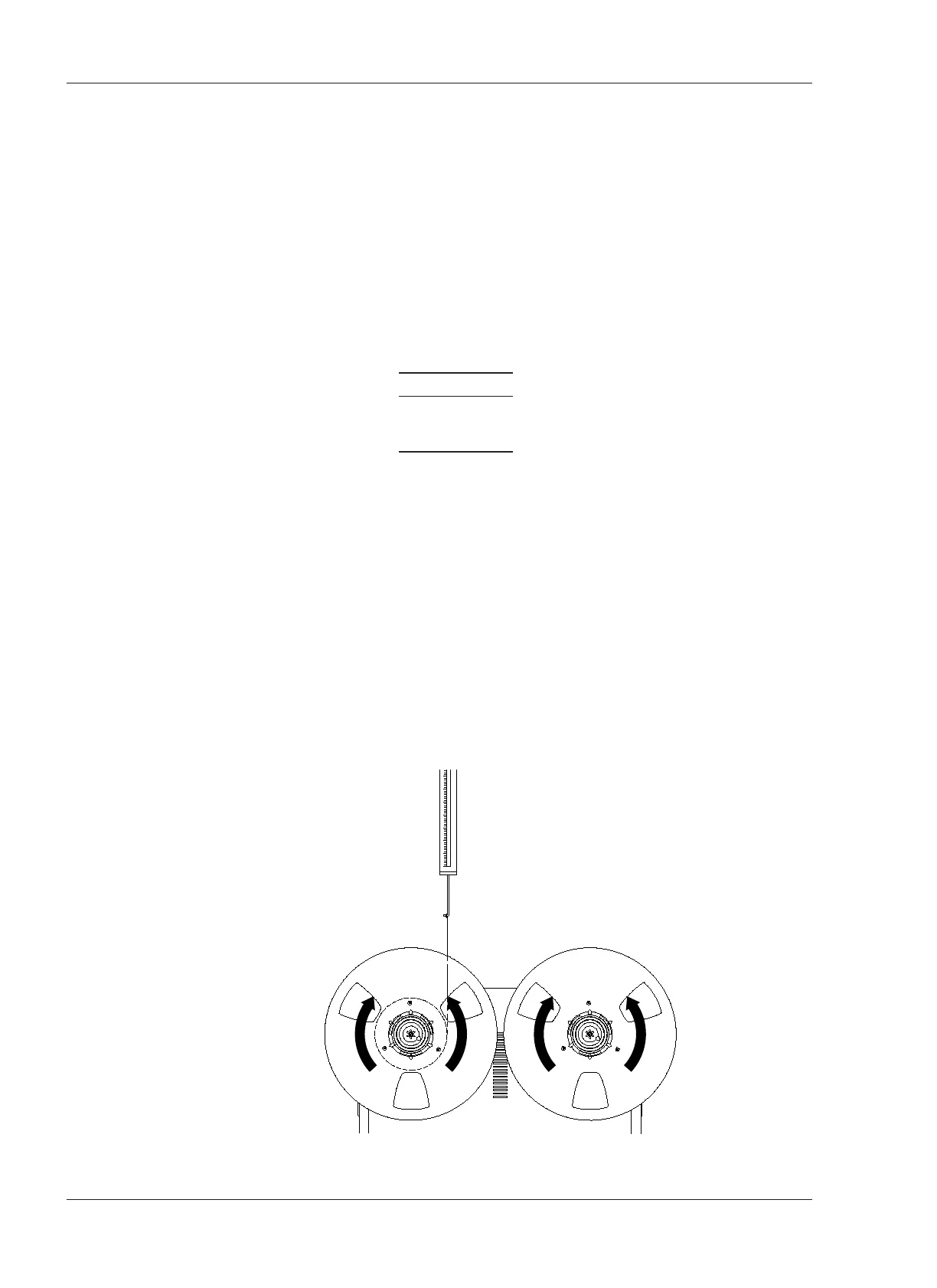
3. Wind a piece of string a few turns counterclockwise on the hub of the NAB
reel.
4. Attach the spring scale to the end of the string.
5. Hold the spring scale upright as shown in Figure 6-1.
6. Pull on the scale slowly to make the reel rotate counterclockwise (direction B
in Figure 6-1). While making sure that the cable does not rub against either
flange, note the scale reading.
7. Wind the string clockwise direction on the supply reel.










 To Next Page