Display Information
Flashing light
Battery undervoltage, battery charging urgently required
Flashing light
Battery overvoltage
Further LED display functions
Further LED display symbols are described in the following sections:
• See section "Usage" > "Drive-away lock" (see Page48)
• See section "Maintenance/repair" > "Troubleshooting" (see Page104)
6.6.1.2 Control panel
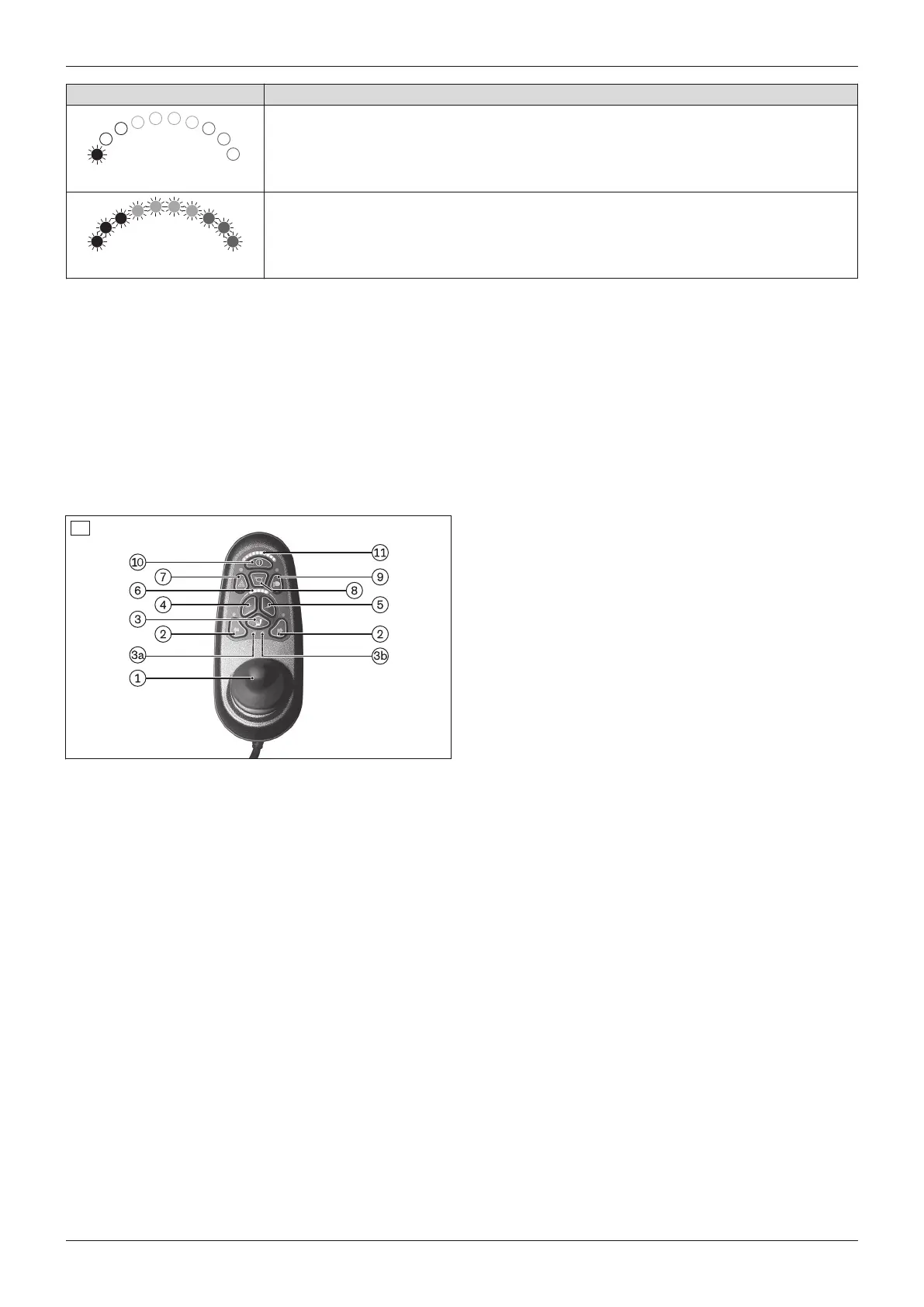
The power wheelchair is operated using the control panel.
The control panel is divided into the keypad, two LED displays and the joystick. The charging/programming recept
acle is on the underside.
The control panel is used to switch the power wheelchair on and off, enter driving commands and display the cur
rent status of certain functions and components.
1 Joystick
2 [Direction indicator left/right] button
3 [Select additional power function] button
3a: [Seat function 1] LED display
3b: [Seat function 2] LED display
4 [Decrease speed] button
5 [Increase speed] button
6 [Selected speed level] LED display
7 [Warning flasher on/off] button
8 [Horn] button
9 [Lights on/off] button
10 [On/off] button
11 [Charge level] LED display
22
-- Charging/programming receptacle (on the back)
6.6.1.2.1 Buttons and display functions
Joystick
The speed and driving direction are controlled with the joystick (see Page46).
When a power seat option is activated, the joystick adjusts this seat option (see Page66).
[On/off] button
Pressing this button turns the power wheelchair on or off (see Page45). In combination with additional operating
steps, it also activates/deactivates the drive-away lock (see Page48).
[Decrease speed] and [Increase speed] buttons
Pressing the button briefly increases/decreases the speed level (see Page46). The acoustic signal changes when
the maximum speed level is reached.
[Select additional power functions] button
Pressing this button toggles through seat function 1 – seat function 2 – no seat function. The selected seat function
is indicated by the LEDs.
27Juvo
Use















 To Next Page