6.14 Control unit accessories
6.14.1 Separate LCD monitor
INFORMATION
More detailed information and operating instructions are contained in a separate manual. Please contact the qual
ified personnel who adjusted your product.
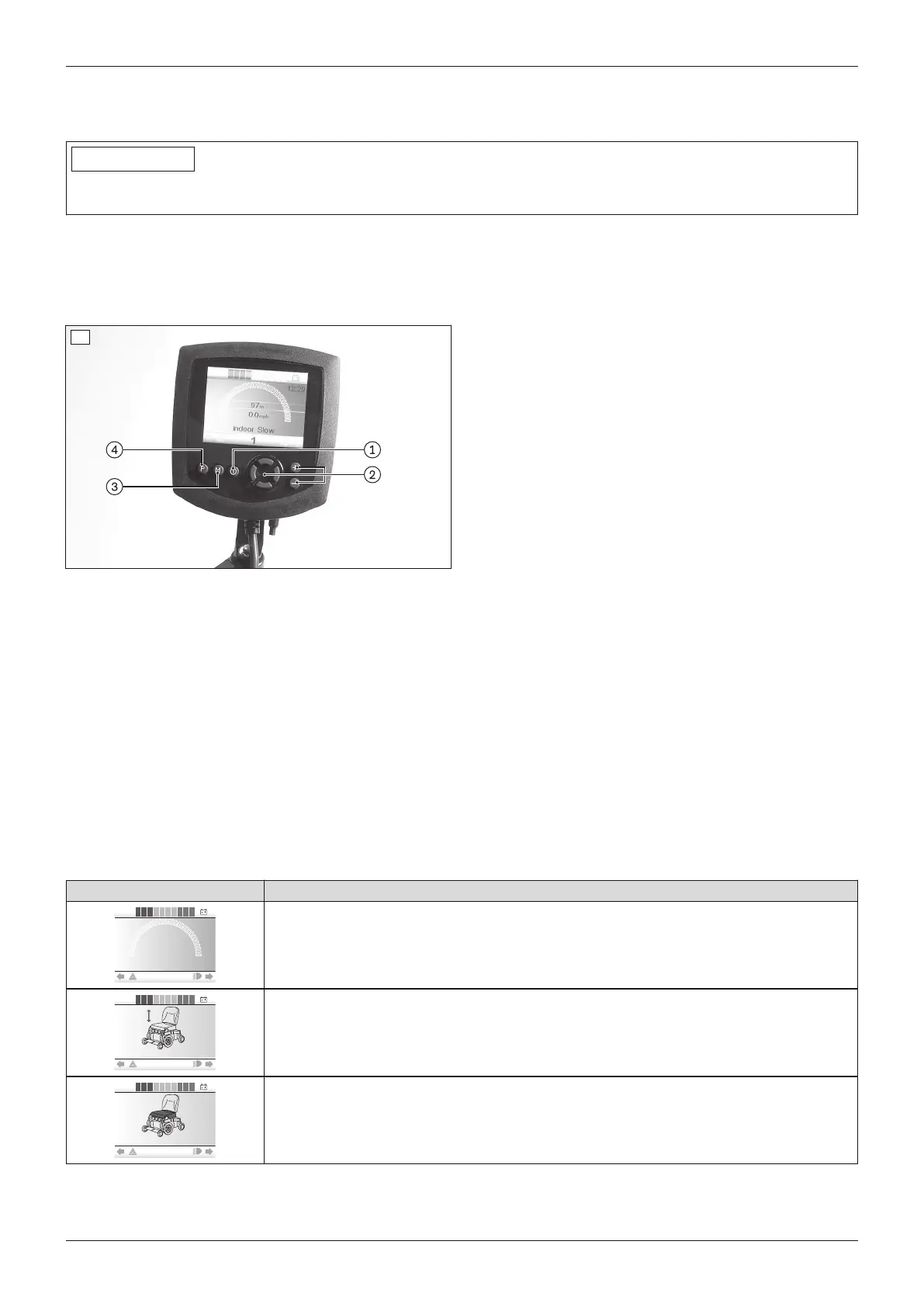
The power wheelchair is equipped with a separate LCD monitor (omni-module).
The LCD monitor allows the control functions to be displayed separately. The LCD monitor displays the current
statuses of all power functions and electrical components, as well as errors and malfunctions.
LCD monitor with menu
1 [On/Off] button
2 Navigation buttons
3 [Mode] button
4 [Profiles] button
67
Functions of the monitor buttons
• [On/off] button: Pressing this button turns the power wheelchair on or off and activates/deactivates the drive-
away lock. After switching on, the LCD monitor displays the menu (see below).
• Only with installed special control:
– Navigation buttons: The qualified personnel can make changes in the settings with these buttons.
– [Mode] button: Pressing this button toggles through the programmed operating modes ("Drive" > "Power
seat functions" > "Bluetooth" ... ). After reaching the last mode, you can switch back to the first mode by
pressing the button again. The joystick is used to navigate within the operating modes (see there).
– [Profile] button: Briefly pressing the button switches from one profile to the next profile (e.g. "Standard";
"Specialty control"; ... ;" "No assist"; "Attendant" -> depending on programming). After reaching the last
profile, you can switch back to the first profile by pressing the button again.
The LCD monitor also serves as the interface to the supplied special control (see Page75).
Important displays on the LCD monitor
Display Information
Programmed driving profile (e.g.driving profile 1: "Drive")
Power seat height adjustment (optional)
Power seat tilt (optional)
71Juvo
Use















 To Next Page