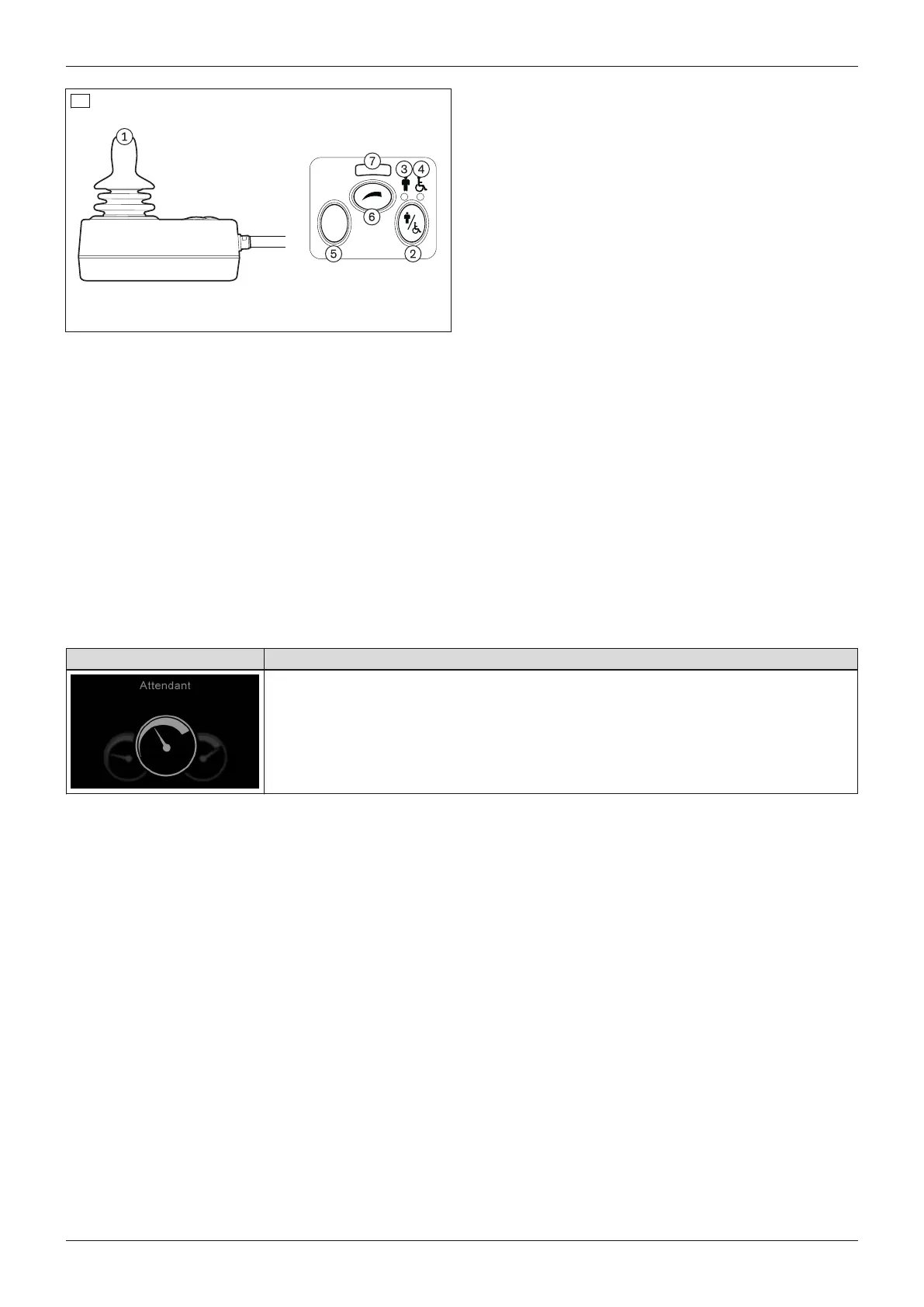
1 Joystick
2 [Activate/deactivate attendant control] button
3 [Attendant control active] LED display (green
LED display)
4 [Primary control active] LED display (red LED
display)
5 [Mode] button
6 [Select speed level] button
69
7 [Selected speed level] LED display
Joystick
The speed and driving direction are controlled in "Drive" mode with the joystick (see Page46).
If the control unit is in a seat mode, the seat option can be operated by moving the joystick forwards/backwards
(see Page66) or switched to the next seat option by moving it left/right.
You can navigate within the operating modes (e.g. "Bluetooth") by moving the joystick forwards/backwards or
right/left.
[Activate/deactivate attendant control] button
The attendant uses this button to assume the control functions from the control panel or special control (if
installed). By pressing the button again, the attendant returns the control functions to the control panel or special
control. The respective state is shown by an LED indicator.
After the attendant control has been switched on, the LCD screen on the control panel shows the following inform
ation:
Symbol Information
Attendant control active
[Attendant control active] LED display
The green LED lights up when the attendant control is activated and the power wheelchair control panel is deactiv
ated.
[Primary control active] LED display
The red LED lights up when the attendant control is deactivated and the power wheelchair control panel is activ
ated.
[Mode] button
Pressing this button toggles through the programmed operating modes ("Power seat functions" > "Bluetooth" >....
> "Drive"). The joystick is used to navigate within the operating modes (see above).
[Select speed level] button
Pressing the button increases/decreases the speed level. The acoustic signal changes when the maximum speed
level is reached.
[Selected speed level] LED display
The LEDs show the currently selected speed level (1–5).
74
Use
Juvo















 To Next Page