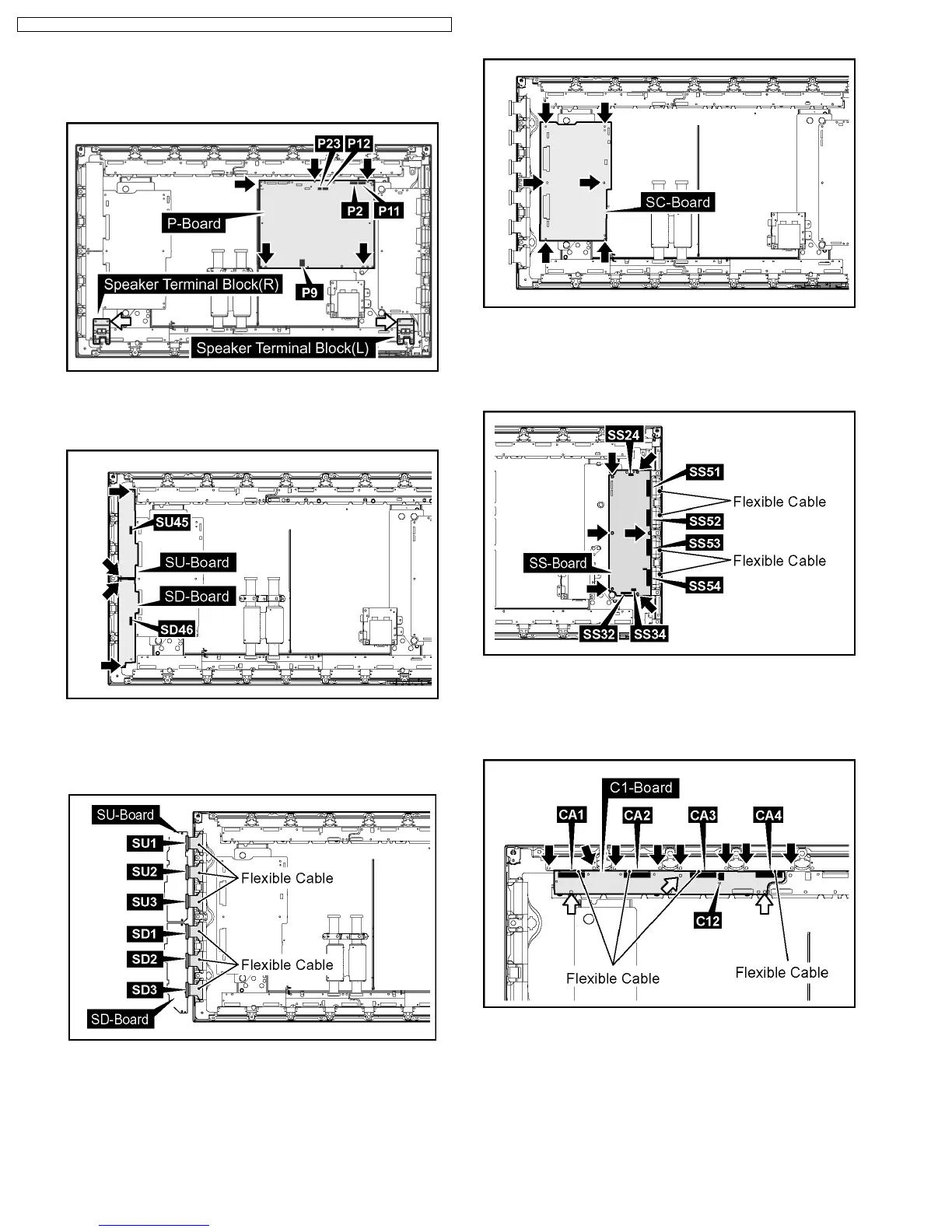
12. Disconnect the couplers(P2, P9, P11, P12, P23) .
13. Remove the 5 screws and then remove the P-Board.
14. Remove the each 1 screw and then remove the Speaker
Terminal Block(L, R).
15. Disconnect the couplers(SU45, SD46).
16. Remove the each 2 screws and then slide the SU-Board
and the SD-Board to the left.
17. Remove the Flexible Cable from the couplers(SU1, SU2,
SU3) and then remove the SU-Board.
18. Remove the Flexible Cable from the couplers(SD1, SD2,
SD3) and then remove the SD-Board.
19. Remove the 6 screws and then remove the SC-Board.
20. Disconnect the couplers(SS24, SS32, SS34).
21. Remove the Flexible Cable from the couplers(SS51, SS52,
SS53, SS54).
22. Remove the 6 screws and then remove the SS-Board.
23. Disconnect the coupler(C12).
24. Remove the 8 screws and then remove the Flexible Cable
from the couplers(CA1, CA2, CA3, CA4).
25. Remove the 3 screws and then remove the C1-Board.
20
TH-37PHD8GK / TH-37PHD8GS / TH-37PHD8UK / TH-42PHD8GK / TH-42PHD8GS / TH-42PHD8UK













 To Next Page