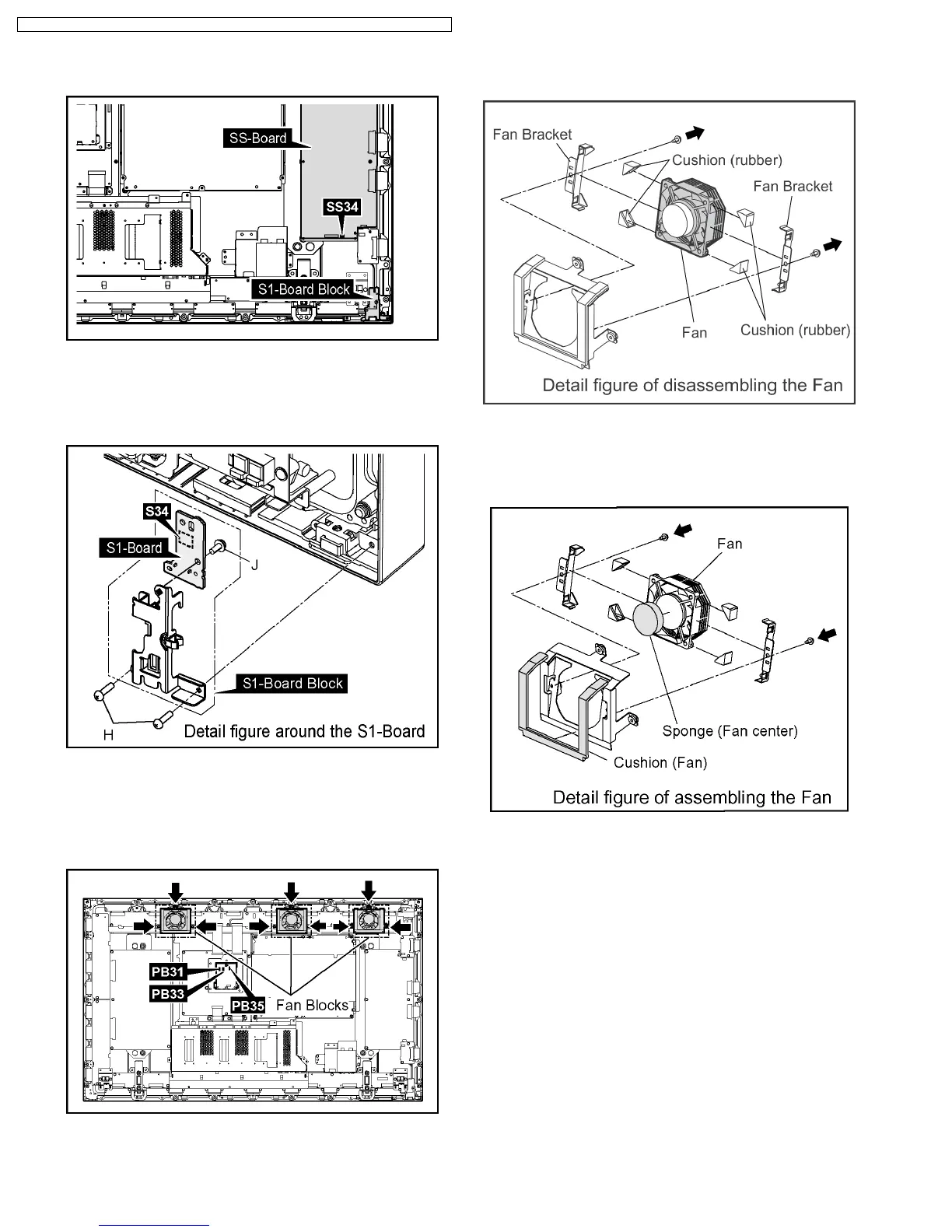
8.15. Removal of the S1-Board
1. Disconnect the coupler(SS34).
2. Remove the 2 screws(H) and then remove the S1-Board
Block.
3. Disconnect the coupler(S34).
4. Remove the 1 screw(J) and then remove the S1-Board.
8.16. Removal of the Fan
1. Disconnect the couplers(PB31, PB33, PB35).
2. Remove the each 3 screws and then remove the 3 Fan
Blocks.
3. Remove the each 2 screws.
4. Remove the each 2 Fan brackets and the each 4 Cushion
s(rubber) and then remove the 3 Fans..
5. Reassemble the Fans in reverse order.
6. Stick the Sponge (Fan center) on the central part of the
Fan.
7. Stick the Cushion (Fan) around the Fan.
Note:
The Sponge (Fan center) and the Cushion (Fan) are
unsuitable to reuse.
Please use a new one at the time of Fan exchange.
28
TH-37PHD8GK / TH-37PHD8GS / TH-37PHD8UK / TH-42PHD8GK / TH-42PHD8GS / TH-42PHD8UK













 To Next Page