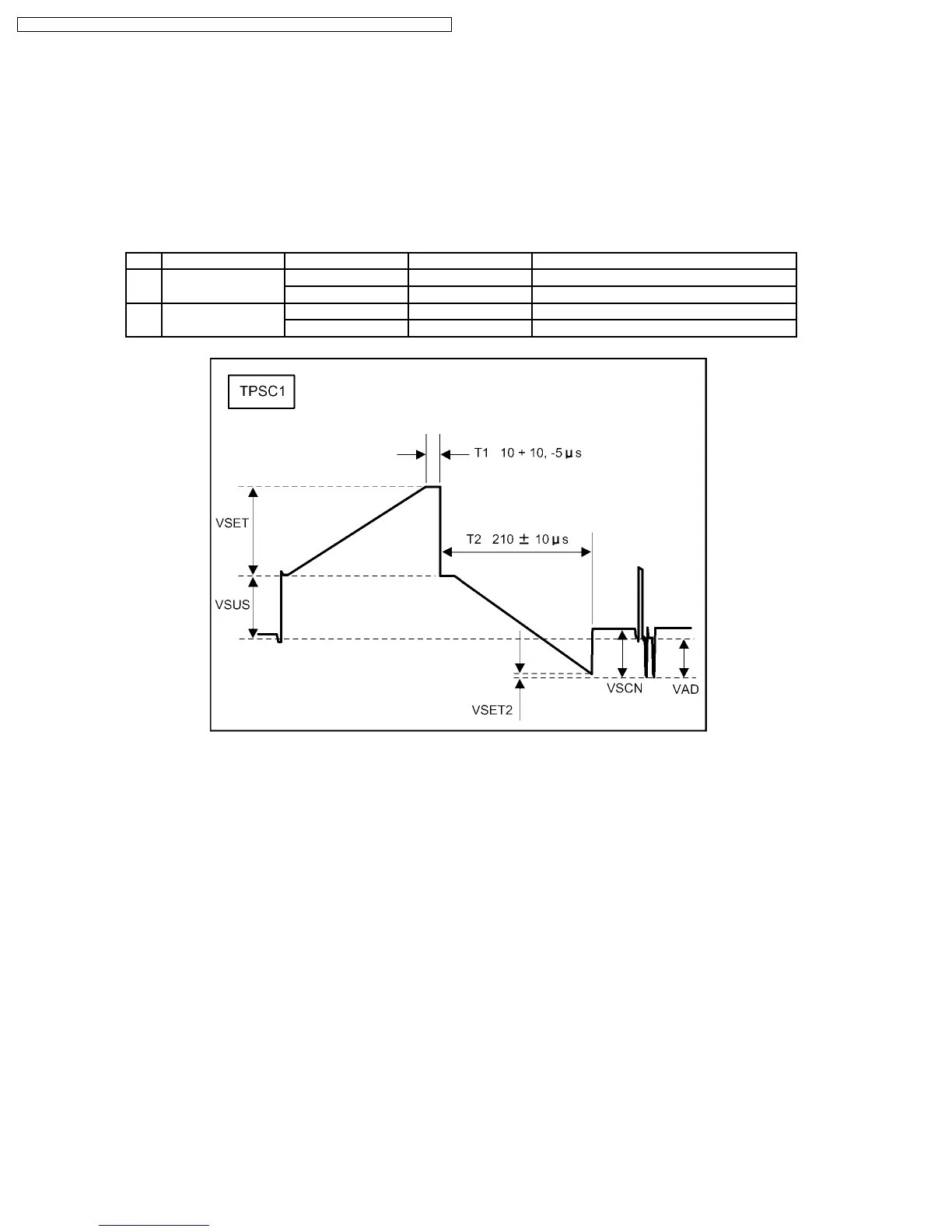
10.2. Initialization Pulse Adjust
1. Input a white signal to plasma video input.
2. Set the picture adjustment items as follows.
·
Picture menu : Standard
·
Color temperature : Normal
·
Picture : 25
·
Aspect : Full
3. Connect Oscilloscope to TPSC1 (T1) and adjust VR6504 (37 inch) / VR6523 (42 inch) for 10 + 10 / -5µ Sec.
4. Connect Oscilloscope to TPSC1 (T2) and adjust VR6505 (37 inch) / VR6557 (42 inch) for 210 ± 10µ Sec.
Test point Volume Level Remarks
T1 TPSC1 (SC) VR6504 (SC) 10 + 10 / -5µ Sec TH-37PHD8GK/GS/UK
VR6523(SC) 10 + 10 / -5µ Sec TH-42PHD8GK/GS/UK
T2 TPSC1 (SC) VR6505 (SC) 210 ± 10µ Sec TH-37PHD8GK/GS/UK
VR6557 (SC) 210 ± 10µ Sec TH-42PHD8GK/GS/UK
38
TH-37PHD8GK / TH-37PHD8GS / TH-37PHD8UK / TH-42PHD8GK / TH-42PHD8GS / TH-42PHD8UK













 To Next Page