10 Adjustment Procedure
10.1. Driver Set-up
10.1.1. Item / Preparation
1. Input a white signal of the RGB signal generator.
2. Set the picture adjustment items as follows.
·
Picture menu : Standard
·
Color temperature : Normal
·
Picture : 25
·
Aspect : Full
10.1.2. Adjustments
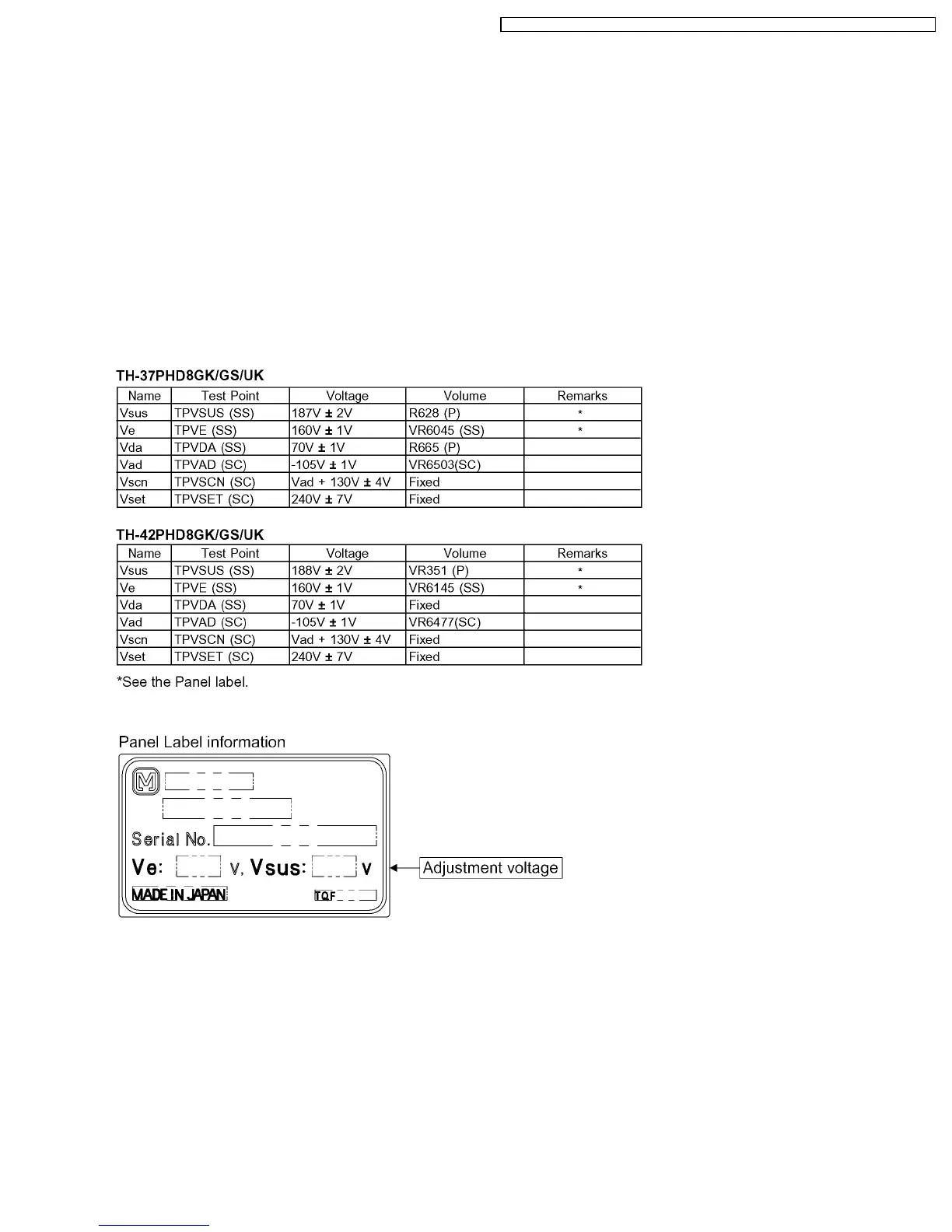
Adjust driver section voltages referring the panel data on the panel data label.
Caution
1. First perform Vsus voltage adjustment.
2. Confirmation of Vscn voltage should be performed after confirmation of Vad voltage adjustment.
When Vad = -105V, Voltage of Vscn is 25V ± 4V.
37
TH-37PHD8GK / TH-37PHD8GS / TH-37PHD8UK / TH-42PHD8GK / TH-42PHD8GS / TH-42PHD8UK













 To Next Page